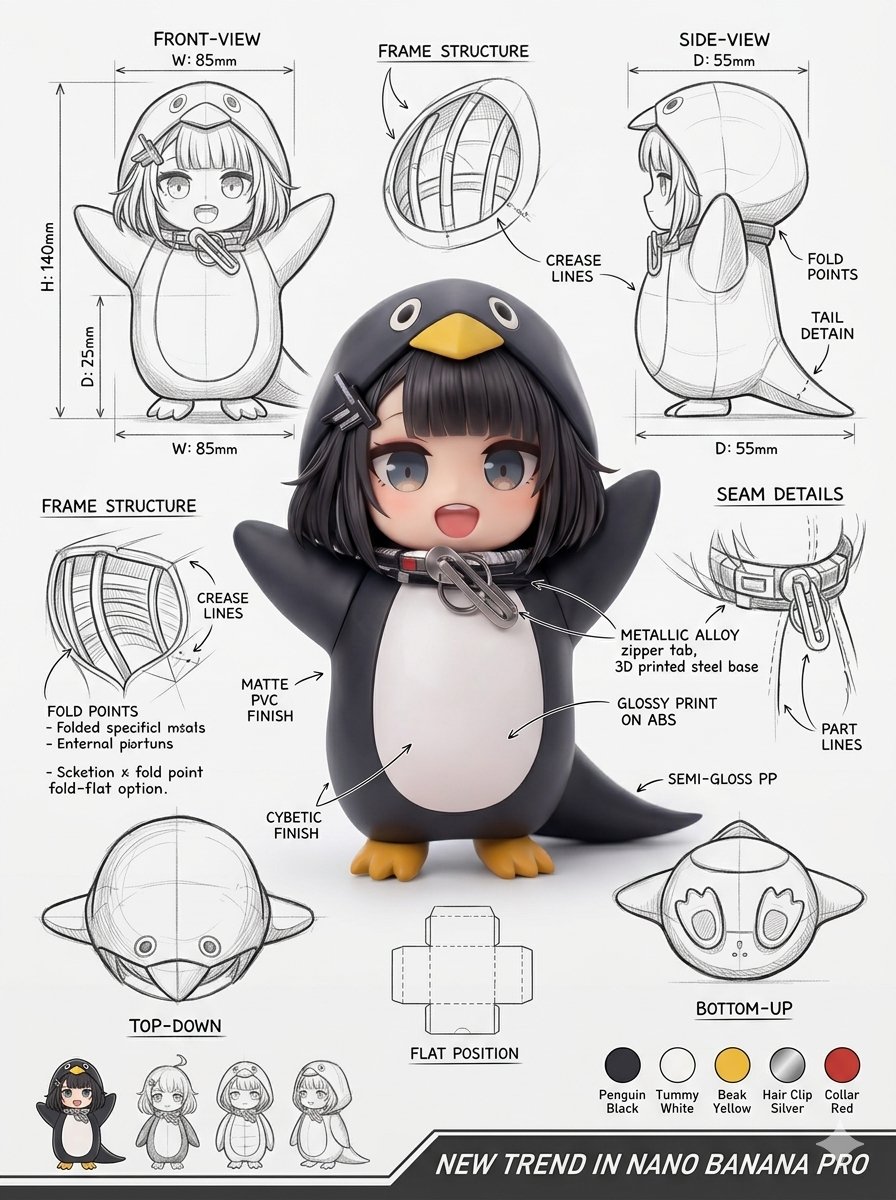
Ontwerpblad voor industriële verpakkingen
Een professionele prompt voor het maken van industriële verpakkingslay-outs, inclusief 3D-renders, technische weergaven en materiaalspecificaties.
Dit is een voorbeeld van een GPT Image 2 prompt voor Product & Commercieel . Gebruik de onderstaande kant-en-klare prompt om vergelijkbare afbeeldingen te genereren en controleer de Awesome GPT Image 2 Prompts en de rechten voor commercieel gebruik voordat u de afbeeldingen hergebruikt.
Free 1K preview
Generate one preview image instantly, no sign-up required.
Free text preview doesn’t preserve reference-image consistency.
Snel
Schrijfklare prompt
Gebruik de meegeleverde referentieafbeelding om een professioneel industrieel ontwerp-illustratieblad te maken voor de verpakking ({argument name="package type" default="VERPAKKINGSTYPE"}). Plaats een hero 3D-render in het midden met fotorealistische materialen, zachte studiolichtinval en een gepolijste commerciële afwerking. Plaats daaromCSSS rondom de technische aanzichten: voorzijde, zijkant, bovenkant, onderkant, een schuin perspectief en een plat uitgevouwen layout. Voeg lijnschetsen toe die de {argument name="technical details" default="frame-structuur, vouw-/vouwlijnen, naadgegevens en dimensiepijlen in millimeters"} tonen. Noteer materialen en oppervlakteafwerkingen ({argument name="material list" default="mat, glanzende print, plastic, papier, glas, etc."}) met handgeschreven annotaties. Voeg kleurstalen, ondersteunende productmock-ups en zachte slagschaduwen toe. Achtergrond: schoon schetsboekpapier. Stijl: fotorealistische render gemengd met potloodschets-overlays, moderne designestS-esthetiek, ultra-gedetailleerd, portfolio-kwaliteit.Vraagvariabelen
Bewerkbare argumentplaceholders in de prompt, met hun standaardwaarden.
Best for
- - Product & Commercieel visual exploration
- - Image generation and reference-image edits
- - Reusable briefs that keep source attribution visible
Change these parts
- - Subject, product, character, or scene
- - Aspect ratio, camera, lighting, and background
- - Brand, text, color, and output constraints
Recommended model and settings
- - Model: gpt-image-2
- - Input mode: Afbeelding naar afbeelding
- - Aspect ratio: source
- - Commercial status: review original source
How to use this prompt
- 1. Copy the prompt and preserve its structure for the first test.
- 2. Replace the subject, context, and publishing channel.
- 3. Change one camera, lighting, or style variable per iteration.
- 4. Inspect the output, source, text, and rights before reuse.
Limitations, source, and reuse cautions
- - Generated output is an editable draft, not factual, legal, or rights evidence.
- - Review the linked source, people, brands, logos, text, and third-party media before commercial use.
Related prompt packs
Meer gevallen in deze categorie
Geprioriteerd op basis van categorie, compatibiliteit met invoermodus, kwaliteit en lager risico.
Hergebruik en bronvermeldingen
Gebruik deze prompt veilig nadat u de casus hebt bekeken.
- 1.Kopieer de prompt of open deze direct in Dovoo met de knop 'Genereren'.
- 2.Pas de variabelen, beeldverhouding en referentieafbeeldingen aan uw eigen toepassing aan.
- 3.Controleer vóór publicatie of betaald gebruik de auteursrechten, de vereisten voor naamsvermelding en de risico's met betrekking tot merk of beeltenis.