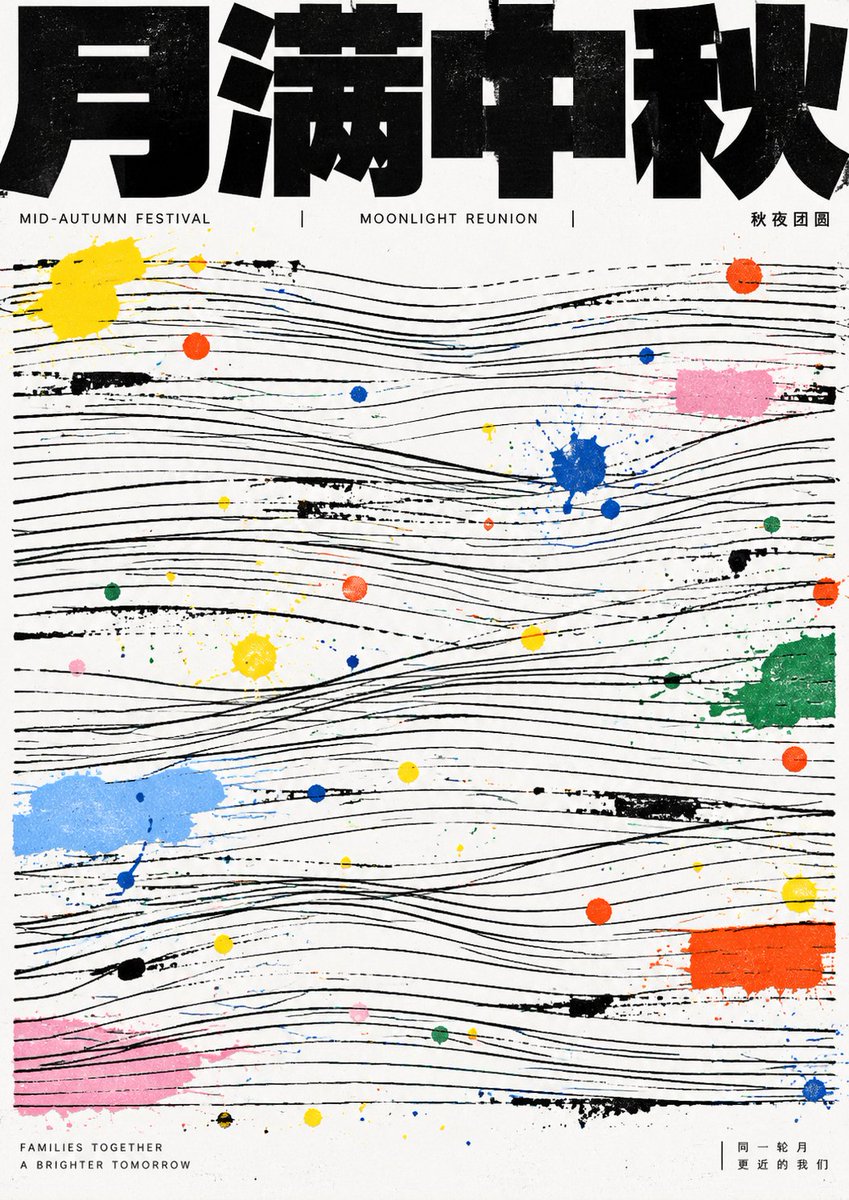
GPT Image 2 Mid-Autumn Festival Linear Structure Poster Prompt
A prompt for GPT Image 2 to create Mid-Autumn Festival posters using a specific aesthetic DNA involving heavy black title blocks, parallel thin lines, and scattered pigment dots. It emphasizes a graphic design style over realistic imagery.
Dit is een voorbeeld van een GPT Image 2 prompt voor Grafisch ontwerp & poster . Gebruik de onderstaande kant-en-klare prompt om vergelijkbare afbeeldingen te genereren en controleer de Awesome GPT Image 2 Prompts en de rechten voor commercieel gebruik voordat u de afbeeldingen hergebruikt.
Heb je de volledige set prompts nodig? Gebruik dan de Grafisch ontwerp & poster Ga naar het themacentrum voor meer gerelateerde voorbeelden, of open de GPT Image 2 prompt catalogus Voor de volledige voorbeeldenindex, herbruikbare structuren en bronvermelding.
Free 1K preview
Generate one preview image instantly, no sign-up required.
2159/4000
Snel
Schrijfklare prompt
Refine the future theme first into a strong readable headline, a few information lines, and a set of linear structures that can fill the canvas. The first impression of the image must be dominated by extremely heavy, jet-black bold text blocks at the top, cropped close to the edge, pressing down on a large area of fine lines below. The title should look like an architectural beam, not decorative text. The main image should not appear as realistic objects but be translated into multiple groups of horizontal, slightly undulating, manually offset parallel fine lines. Between line groups, there are breaks, intersections, partial tilts, and incomplete alignments, forming an underlying grid where readable order and improvised imbalance coexist. Theme energy intervenes in the line field through scattered paint dots, short smudges, and small color blocks. Colors use a few high-saturation primaries juxtaposed with light gray, pale pink, light blue, green, and orange, resembling traces left after manual splashing or misregistration in printing. Color dots vary greatly in size, ranging from pinpoints to fingertip-sized patches; their distribution seems random but creates pauses, accents, and jumps around the rhythm of the lines. The text system uses extreme compression hierarchy: the main title is a heavy sans-serif black block with wide glyphs, uniform strokes, compressed internal whitespace, flat endpoints, and tight connections. Any writing system should maintain block-face priority and correct character recognition. Auxiliary text is thin, narrow, calm, close to the title or bottom edge, serving as institutionalized information rather than the visual protagonist. The background remains unadorned white paper, retaining clean boundaries, slight printing stiffness, and the imperfection of manual stains. Do not add gradients, shadows, photographic texture, refined illustrations, symmetrical decorations, or softening beautification. Let the black order and colorful accidents together constitute the theme.

——————
Theme: Mid-Autumn Festival Poster

Total 10 images
Each is a different creative interpretation based on this aesthetic DNA
Best for
- - Grafisch ontwerp & poster visual exploration
- - Image generation and reference-image edits
- - Reusable briefs that keep source attribution visible
Change these parts
- - Subject, product, character, or scene
- - Aspect ratio, camera, lighting, and background
- - Brand, text, color, and output constraints
Recommended model and settings
- - Model: gpt-image-2
- - Input mode: Tekst naar afbeelding
- - Aspect ratio: source
- - Commercial status: review original source
How to use this prompt
- 1. Copy the prompt and preserve its structure for the first test.
- 2. Replace the subject, context, and publishing channel.
- 3. Change one camera, lighting, or style variable per iteration.
- 4. Inspect the output, source, text, and rights before reuse.
Limitations, source, and reuse cautions
- - Generated output is an editable draft, not factual, legal, or rights evidence.
- - Review the linked source, people, brands, logos, text, and third-party media before commercial use.
Geïmporteerd van Awesome GPT Image 2 Prompts . Naamsvermelding is vereist. Commercieel gebruik is toegestaan volgens de status allowed ; controleer de rechten van de bron voordat u het tegen betaling gebruikt.
Meer gevallen in deze categorie
Geprioriteerd op basis van categorie, compatibiliteit met invoermodus, kwaliteit en lager risico.

Boisterous Shrimpers Entering Pub
Tekst naar afbeelding

Tuxedo Cat Photo and Line Art Diptych
Tekst naar afbeelding

Luxury Travel Fashion Portrait Prompt
Tekst naar afbeelding

Autumn Cozy Casual Outfit Prompt
Tekst naar afbeelding

Cute Focus Desk Flat Lay and Kawaii Illustration
Tekst naar afbeelding

Studio Portrait of Woman with Sunglasses
Tekst naar afbeelding
Hergebruik en bronvermeldingen
Gebruik deze prompt veilig nadat u de casus hebt bekeken.
- 1.Kopieer de prompt of open deze direct in Dovoo met de knop 'Genereren'.
- 2.Pas de variabelen, beeldverhouding en referentieafbeeldingen aan uw eigen toepassing aan.
- 3.Controleer vóór publicatie of betaald gebruik de auteursrechten, de vereisten voor naamsvermelding en de risico's met betrekking tot merk of beeltenis.