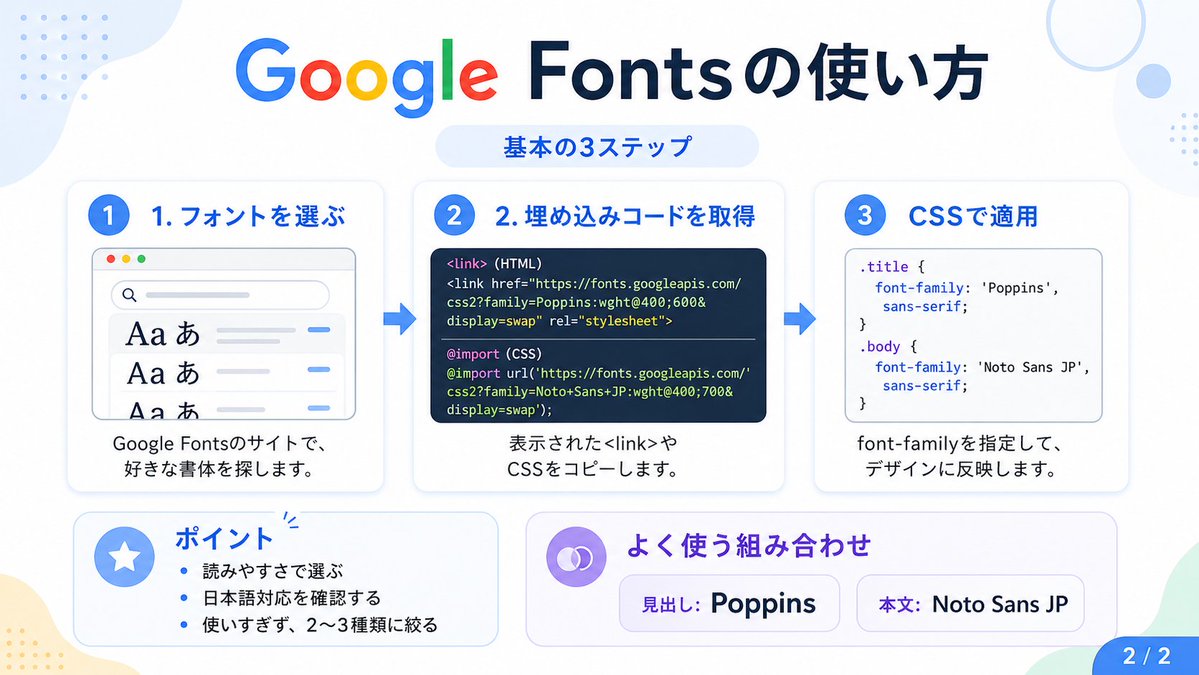
Infographic met een handleiding voor het Japans met behulp van Google Fonts
Deze prompt genereert een overzichtelijke Japanse infographic die de drie basisstappen voor het gebruik van Google Fonts uitlegt, geschikt voor berichten op sociale media, tutorials en presentaties.
Dit is een voorbeeld van een GPT Image 2 prompt voor Grafisch ontwerp & poster . Gebruik de onderstaande kant-en-klare prompt om vergelijkbare afbeeldingen te genereren en controleer de Awesome GPT Image 2 Prompts en de rechten voor commercieel gebruik voordat u de afbeeldingen hergebruikt.
Heb je de volledige set prompts nodig? Gebruik dan de Grafisch ontwerp & poster Ga naar het themacentrum voor meer gerelateerde voorbeelden, of open de GPT Image 2 prompt catalogus Voor de volledige voorbeeldenindex, herbruikbare structuren en bronvermelding.
Free 1K preview
Generate one preview image instantly, no sign-up required.
3784/4000
Snel
Schrijfklare prompt
{
  "type": "Japanese infographic",
  "topic": "How to use Google Fonts",
  "style": "clean modern flat design, white background, soft pastel blue and mint corner blobs, rounded cards with subtle shadows, tech tutorial aesthetic, crisp vector typography and UI illustrations",
  "canvas": {
    "aspect_ratio": "16:9"
  },
  "headline": {
    "main": "Google Fontsの使い方",
    "sub": "基本の3ステップ"
  },
  "layout": {
    "sections": [
      {
        "title": "1. フォントを選ぶ",
        "position": "left",
        "count": 1,
        "labels": [
          "1. フォントを選ぶ"
        ],
        "card_style": "rounded white panel with light blue border/shadow",
        "icon": "blue numbered circle with 1",
        "illustration": "browser window showing a font search interface, 3 visible font preview rows with large Aa あ samples, a search bar at top, small colored window buttons, light gray interface lines and blue accent dashes",
        "body_text": "Google Fontsのサイトで、好きな書体を探します。"
      },
      {
        "title": "2. 埋め込みコードを取得",
        "position": "center",
        "count": 1,
        "labels": [
          "2. 埋め込みコードを取得"
        ],
        "card_style": "rounded white panel with light blue border/shadow",
        "icon": "blue numbered circle with 2",
        "illustration": "dark code panel with two labeled code examples separated by a thin divider",
        "code_blocks": {
          "count": 2,
          "labels": [
            "<link> (HTML)",
            "@import (CSS)"
          ],
          "content": [
            "<link href=\"https://fonts.googleapis.com/css2?family=Poppins:wght@400;600&display=swap\" rel=\"stylesheet\">",
            "@import url('https://fonts.googleapis.com/css2?family=Noto+Sans+JP:wght@400;700&display=swap');"
          ]
        },
        "body_text": "表示された<link>やCSSをコピーします。"
      },
      {
        "title": "3. CSSで適用",
        "position": "right",
        "count": 1,
        "labels": [
          "3. CSSで適用"
        ],
        "card_style": "rounded white panel with light blue border/shadow",
        "icon": "blue numbered circle with 3",
        "illustration": "white code card containing CSS with two selectors and font-family rules",
        "code_blocks": {
          "count": 2,
          "labels": [
            ".title",
            "body"
          ],
          "content": [
            ".title { font-family: 'Poppins', sans-serif; }",
            "body { font-family: 'Noto Sans JP', sans-serif; }"
          ]
        },
        "body_text": "font-familyを指定して、デザインに反映します。"
      },
      {
        "title": "ポイント",
        "position": "bottom-left",
        "count": 3,
        "labels": [
          "読みやすさで選ぶ",
          "日本語対応を確認する",
          "使いすぎず、2〜3種類に絞る"
        ],
        "card_style": "rounded white panel with pale blue tint",
        "icon": "blue star in a circle",
        "body_format": "bullet list"
      },
      {
        "title": "よく使う組み合わせ",
        "position": "bottom-center-right",
        "count": 2,
        "labels": [
          "見出し: Poppins",
          "Main text: Noto Sans JP"
        ],
        "card_style": "rounded white panel with pale lavender tint",
        "icon": "purple linked-rings symbol",
        "body_format": "two pill-shaped example boxes"
      }
    ],
    "connectors": {
      "count": 2,
      "style": "large blue right-pointing arrows between the 3 top cards"
    },
    "pagination": {
      "text": "2 / 2",
      "position": "bottom-right",
      "style": "blue rounded corner tab"
    }
  },
  "text_language": "Japanese",
  "color_palette": {
    "primary_blue": "#2f80ff",
    "navy": "#0f2b5b",
    "google_colors": [
      "#4285F4",
      "#DB4437",
      "#F4B400",
      "#0F9D58"
    ],
    "lavender": "#8b6cff",
    "background": "#ffffff"
  }
}
Best for
- - Grafisch ontwerp & poster visual exploration
- - Image generation and reference-image edits
- - Reusable briefs that keep source attribution visible
Change these parts
- - Subject, product, character, or scene
- - Aspect ratio, camera, lighting, and background
- - Brand, text, color, and output constraints
Recommended model and settings
- - Model: gpt-image-2
- - Input mode: Tekst naar afbeelding
- - Aspect ratio: source
- - Commercial status: review original source
How to use this prompt
- 1. Copy the prompt and preserve its structure for the first test.
- 2. Replace the subject, context, and publishing channel.
- 3. Change one camera, lighting, or style variable per iteration.
- 4. Inspect the output, source, text, and rights before reuse.
Limitations, source, and reuse cautions
- - Generated output is an editable draft, not factual, legal, or rights evidence.
- - Review the linked source, people, brands, logos, text, and third-party media before commercial use.
Geïmporteerd van Awesome GPT Image 2 Prompts . Naamsvermelding is vereist. Commercieel gebruik is toegestaan volgens de status allowed ; controleer de rechten van de bron voordat u het tegen betaling gebruikt.
Meer gevallen in deze categorie
Geprioriteerd op basis van categorie, compatibiliteit met invoermodus, kwaliteit en lager risico.

Surreal 3D Chess Match Artwork
Tekst naar afbeelding

Pink Hijab Mirror Selfie Portrait
Tekst naar afbeelding

Natural Face Realism Modifier
Tekst naar afbeelding

Spring Editorial Fashion Collage
Tekst naar afbeelding

Y2K Style Photo Booth Collage
Tekst naar afbeelding

Transparent Earbuds on Stone Pedestal
Tekst naar afbeelding
Hergebruik en bronvermeldingen
Gebruik deze prompt veilig nadat u de casus hebt bekeken.
- 1.Kopieer de prompt of open deze direct in Dovoo met de knop 'Genereren'.
- 2.Pas de variabelen, beeldverhouding en referentieafbeeldingen aan uw eigen toepassing aan.
- 3.Controleer vóór publicatie of betaald gebruik de auteursrechten, de vereisten voor naamsvermelding en de risico's met betrekking tot merk of beeltenis.