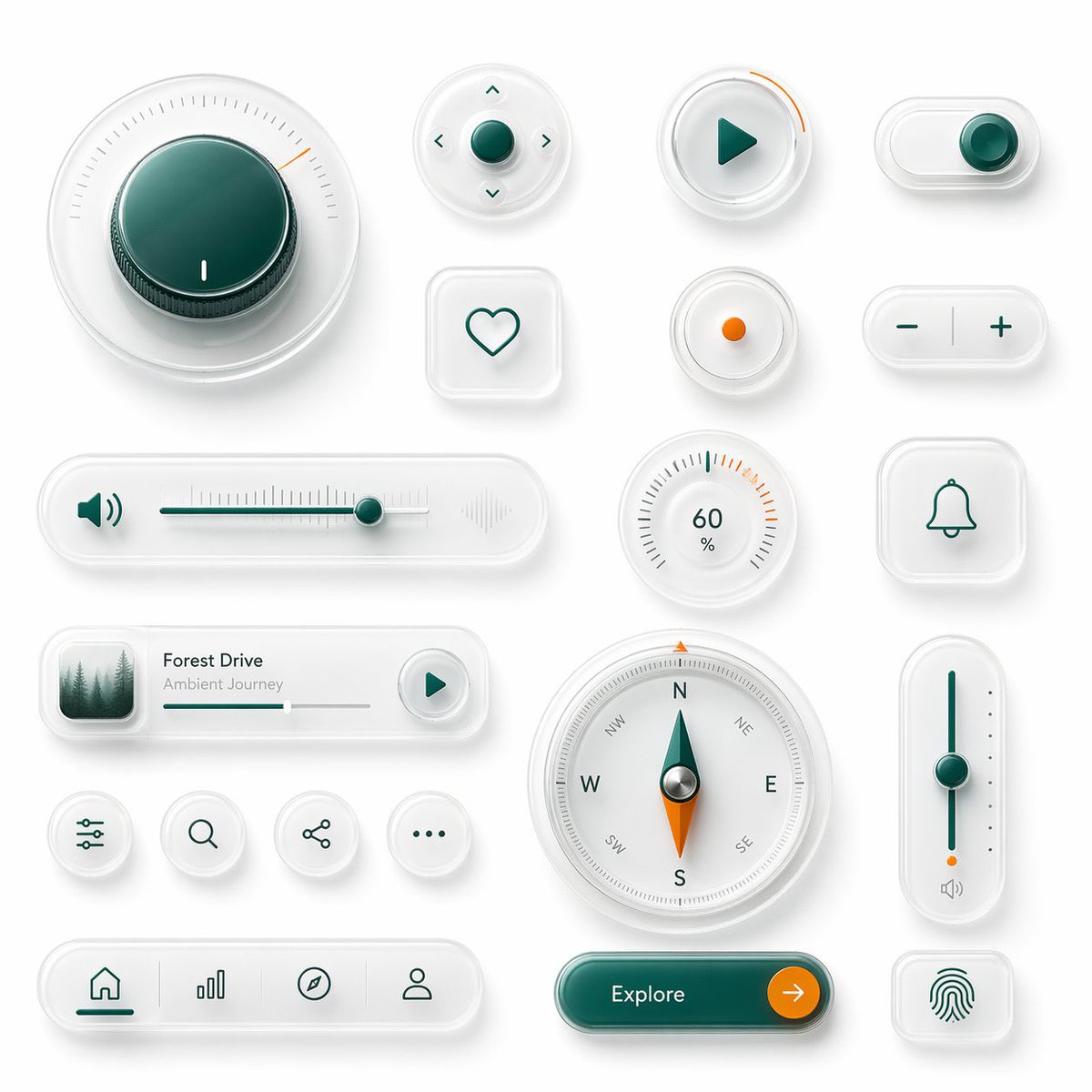
Glassmorphism UI-componentenkit
Een hoogwaardig 3D Glassmorphism-interfacebord met meerdere futuristische UI-elementen, ideaal voor design-system mockups, productvisualisaties en app-conceptpresentaties.
Dit is een voorbeeld van een GPT Image 2 prompt voor Product & Commercieel . Gebruik de onderstaande kant-en-klare prompt om vergelijkbare afbeeldingen te genereren en controleer de Awesome GPT Image 2 Prompts en de rechten voor commercieel gebruik voordat u de afbeeldingen hergebruikt.
Heb je de volledige set prompts nodig? Gebruik dan de Product & Commercieel Ga naar het themacentrum voor meer gerelateerde voorbeelden, of open de GPT Image 2 prompt catalogus Voor de volledige voorbeeldenindex, herbruikbare structuren en bronvermelding.
Free 1K preview
Generate one preview image instantly, no sign-up required.
4000/4000
Snel
Schrijfklare prompt
{
  "type": "glassmorphism UI component showcase",
  "style": "premium minimalist neumorphic interface kit, frosted translucent white acrylic, soft shadows, subtle reflections, rounded corners, clean white background, teal green and orange accent colors, ultra-detailed 3D product render, top-down view",
  "palette": {
    "background": "soft light gray-white",
    "primary": "deep teal green",
    "secondary": "bright orange",
    "material": "milky translucent glass with satin plastic details"
  },
  "layout": {
    "composition": "single canvas with evenly spaced floating UI widgets arranged in a clean design-system presentation",
    "sections": [
      {
        "title": "large dial",
        "position": "top left",
        "count": 1,
        "labels": [
          "circular rotary knob with radial tick marks and one orange indicator"
        ]
      },
      {
        "title": "direction pad",
        "position": "upper center",
        "count": 1,
        "labels": [
          "round four-way control with center button and four arrow icons"
        ]
      },
      {
        "title": "play button",
        "position": "upper center-right",
        "count": 1,
        "labels": [
          "round button with teal play triangle and orange progress arc"
        ]
      },
      {
        "title": "toggle switch",
        "position": "top right",
        "count": 1,
        "labels": [
          "horizontal pill toggle switched on"
        ]
      },
      {
        "title": "favorite button",
        "position": "mid upper center-left",
        "count": 1,
        "labels": [
          "rounded square tile with heart outline"
        ]
      },
      {
        "title": "status dot",
        "position": "mid upper center-right",
        "count": 1,
        "labels": [
          "small circular button with orange center dot"
        ]
      },
      {
        "title": "stepper",
        "position": "mid upper center-right",
        "count": 1,
        "labels": [
          "horizontal pill with minus and plus symbols"
        ]
      },
      {
        "title": "audio slider",
        "position": "center left",
        "count": 1,
        "labels": [
          "long horizontal volume slider with speaker icon on left and waveform emboss on right"
        ]
      },
      {
        "title": "percentage gauge",
        "position": "middle center-right",
        "count": 1,
        "labels": [
          "round gauge showing 60 % with radial ticks"
        ]
      },
      {
        "title": "notification tile",
        "position": "center right",
        "count": 1,
        "labels": [
          "rounded square tile with bell outline"
        ]
      },
      {
        "title": "music card",
        "position": "lower middle-left",
        "count": 1,
        "labels": [
          "media card with forest thumbnail, title {argument name=\"track title\" default=\"Forest Drive\"}, subtitle {argument name=\"track subtitle\" default=\"Ambient Journey\"}, progress bar, and circular play button"
        ]
      },
      {
        "title": "utility icons",
        "position": "lower left-center",
        "count": 4,
        "labels": [
          "sliders settings icon",
          "search icon",
          "share icon",
          "more menu icon"
        ]
      },
      {
        "title": "compass",
        "position": "lower center",
        "count": 1,
        "labels": [
          "large circular compass with N E S W markings and teal-orange needle"
        ]
      },
      {
        "title": "vertical slider",
        "position": "lower right-center",
        "count": 1,
        "labels": [
          "tall rounded slider with teal track, teal knob, orange endpoint, and small speaker icon"
        ]
      },
      {
        "title": "bottom navigation",
        "position": "lower left",
        "count": 1,
        "labels": [
          "pill navigation bar with 4 icons: home, bar chart, compass, profile"
        ]
      },
      {
        "title": "call to action",
        "position": "bottom center-right",
        "count": 1,
        "labels": [
          "pill button labeled {argument name=\"button text\" default=\"Explore\"} with orange circular arrow segment"
        ]
      },
      {
        "title": "biometric tile",
        "position": "lower right",
        "count": 1,
        "labels": [
          "rounded square tile with fingerprint icon"
        ]
      }
    ]
  },
  "rendering": {
    "lighting": "soft studio lighting from upper left",
    "shadow": "diffuse layered shadows for floating depth",
    "finish": "high-end consumer electronics aesthetic, polished yet minimal",
    "quality": "sharp, clean, realistic 3D interface mockup suitable for a design system hero image"
  }
Vraagvariabelen
Bewerkbare argumentplaceholders in de prompt, met hun standaardwaarden.
Variabele
track title
Standaard
Forest Drive
Variabele
track subtitle
Standaard
Ambient Journey
Variabele
button text
Standaard
Explore
Best for
- - Product & Commercieel visual exploration
- - Image generation and reference-image edits
- - Reusable briefs that keep source attribution visible
Change these parts
- - Subject, product, character, or scene
- - Aspect ratio, camera, lighting, and background
- - Brand, text, color, and output constraints
Recommended model and settings
- - Model: gpt-image-2
- - Input mode: Tekst naar afbeelding
- - Aspect ratio: source
- - Commercial status: review original source
How to use this prompt
- 1. Copy the prompt and preserve its structure for the first test.
- 2. Replace the subject, context, and publishing channel.
- 3. Change one camera, lighting, or style variable per iteration.
- 4. Inspect the output, source, text, and rights before reuse.
Limitations, source, and reuse cautions
- - Generated output is an editable draft, not factual, legal, or rights evidence.
- - Review the linked source, people, brands, logos, text, and third-party media before commercial use.
Geïmporteerd van Awesome GPT Image 2 Prompts . Naamsvermelding is vereist. Commercieel gebruik is toegestaan volgens de status allowed ; controleer de rechten van de bron voordat u het tegen betaling gebruikt.
Meer gevallen in deze categorie
Geprioriteerd op basis van categorie, compatibiliteit met invoermodus, kwaliteit en lager risico.

Transparent Earbuds on Stone Pedestal
Tekst naar afbeelding

Wet Transparent Earbud Macro
Tekst naar afbeelding

Overhead Pepperoni Pizza Photo
Tekst naar afbeelding

Fashion Studio Portrait with Blue Rim Lighting
Tekst naar afbeelding

New Chinese-Style Editorial Portrait
Tekst naar afbeelding

Surreal 3D Chess Match Artwork
Tekst naar afbeelding
Hergebruik en bronvermeldingen
Gebruik deze prompt veilig nadat u de casus hebt bekeken.
- 1.Kopieer de prompt of open deze direct in Dovoo met de knop 'Genereren'.
- 2.Pas de variabelen, beeldverhouding en referentieafbeeldingen aan uw eigen toepassing aan.
- 3.Controleer vóór publicatie of betaald gebruik de auteursrechten, de vereisten voor naamsvermelding en de risico's met betrekking tot merk of beeltenis.