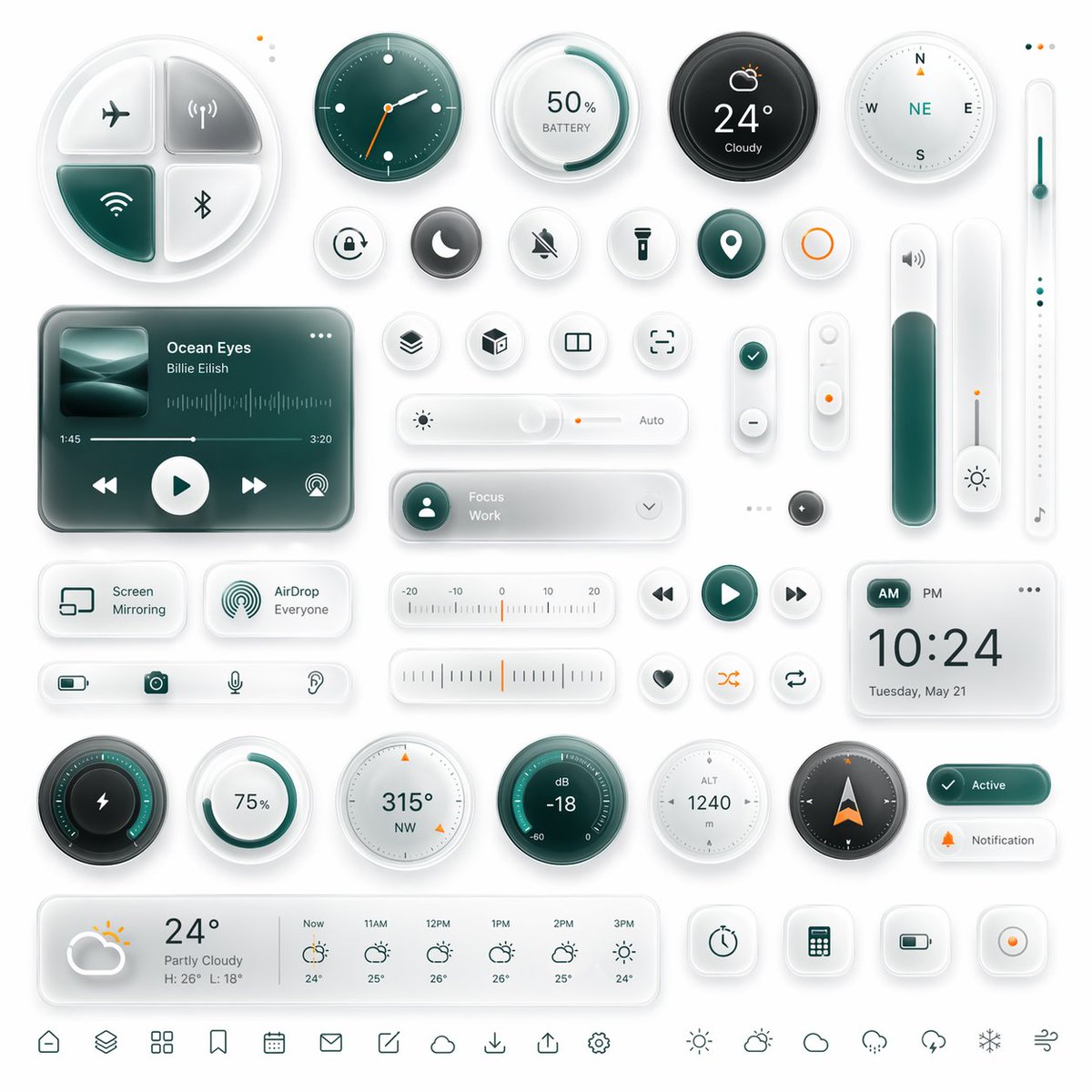
Glassmorphism Smart UI Kit
Een stijlvolle, futuristische dashboardinterfacekit met veel Glassmorphism-widgets, ideaal voor conceptuele app-UI-renders, productmockups en designpresentaties.
Dit is een voorbeeld van een GPT Image 2 prompt voor Product & Commercieel . Gebruik de onderstaande kant-en-klare prompt om vergelijkbare afbeeldingen te genereren en controleer de Awesome GPT Image 2 Prompts en de rechten voor commercieel gebruik voordat u de afbeeldingen hergebruikt.
Heb je de volledige set prompts nodig? Gebruik dan de Product & Commercieel Ga naar het themacentrum voor meer gerelateerde voorbeelden, of open de GPT Image 2 prompt catalogus Voor de volledige voorbeeldenindex, herbruikbare structuren en bronvermelding.
Free 1K preview
Generate one preview image instantly, no sign-up required.
4000/4000
Snel
Schrijfklare prompt
{
  "type": "glassmorphism neumorphic smart dashboard UI kit",
  "style": {
    "theme": "clean futuristic mobile interface components",
    "background": "soft light gray-white",
    "materials": "frosted glass, translucent acrylic, soft shadows, subtle inner glow, rounded corners, embossed and debossed details",
    "accent color": "{argument name=\"accent color\" default=\"deep teal green\"}",
    "secondary accent": "warm orange",
    "lighting": "soft studio lighting from upper left, gentle ambient reflections, high polish",
    "rendering": "ultra-detailed 3D UI mockup, premium dribbble-style product design"
  },
  "layout": {
    "canvas": "square composition",
    "arrangement": "evenly spaced grid of isolated widgets and controls",
    "density": "information-dense but balanced with generous white space",
    "sections": [
      {
        "title": "top row controls",
        "position": "top",
        "count": 6,
        "labels": [
          "4-quadrant connectivity pad",
          "analog clock",
          "50% BATTERY circular gauge",
          "24° Cloudy weather dial",
          "compass",
          "vertical temperature slider"
        ]
      },
      {
        "title": "small circular shortcut buttons",
        "position": "upper middle",
        "count": 11,
        "labels": [
          "alarm",
          "moon",
          "mute bell",
          "flashlight",
          "location pin",
          "orange ring button",
          "layers",
          "cube",
          "split view",
          "focus frame",
          "check icon"
        ]
      },
      {
        "title": "center widgets",
        "position": "middle",
        "count": 8,
        "labels": [
          "music player card",
          "brightness slider with Auto",
          "Focus Work dropdown pill",
          "vertical plus-minus rocker",
          "small vertical toggle with orange dot",
          "tall volume slider",
          "small dark circular button",
          "thin vertical light slider with note icon"
        ]
      },
      {
        "title": "secondary cards and controls",
        "position": "lower middle",
        "count": 11,
        "labels": [
          "Screen Mirroring card",
          "AirDrop Everyone card",
          "bottom utility strip with battery camera microphone hearing icons",
          "horizontal temperature scale",
          "media back button",
          "media play button",
          "media next button",
          "heart button",
          "shuffle button",
          "repeat button",
          "digital clock card"
        ]
      },
      {
        "title": "bottom gauges and status",
        "position": "lower",
        "count": 11,
        "labels": [
          "lightning circular power gauge",
          "75% circular ring",
          "315° NW compass dial",
          "dB -18 meter",
          "ALT 1240 meter",
          "navigation compass arrow",
          "Active status pill",
          "Notification pill",
          "weekly weather forecast card",
          "4 square utility buttons",
          "bottom navigation icon row"
        ]
      }
    ],
    "bottom navigation count": 13
  },
  "objects": {
    "connectivity pad": {
      "shape": "large rounded 4-way disc",
      "quadrants": 4,
      "icons": [
        "airplane mode",
        "wireless signal",
        "WiFi",
        "bluetooth"
      ],
      "active quadrants": 1
    },
    "music player": {
      "artist": "{argument name=\"artist name\" default=\"Billie Eilish\"}",
      "track": "{argument name=\"song title\" default=\"Ocean Eyes\"}",
      "artwork": "abstract ocean wave image in teal tones",
      "controls": 4,
      "timeline": "1:45 to 3:20",
      "extra": "audio waveform"
    },
    "weather main": {
      "temperature": "{argument name=\"temperature\" default=\"24°\"}",
      "condition": "Cloudy"
    },
    "digital clock": {
      "time": "{argument name=\"clock time\" default=\"10:24\"}",
      "date": "Tuesday, May 21",
      "period toggle": "AM PM"
    },
    "forecast": {
      "current": "24° Partly Cloudy, H: 26° L: 18°",
      "hourly count": 6,
      "hours": [
        "Now",
        "11AM",
        "12PM",
        "1PM",
        "2PM",
        "3PM"
      ]
    },
    "utility buttons": {
      "count": 4,
      "icons": [
        "timer",
        "calculator",
        "battery",
        "record"
      ]
    }
  },
  "color palette": {
    "count": 5,
    "colors": [
      "white",
      "light gray",
      "deep teal green",
      "dark charcoal",
      "soft orange"
    ]
  },
  "camera": {
    "view": "straight-on top view",
    "framing": "entire UI kit visible edge to edge"
  }
}
Vraagvariabelen
Bewerkbare argumentplaceholders in de prompt, met hun standaardwaarden.
Variabele
accent color
Standaard
deep teal green
Variabele
artist name
Standaard
Billie Eilish
Variabele
song title
Standaard
Ocean Eyes
Variabele
temperature
Standaard
24°
Variabele
clock time
Standaard
10:24
Best for
- - Product & Commercieel visual exploration
- - Image generation and reference-image edits
- - Reusable briefs that keep source attribution visible
Change these parts
- - Subject, product, character, or scene
- - Aspect ratio, camera, lighting, and background
- - Brand, text, color, and output constraints
Recommended model and settings
- - Model: gpt-image-2
- - Input mode: Tekst naar afbeelding
- - Aspect ratio: source
- - Commercial status: review original source
How to use this prompt
- 1. Copy the prompt and preserve its structure for the first test.
- 2. Replace the subject, context, and publishing channel.
- 3. Change one camera, lighting, or style variable per iteration.
- 4. Inspect the output, source, text, and rights before reuse.
Limitations, source, and reuse cautions
- - Generated output is an editable draft, not factual, legal, or rights evidence.
- - Review the linked source, people, brands, logos, text, and third-party media before commercial use.
Geïmporteerd van Awesome GPT Image 2 Prompts . Naamsvermelding is vereist. Commercieel gebruik is toegestaan volgens de status allowed ; controleer de rechten van de bron voordat u het tegen betaling gebruikt.
Meer gevallen in deze categorie
Geprioriteerd op basis van categorie, compatibiliteit met invoermodus, kwaliteit en lager risico.

Transparent Earbuds on Stone Pedestal
Tekst naar afbeelding

Wet Transparent Earbud Macro
Tekst naar afbeelding

Overhead Pepperoni Pizza Photo
Tekst naar afbeelding

Fashion Studio Portrait with Blue Rim Lighting
Tekst naar afbeelding

New Chinese-Style Editorial Portrait
Tekst naar afbeelding

Surreal 3D Chess Match Artwork
Tekst naar afbeelding
Hergebruik en bronvermeldingen
Gebruik deze prompt veilig nadat u de casus hebt bekeken.
- 1.Kopieer de prompt of open deze direct in Dovoo met de knop 'Genereren'.
- 2.Pas de variabelen, beeldverhouding en referentieafbeeldingen aan uw eigen toepassing aan.
- 3.Controleer vóór publicatie of betaald gebruik de auteursrechten, de vereisten voor naamsvermelding en de risico's met betrekking tot merk of beeltenis.