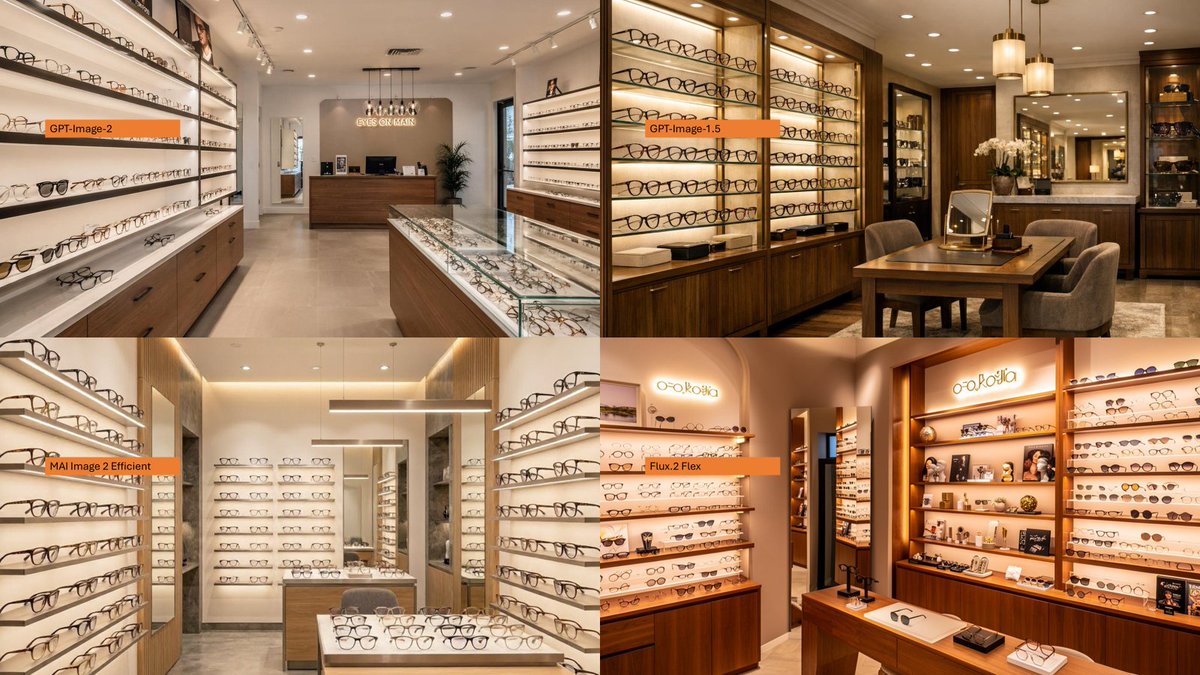
Vergelijking van winkelmodellen van brillen met vier panelen
Creëert een fotorealistische 2x2 vergelijkingscollage van interieurs van brillenboetieks, gelabeld met behulp van een model voor beeldgeneratie.
Dit is een voorbeeld van een GPT Image 2 prompt voor Interieur & Architectuur . Gebruik de onderstaande kant-en-klare prompt om vergelijkbare afbeeldingen te genereren en controleer de Awesome GPT Image 2 Prompts en de rechten voor commercieel gebruik voordat u de afbeeldingen hergebruikt.
Free 1K preview
Generate one preview image instantly, no sign-up required.
Free text preview doesn’t preserve reference-image consistency.
Snel
Schrijfklare prompt
Using the provided reference image as a layout/comparison inspiration, replace the dense Japanese policy infographic with a photorealistic 2×2 comparison collage. Each of the 4 panels should show a different realistic interior view of {argument name="store type" default="a modern eyeglasses boutique"}, with warm retail lighting, shelves full of glasses, wooden cabinetry, display cases, mirrors, and a polished upscale showroom feel. Add one small horizontal orange label near the left side of each panel, using exactly these 4 labels: {argument name="top left label" default="GPT-Image-2"}, {argument name="top right label" default="GPT-Image-1.5"}, {argument name="bottom left label" default="MAI Image 2 Efficient"}, and {argument name="bottom right label" default="Flux.2 Flex"}. Keep the image as a clean four-quadrant comparison, with no Japanese report text, no diagrams, no government-style boxes, and no extra captions beyond the four orange labels.Vraagvariabelen
Bewerkbare argumentplaceholders in de prompt, met hun standaardwaarden.
Best for
- - Interieur & Architectuur visual exploration
- - Image generation and reference-image edits
- - Reusable briefs that keep source attribution visible
Change these parts
- - Subject, product, character, or scene
- - Aspect ratio, camera, lighting, and background
- - Brand, text, color, and output constraints
Recommended model and settings
- - Model: gpt-image-2
- - Input mode: Afbeelding naar afbeelding
- - Aspect ratio: source
- - Commercial status: review original source
How to use this prompt
- 1. Copy the prompt and preserve its structure for the first test.
- 2. Replace the subject, context, and publishing channel.
- 3. Change one camera, lighting, or style variable per iteration.
- 4. Inspect the output, source, text, and rights before reuse.
Limitations, source, and reuse cautions
- - Generated output is an editable draft, not factual, legal, or rights evidence.
- - Review the linked source, people, brands, logos, text, and third-party media before commercial use.
Meer gevallen in deze categorie
Geprioriteerd op basis van categorie, compatibiliteit met invoermodus, kwaliteit en lager risico.






Hergebruik en bronvermeldingen
Gebruik deze prompt veilig nadat u de casus hebt bekeken.
- 1.Kopieer de prompt of open deze direct in Dovoo met de knop 'Genereren'.
- 2.Pas de variabelen, beeldverhouding en referentieafbeeldingen aan uw eigen toepassing aan.
- 3.Controleer vóór publicatie of betaald gebruik de auteursrechten, de vereisten voor naamsvermelding en de risico's met betrekking tot merk of beeltenis.