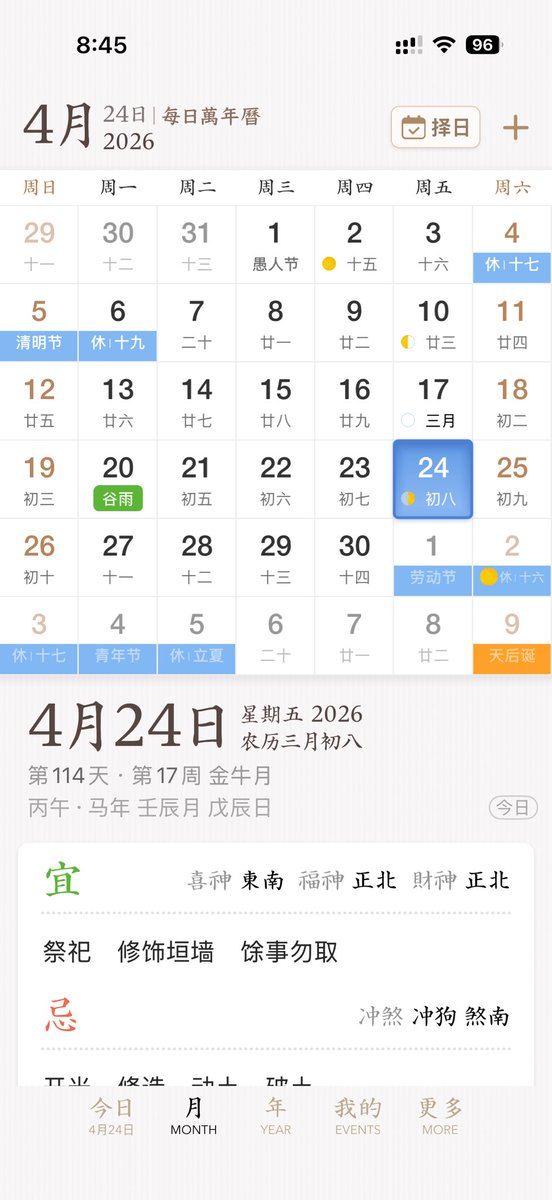
Elegante gebruikersinterface voor een Chinese kalender-app
Deze prompt genereert een verfijnd mobiel UI-concept voor een Chinese eeuwigdurende kalender- en almanak-app, geschikt voor app-designpresentaties of productmockups.
Dit is een voorbeeld van een GPT Image 2 prompt voor Grafisch ontwerp & poster . Gebruik de onderstaande kant-en-klare prompt om vergelijkbare afbeeldingen te genereren en controleer de Awesome GPT Image 2 Prompts en de rechten voor commercieel gebruik voordat u de afbeeldingen hergebruikt.
Heb je de volledige set prompts nodig? Gebruik dan de Grafisch ontwerp & poster Ga naar het themacentrum voor meer gerelateerde voorbeelden, of open de GPT Image 2 prompt catalogus Voor de volledige voorbeeldenindex, herbruikbare structuren en bronvermelding.
Free 1K preview
Generate one preview image instantly, no sign-up required.
3728/4000
Snel
Schrijfklare prompt
A sleek and elegant iPhone App UI prototype showcasing a Chinese perpetual calendar and almanac application. The image is a full-screen mobile screenshot with a soft, warm white background featuring a delicate paper texture, embodying refined East Asian editorial aesthetics. The interface combines minimalist serif and sans-serif typography, with a color palette of soft browns, grays, blacks, light blues, greens, and golden accents, and a spacious layout with delicate dividers. The top displays the iOS status bar, showing 8:45 with cellular signal, Wi-Fi icon, and 96% battery. Below is the title of {argument name="month" default="April"}, accompanied by the subtitle “24th | Daily Perpetual Calendar,” with a rounded rectangle date selection button labeled “Choose Date” on the right, featuring a calendar icon and a plus icon. The main section presents the monthly calendar grid for {argument name="year" default="2026"}, with 7 columns for the days of the week, labeled in Chinese as: Sunday, Monday, Tuesday, Wednesday, Thursday, Friday, Saturday. It renders 6 rows of monthly views, totaling 42 date cells, including dates from adjacent months. Visible dates should be: first row 29, 30, 31, 1, 2, 3, 4; second row 5, 6, 7, 8, 9, 10, 11; third row 12, 13, 14, 15, 16, 17, 18; fourth row 19, 20, 21, 22, 23, 24, 25; fifth row 26, 27, 28, 29, 30, 1, 2; sixth row 3, 4, 5, 6, 7, 8, 9. Each date cell contains a larger Gregorian date with a smaller lunar date or note below. Colored holiday and solar term labels are added to specific cells, displaying 10 highlighted labels: “Rest 17th” on the 4th, “Qingming Festival” on the 5th, “Rest 19th” on the 6th, green “Grain Rain” on the 20th, “Labor Day” on the 1st of next month, “Rest 16th” on the 2nd of next month, “Rest 17th” on the 3rd of the last row, “Youth Day” on the 4th of the last row, “Rest Lichia” on the 5th of the last row, and orange “Tianhou Birthday” on the 9th of the last row. Small lunar phase markings are added to certain dates, including yellow crescent moons or dots around the 2nd, 10th, 17th, 24th, and the 2nd of next month. The cell for {argument name="selected date" default="24"} in the Friday column is highlighted with a rounded blue gradient tile and soft shadow, displaying the smaller text “8th.” A detailed daily information panel is separated from the calendar below with whitespace. On the left is a prominent date title “April 24th”; on the right, “Friday 2026” and “Lunar March 8th” are stacked. Below is a smaller gray metadata row, such as “114th Day · 17th Week Golden Moon,” and the traditional sexagenary cycle/date string, such as “Prophet Horse Year Ren Chen Month Wu Chen Day.” A rounded outline capsule button labeled “Today” is placed at the far right of this metadata area. Below is a white rounded large card with almanac guidance. The card contains two main sections with 2 titles: a green “Favorable” section and a red “Unfavorable” section, separated by a fine dotted line. The “Favorable” section includes the directional fortune row “Lucky God Southeast, Wealth God Northeast, Fortune God Northeast” and three activities: “Worship,” “Repair Walls,” and “Avoid Other Activities.” The “Unfavorable” section includes the conflict row “Clash Dog, Direction South.” At the bottom, there is a 5-item iOS-style tab bar with the labels “Today,” “MONTH,” “YEAR,” “EVENTS,” and “MORE”; the first tab is active and includes a small sub-label “April 24th.” Overall style: high-end App design concept, stable Chinese traditional calendar aesthetics, high-fidelity mobile product screenshot, a realistic yet idealized interface, perfect alignment, delicate shadows, soft contrast, and the sophistication of an early-stage product.Vraagvariabelen
Bewerkbare argumentplaceholders in de prompt, met hun standaardwaarden.
Variabele
month
Standaard
April
Variabele
year
Standaard
2026
Variabele
selected date
Standaard
24
Best for
- - Grafisch ontwerp & poster visual exploration
- - Image generation and reference-image edits
- - Reusable briefs that keep source attribution visible
Change these parts
- - Subject, product, character, or scene
- - Aspect ratio, camera, lighting, and background
- - Brand, text, color, and output constraints
Recommended model and settings
- - Model: gpt-image-2
- - Input mode: Tekst naar afbeelding
- - Aspect ratio: source
- - Commercial status: review original source
How to use this prompt
- 1. Copy the prompt and preserve its structure for the first test.
- 2. Replace the subject, context, and publishing channel.
- 3. Change one camera, lighting, or style variable per iteration.
- 4. Inspect the output, source, text, and rights before reuse.
Limitations, source, and reuse cautions
- - Generated output is an editable draft, not factual, legal, or rights evidence.
- - Review the linked source, people, brands, logos, text, and third-party media before commercial use.
Geïmporteerd van Awesome GPT Image 2 Prompts . Naamsvermelding is vereist. Commercieel gebruik is toegestaan volgens de status allowed ; controleer de rechten van de bron voordat u het tegen betaling gebruikt.
Meer gevallen in deze categorie
Geprioriteerd op basis van categorie, compatibiliteit met invoermodus, kwaliteit en lager risico.

Surreal 3D Chess Match Artwork
Tekst naar afbeelding

Pink Hijab Mirror Selfie Portrait
Tekst naar afbeelding

Fashion Studio Portrait with Blue Rim Lighting
Tekst naar afbeelding

Spring Editorial Fashion Collage
Tekst naar afbeelding

Glitch Aesthetic Surreal Portrait
Tekst naar afbeelding

New Chinese-Style Editorial Portrait
Tekst naar afbeelding
Hergebruik en bronvermeldingen
Gebruik deze prompt veilig nadat u de casus hebt bekeken.
- 1.Kopieer de prompt of open deze direct in Dovoo met de knop 'Genereren'.
- 2.Pas de variabelen, beeldverhouding en referentieafbeeldingen aan uw eigen toepassing aan.
- 3.Controleer vóór publicatie of betaald gebruik de auteursrechten, de vereisten voor naamsvermelding en de risico's met betrekking tot merk of beeltenis.