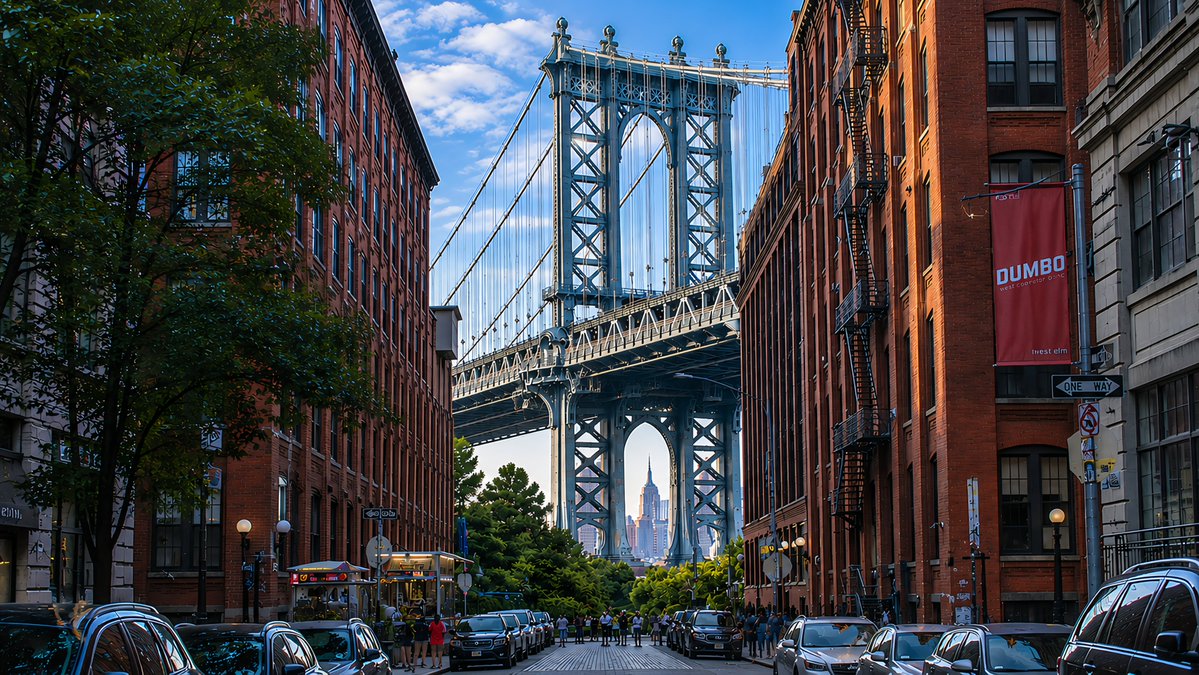
DUMBO Bridge Desktop Wallpaper
Creates a photorealistic 16:9 urban wallpaper of the Manhattan Bridge view in DUMBO using the reference image’s lighting and polished scenic style.
Dit is een voorbeeld van een GPT Image 2 prompt voor Landschap & Natuur . Gebruik de onderstaande kant-en-klare prompt om vergelijkbare afbeeldingen te genereren en controleer de Awesome GPT Image 2 Prompts en de rechten voor commercieel gebruik voordat u de afbeeldingen hergebruikt.
Free 1K preview
Generate one preview image instantly, no sign-up required.
Free text preview doesn’t preserve reference-image consistency.
Snel
Schrijfklare prompt
Using the provided reference image as a visual-quality and lighting reference, transform the scene into a photorealistic 16:9 desktop wallpaper of {argument name="location" default="DUMBO, Brooklyn"}. Replace the lighthouse coastline with an urban street-canyon composition: exactly 2 rows of tall red-brick warehouse buildings on the left and right, 1 large leafy tree in the left foreground, and 1 centered steel suspension bridge tower filling the background. Frame {argument name="distant landmark" default="the Empire State Building"} precisely through the lower arch of the bridge. Add 2 rows of parked cars along both curbs, a small cluster of pedestrians near the bridge approach, and wet-looking reflective street details for depth. Include exactly 2 readable street elements: a vertical red banner reading {argument name="banner text" default="DUMBO"} on the right building and a black-and-white {argument name="street sign text" default="ONE WAY"} sign below it. Preserve the reference image’s crisp high-resolution realism, blue sky with scattered clouds, rich contrast, golden side lighting, and dreamy wallpaper polish. No lighthouse, ocean, rocks, waves, or coastal buildings.Vraagvariabelen
Bewerkbare argumentplaceholders in de prompt, met hun standaardwaarden.
Best for
- - Landschap & Natuur visual exploration
- - Image generation and reference-image edits
- - Reusable briefs that keep source attribution visible
Change these parts
- - Subject, product, character, or scene
- - Aspect ratio, camera, lighting, and background
- - Brand, text, color, and output constraints
Recommended model and settings
- - Model: gpt-image-2
- - Input mode: Afbeelding naar afbeelding
- - Aspect ratio: source
- - Commercial status: review original source
How to use this prompt
- 1. Copy the prompt and preserve its structure for the first test.
- 2. Replace the subject, context, and publishing channel.
- 3. Change one camera, lighting, or style variable per iteration.
- 4. Inspect the output, source, text, and rights before reuse.
Limitations, source, and reuse cautions
- - Generated output is an editable draft, not factual, legal, or rights evidence.
- - Review the linked source, people, brands, logos, text, and third-party media before commercial use.
Meer gevallen in deze categorie
Geprioriteerd op basis van categorie, compatibiliteit met invoermodus, kwaliteit en lager risico.






Hergebruik en bronvermeldingen
Gebruik deze prompt veilig nadat u de casus hebt bekeken.
- 1.Kopieer de prompt of open deze direct in Dovoo met de knop 'Genereren'.
- 2.Pas de variabelen, beeldverhouding en referentieafbeeldingen aan uw eigen toepassing aan.
- 3.Controleer vóór publicatie of betaald gebruik de auteursrechten, de vereisten voor naamsvermelding en de risico's met betrekking tot merk of beeltenis.