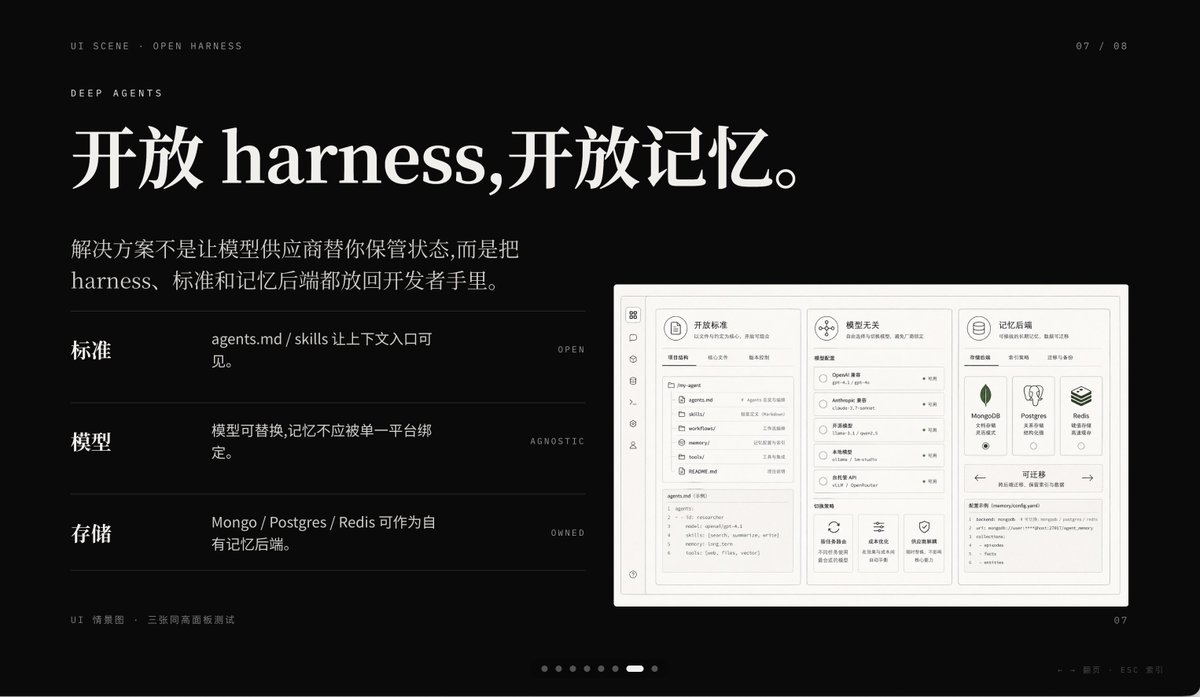
Presentatieslide over Dark AI-producten
Deze prompt genereert een strakke, zwarte presentatieslide voor een AI-productpresentatie, ideaal voor keynotes, storytelling bij startups en professionele PowerPoint-covers.
Dit is een voorbeeld van een GPT Image 2 prompt voor Grafisch ontwerp & poster . Gebruik de onderstaande kant-en-klare prompt om vergelijkbare afbeeldingen te genereren en controleer de Awesome GPT Image 2 Prompts en de rechten voor commercieel gebruik voordat u de afbeeldingen hergebruikt.
Heb je de volledige set prompts nodig? Gebruik dan de Grafisch ontwerp & poster Ga naar het themacentrum voor meer gerelateerde voorbeelden, of open de GPT Image 2 prompt catalogus Voor de volledige voorbeeldenindex, herbruikbare structuren en bronvermelding.
Free 1K preview
Generate one preview image instantly, no sign-up required.
3184/4000
Snel
Schrijfklare prompt
A sophisticated dark-mode presentation slide employing a minimalist tech aesthetic, 16:9 widescreen layout, matte black background, complemented by refined gray-white typography and subtle gray dividers. The overall atmosphere is fashionable, cinematic, and high-end, reminiscent of a product launch or a design-forward AI startup pitch deck. Position two lines of small navigation text in the upper left corner: “UI SCENE · OPEN HARNESS”, followed by “DEEP AGENTS”, using a slender, uppercase sans-serif font with generous letter-spacing. Add a small page indicator in the upper right corner displaying “07 / 08”. The main title occupies the upper left, employing an elegant, large serif font with a Chinese-English mix: {argument name="headline text" default="Open harness, open memory."}. Below it, add a 2-line Chinese body text, using a smaller serif font: {argument name="body text" default="The solution isn't to have model vendors manage your state for you, but to put the harness, standards, and memory backends in the hands of developers."}. In the left-center area, create 3 horizontal feature rows separated by thin gray lines, each with a bold Chinese label on the left, a brief Chinese description in the middle, and a tiny uppercase English keyword aligned to the right. Row 1 label: “Standards”, description: “agents.md / skills make context entry visible.”, keyword: “OPEN”. Row 2 label: “Models”, description: “Models are replaceable, memory should not be tied to a single platform.”, keyword: “AGNOSTIC”. Row 3 label: “Storage”, description: “Mongo / Postgres / Redis can serve as proprietary memory backends.”, keyword: “OWNED”. On the right side, place a large embedded UI model within a light gray rounded rectangle with a subtle shadow, resembling a screenshot of a product project dashboard. The model should be monochromatic in pale beige and gray, structurally rigorous, divided into 3 main columns. Left column: a narrow vertical icon sidebar, plus a panel listing “agents.md”, “skills”, “workflows”, “memories”, “tools”, etc. items/files, with a code editor block at the bottom. Middle column: a section titled “Model Agnostic”, containing 4 selectable models and small controls, with 3 feature cards at the bottom. Right column: a section titled “Memory Backends”, containing 3 database cards for MongoDB, Postgres, and Redis, plus a panel at the bottom titled “Migratable”, displaying a code snippet. Include another top card within the model, titled “Open Standards”, with tab-like controls. Add a line of tiny Chinese-English explanatory text in the lower left outside the model: “UI Scenario · Three equal-height panel test”. Include a carousel indicator at the bottom center consisting of 8 small dots, with the 7th dot highlighted as a short white capsule, and the rest as dark gray circles. Place a small page number “07” in the lower right corner. Additionally, add a faint line of tiny footnote text (Chinese-English) near the right bottom edge, very discreetly, such as presentation metadata. Use precise grid alignment, ample whitespace, understated luxury, Swiss-style composition, and refined YouMind AI product theme presentation aesthetics.Vraagvariabelen
Bewerkbare argumentplaceholders in de prompt, met hun standaardwaarden.
Variabele
headline text
Standaard
Open harness, open memory.
Variabele
body text
Standaard
The solution isn't to have model vendors manage your state for you, but to put the harness, standards, and memory backends in the hands of developers.
Best for
- - Grafisch ontwerp & poster visual exploration
- - Image generation and reference-image edits
- - Reusable briefs that keep source attribution visible
Change these parts
- - Subject, product, character, or scene
- - Aspect ratio, camera, lighting, and background
- - Brand, text, color, and output constraints
Recommended model and settings
- - Model: gpt-image-2
- - Input mode: Tekst naar afbeelding
- - Aspect ratio: source
- - Commercial status: review original source
How to use this prompt
- 1. Copy the prompt and preserve its structure for the first test.
- 2. Replace the subject, context, and publishing channel.
- 3. Change one camera, lighting, or style variable per iteration.
- 4. Inspect the output, source, text, and rights before reuse.
Limitations, source, and reuse cautions
- - Generated output is an editable draft, not factual, legal, or rights evidence.
- - Review the linked source, people, brands, logos, text, and third-party media before commercial use.
Geïmporteerd van Awesome GPT Image 2 Prompts . Naamsvermelding is vereist. Commercieel gebruik is toegestaan volgens de status allowed ; controleer de rechten van de bron voordat u het tegen betaling gebruikt.
Meer gevallen in deze categorie
Geprioriteerd op basis van categorie, compatibiliteit met invoermodus, kwaliteit en lager risico.

Fashion Studio Portrait with Blue Rim Lighting
Tekst naar afbeelding

Transparent Earbuds on Stone Pedestal
Tekst naar afbeelding

Surreal 3D Chess Match Artwork
Tekst naar afbeelding

Pink Hijab Mirror Selfie Portrait
Tekst naar afbeelding

Spring Editorial Fashion Collage
Tekst naar afbeelding

New Chinese-Style Editorial Portrait
Tekst naar afbeelding
Hergebruik en bronvermeldingen
Gebruik deze prompt veilig nadat u de casus hebt bekeken.
- 1.Kopieer de prompt of open deze direct in Dovoo met de knop 'Genereren'.
- 2.Pas de variabelen, beeldverhouding en referentieafbeeldingen aan uw eigen toepassing aan.
- 3.Controleer vóór publicatie of betaald gebruik de auteursrechten, de vereisten voor naamsvermelding en de risico's met betrekking tot merk of beeltenis.