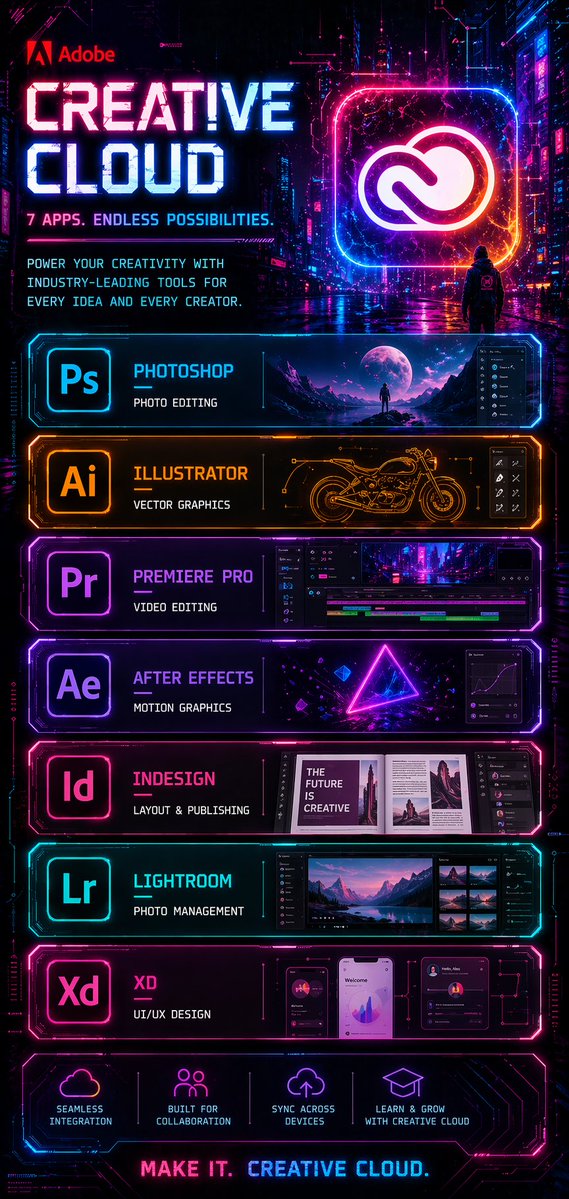
Cyberpunk Creative Cloud-poster
Een hoge, neonkleurige cyberpunk-promotieposter voor Adobe Creative Cloud, ideaal om een futuristische softwareadvertentie na te maken met gestapelde app-presentatiepanelen.
Dit is een voorbeeld van een GPT Image 2 prompt voor Grafisch ontwerp & poster . Gebruik de onderstaande kant-en-klare prompt om vergelijkbare afbeeldingen te genereren en controleer de Awesome GPT Image 2 Prompts en de rechten voor commercieel gebruik voordat u de afbeeldingen hergebruikt.
Free 1K preview
Generate one preview image instantly, no sign-up required.
Free text preview doesn’t preserve reference-image consistency.
Snel
Schrijfklare prompt
{
  "type": "cyberpunk software advertisement poster",
  "brand": "Adobe",
  "product": "Creative Cloud",
  "style": "futuristic neon sci-fi marketing poster with a dark rainy cyberpunk city background, glossy reflections, magenta, cyan, violet, and electric orange lighting, high contrast, ultra-detailed UI-inspired frames, holographic glow, sleek tech panel design",
  "format": "tall vertical poster",
  "background": {
    "scene": "nighttime neon city alley with towering buildings, digital signage, wet pavement reflecting pink and blue lights, cinematic atmosphere",
    "figure": "a single small hooded person seen from behind in the mid-background, standing on the street and facing a giant glowing Creative Cloud logo"
  },
  "header": {
    "logo": "Adobe",
    "headline": "{argument name=\"headline text\" default=\"CREATIVE CLOUD\"}",
    "subheadline": "7 APPS. ENDLESS POSSIBILITIES.",
    "body_text": "POWER YOUR CREATIVITY WITH INDUSTRY-LEADING TOOLS FOR EVERY IDEA AND EVERY CREATOR.",
    "hero_icon": "large glowing rounded-square frame containing the Creative Cloud logo in white, surrounded by pink, blue, and orange neon"
  },
  "layout": {
    "sections": [
      {
        "title": "Photoshop",
        "position": "top app panel",
        "count": 1,
        "labels": [
          "Ps"
        ],
        "description": "cyan neon framed panel with app icon on the left, title Photoshop, subtitle PHOTO EDITING, and a wide preview image of a surreal moonlit landscape with a lone figure plus a dark editing interface sidebar on the right"
      },
      {
        "title": "Illustrator",
        "position": "second app panel",
        "count": 1,
        "labels": [
          "Ai"
        ],
        "description": "orange neon framed panel with app icon on the left, title Illustrator, subtitle VECTOR GRAPHICS, and a central technical line-art motorcycle drawing with small vector-tool interface icons on the right"
      },
      {
        "title": "Premiere Pro",
        "position": "third app panel",
        "count": 1,
        "labels": [
          "Pr"
        ],
        "description": "purple neon framed panel with app icon on the left, title Premiere Pro, subtitle VIDEO EDITING, and a timeline-based video editing interface showing a cyberpunk city clip"
      },
      {
        "title": "After Effects",
        "position": "fourth app panel",
        "count": 1,
        "labels": [
          "Ae"
        ],
        "description": "violet neon framed panel with app icon on the left, title After Effects, subtitle MOTION GRAPHICS, and a glowing triangle composition with floating geometric elements plus a graph editor panel on the right"
      },
      {
        "title": "InDesign",
        "position": "fifth app panel",
        "count": 1,
        "labels": [
          "Id"
        ],
        "description": "pink neon framed panel with app icon on the left, title InDesign, subtitle LAYOUT & PUBLISHING, and an editorial magazine spread preview with the visible cover text THE FUTURE IS CREATIVE and layout panels to the right"
      },
      {
        "title": "Lightroom",
        "position": "sixth app panel",
        "count": 1,
        "labels": [
          "Lr"
        ],
        "description": "cyan neon framed panel with app icon on the left, title Lightroom, subtitle PHOTO MANAGEMENT, and a photo browser interface featuring a mountain lake landscape with thumbnail images on the right"
      },
      {
        "title": "XD",
        "position": "seventh app panel",
        "count": 1,
        "labels": [
          "Xd"
        ],
        "description": "magenta neon framed panel with app icon on the left, title XD, subtitle UI/UX DESIGN, and three mobile app mockup screens with charts, profile cards, and dashboard widgets"
      },
      {
        "title": "feature icons",
        "position": "bottom strip",
        "count": 4,
        "labels": [
          "SEAMLESS INTEGRATION",
          "BUILT FOR COLLABORATION",
          "SYNC ACROSS DEVICES",
          "LEARN & GROW WITH CREATIVE CLOUD"
        ],
        "description": "four glowing line icons with short captions, evenly spaced across a dark neon panel"
      }
    ],
    "footer": {
      "tagline": "MAKE IT. CREATIVE CLOUD."
    }
  },
  "color_palette": {
    "primary": [
      "electric blue",
      "hot pink",
      "purple",
      "deep black"
    ],
    "accent": [
      "orange",
      "white"
    ]
  },
  "rendering": "crisp graphic design poster, polished commercial key art, symmetrical stacked panel layout, intense glow effects, legible typography, premium tech-ad aesthetic"
}
Vraagvariabelen
Bewerkbare argumentplaceholders in de prompt, met hun standaardwaarden.
Best for
- - Grafisch ontwerp & poster visual exploration
- - Image generation and reference-image edits
- - Reusable briefs that keep source attribution visible
Change these parts
- - Subject, product, character, or scene
- - Aspect ratio, camera, lighting, and background
- - Brand, text, color, and output constraints
Recommended model and settings
- - Model: gpt-image-2
- - Input mode: Afbeelding naar afbeelding
- - Aspect ratio: source
- - Commercial status: review original source
How to use this prompt
- 1. Copy the prompt and preserve its structure for the first test.
- 2. Replace the subject, context, and publishing channel.
- 3. Change one camera, lighting, or style variable per iteration.
- 4. Inspect the output, source, text, and rights before reuse.
Limitations, source, and reuse cautions
- - Generated output is an editable draft, not factual, legal, or rights evidence.
- - Review the linked source, people, brands, logos, text, and third-party media before commercial use.
Meer gevallen in deze categorie
Geprioriteerd op basis van categorie, compatibiliteit met invoermodus, kwaliteit en lager risico.






Hergebruik en bronvermeldingen
Gebruik deze prompt veilig nadat u de casus hebt bekeken.
- 1.Kopieer de prompt of open deze direct in Dovoo met de knop 'Genereren'.
- 2.Pas de variabelen, beeldverhouding en referentieafbeeldingen aan uw eigen toepassing aan.
- 3.Controleer vóór publicatie of betaald gebruik de auteursrechten, de vereisten voor naamsvermelding en de risico's met betrekking tot merk of beeltenis.