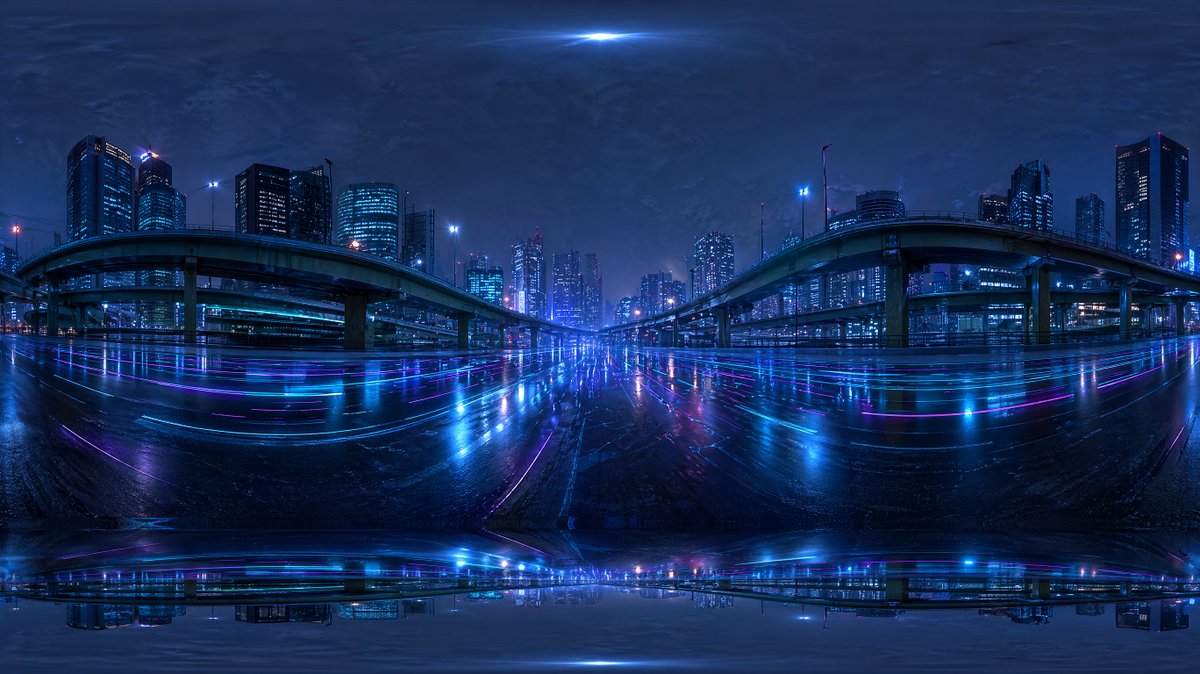
Cyberpunk City Highway HDRI
Een futuristisch stadspanorama in een regenachtige nacht, ontworpen als een 360-graden HDRI-omgevingskaart voor 3D-renderingachtergronden en -verlichting.
Dit is een voorbeeld van een GPT Image 2 prompt voor Landschap & Natuur . Gebruik de onderstaande kant-en-klare prompt om vergelijkbare afbeeldingen te genereren en controleer de Awesome GPT Image 2 Prompts en de rechten voor commercieel gebruik voordat u de afbeeldingen hergebruikt.
Heb je de volledige set prompts nodig? Gebruik dan de Landschap & Natuur Ga naar het themacentrum voor meer gerelateerde voorbeelden, of open de GPT Image 2 prompt catalogus Voor de volledige voorbeeldenindex, herbruikbare structuren en bronvermelding.
Free 1K preview
Generate one preview image instantly, no sign-up required.
1557/4000
Snel
Schrijfklare prompt
Create a seamless-looking 360-degree equirectangular HDRI environment map of a futuristic urban expressway at night, viewed from the middle of a wide wet roadway beneath elevated highways in a dense modern city. Use a panoramic full-surround composition with strong fisheye-like equirectangular distortion at the top and bottom edges, designed for use as a Blender world background. The scene should feature 2 large curving elevated highway ramps, one on the left and one on the right, arching inward toward the center, with multiple supporting pillars and additional overpass layers receding into the distance. Surround the roadway with a skyline of illuminated high-rise office towers and apartment buildings, with cool blue and cyan windows and a few magenta and purple accent lights. Make the road surface glossy and rain-soaked, reflecting the city lights in long horizontal streaks of neon blue, violet, and pink. Add subtle light trails and luminous reflections across the pavement, creating a cyberpunk mood. The sky should be dark, cloudy, and atmospheric with a faint bright glow at the zenith and soft haze around distant buildings. Keep the overall palette dominated by deep indigo, electric blue, cyan, and purple. The image should feel cinematic, moody, ultra-detailed, photorealistic, high dynamic range, with realistic urban lighting and mirrored wet-surface reflections, suitable as an HDRI backdrop. Include slight panorama seam artifacts and stretched distortion near the poles so it feels like an AI-generated but usable environment map.
Best for
- - Landschap & Natuur visual exploration
- - Image generation and reference-image edits
- - Reusable briefs that keep source attribution visible
Change these parts
- - Subject, product, character, or scene
- - Aspect ratio, camera, lighting, and background
- - Brand, text, color, and output constraints
Recommended model and settings
- - Model: gpt-image-2
- - Input mode: Tekst naar afbeelding
- - Aspect ratio: source
- - Commercial status: review original source
How to use this prompt
- 1. Copy the prompt and preserve its structure for the first test.
- 2. Replace the subject, context, and publishing channel.
- 3. Change one camera, lighting, or style variable per iteration.
- 4. Inspect the output, source, text, and rights before reuse.
Limitations, source, and reuse cautions
- - Generated output is an editable draft, not factual, legal, or rights evidence.
- - Review the linked source, people, brands, logos, text, and third-party media before commercial use.
Geïmporteerd van Awesome GPT Image 2 Prompts . Naamsvermelding is vereist. Commercieel gebruik is toegestaan volgens de status allowed ; controleer de rechten van de bron voordat u het tegen betaling gebruikt.
Meer gevallen in deze categorie
Geprioriteerd op basis van categorie, compatibiliteit met invoermodus, kwaliteit en lager risico.

MotoGP POV Cornering Shot
Tekst naar afbeelding

Cinematic Blue Backlit Portrait
Tekst naar afbeelding

GPT Image 2 Real-Life Character Street Snap
Tekst naar afbeelding

Luxury Travel Fashion Portrait Prompt
Tekst naar afbeelding

Street Selfie with Cat in Matching Cap
Tekst naar afbeelding

GPT Image 2 Prompt: Garden Dappled Light
Tekst naar afbeelding
Hergebruik en bronvermeldingen
Gebruik deze prompt veilig nadat u de casus hebt bekeken.
- 1.Kopieer de prompt of open deze direct in Dovoo met de knop 'Genereren'.
- 2.Pas de variabelen, beeldverhouding en referentieafbeeldingen aan uw eigen toepassing aan.
- 3.Controleer vóór publicatie of betaald gebruik de auteursrechten, de vereisten voor naamsvermelding en de risico's met betrekking tot merk of beeltenis.