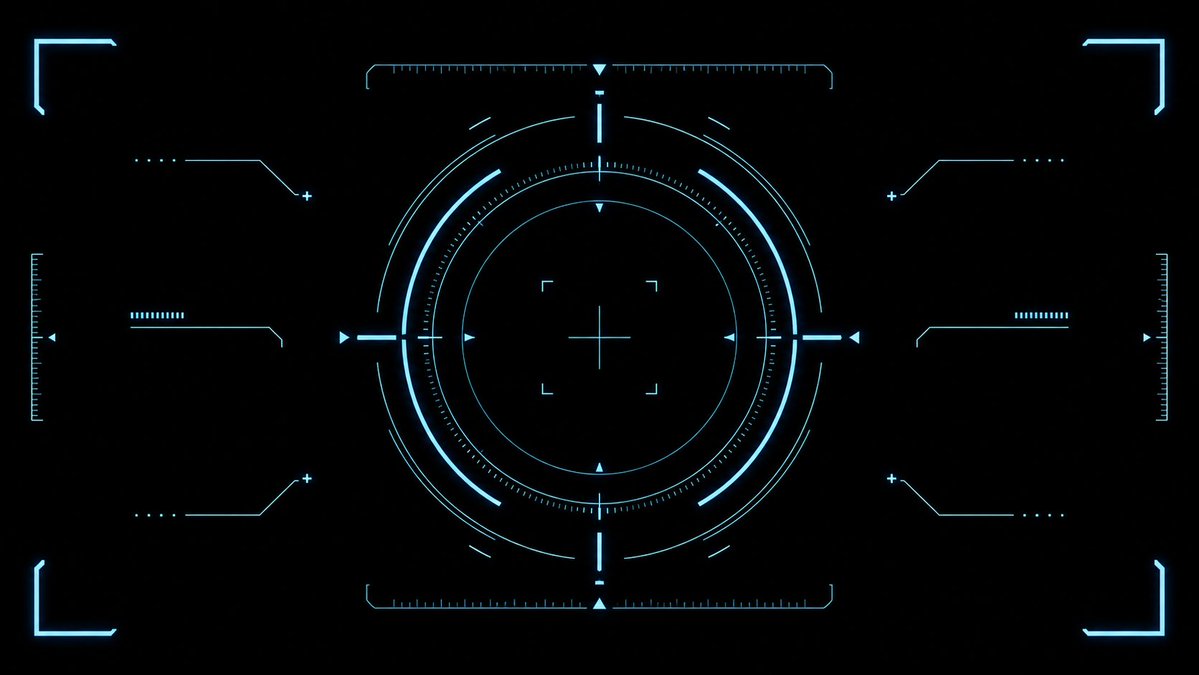
Cyaan Sci-Fi HUD-richtkruisoverlay
Genereert een strak, futuristisch cyaan richteffect voor HUD-elementen in games, video-overlays en sciencefiction-interfaceontwerpen.
Dit is een voorbeeld van een GPT Image 2 prompt voor Anime & Game . Gebruik de onderstaande kant-en-klare prompt om vergelijkbare afbeeldingen te genereren en controleer de Awesome GPT Image 2 Prompts en de rechten voor commercieel gebruik voordat u de afbeeldingen hergebruikt.
Heb je de volledige set prompts nodig? Gebruik dan de Anime & Game Ga naar het themacentrum voor meer gerelateerde voorbeelden, of open de GPT Image 2 prompt catalogus Voor de volledige voorbeeldenindex, herbruikbare structuren en bronvermelding.
Free 1K preview
Generate one preview image instantly, no sign-up required.
2652/4000
Snel
Schrijfklare prompt
{
  "type": "futuristic sci-fi HUD interface effect asset",
  "format": "wide 16:9 transparent-style graphic on pure black background",
  "style": "minimal high-tech vector UI, clean cyan neon glow, thin luminous strokes, symmetrical targeting overlay, game interface / cockpit scanner aesthetic, no text, no logos, no humans",
  "color_palette": {
    "primary": "{argument name=\"glow color\" default=\"electric cyan blue\"}",
    "background": "{argument name=\"background color\" default=\"deep black\"}",
    "line_weight": "ultra-thin technical lines with soft bloom"
  },
  "composition": {
    "overall": "perfectly centered, horizontally symmetrical heads-up display reticle with large circular target in the middle and decorative interface brackets around the edges",
    "canvas": "{argument name=\"aspect ratio\" default=\"16:9 widescreen\"}",
    "central_elements": {
      "count": 10,
      "items": [
        "1 large outer circular ring made from segmented arcs",
        "1 bright inner circular ring",
        "1 dotted micro-tick circular scale surrounding the inner ring",
        "1 thin innermost circle",
        "1 central crosshair with horizontal and vertical lines",
        "4 small corner focus brackets around the crosshair",
        "4 cardinal triangular pointers at top, bottom, left, and right of the circle",
        "4 short bright radial bars at the cardinal directions",
        "multiple fine calibration ticks along the circle",
        "small broken outer orbit arcs for motion-graphic detail"
      ]
    },
    "side_elements": {
      "count": 6,
      "items": [
        "3 left-side connector-line HUD widgets: top, middle, bottom",
        "3 right-side connector-line HUD widgets: top, middle, bottom"
      ],
      "details": "each side widget uses angled circuit-like lines, small dots, plus signs, and short ruler bars, mirrored left to right"
    },
    "edge_elements": {
      "count": 8,
      "items": [
        "4 glowing corner frame brackets, one in each corner",
        "2 vertical ruler scales at the far left and far right edges",
        "2 horizontal ruler scales centered near the top and bottom of the main circle",
        "small triangular side markers near the left and right edges"
      ]
    }
  },
  "lighting": "soft neon bloom around every line, crisp dark negative space, high contrast",
  "rendering": "2D vector effect material, sharp clean geometry, anti-aliased, suitable as a transparent overlay or VFX asset",
  "negative_prompt": "no words, no numbers, no icons with meaning, no cluttered background, no gradients except glow, no realistic objects, no characters"
}
Vraagvariabelen
Bewerkbare argumentplaceholders in de prompt, met hun standaardwaarden.
Variabele
glow color
Standaard
electric cyan blue
Variabele
background color
Standaard
deep black
Variabele
aspect ratio
Standaard
16:9 widescreen
Best for
- - Anime & Game visual exploration
- - Image generation and reference-image edits
- - Reusable briefs that keep source attribution visible
Change these parts
- - Subject, product, character, or scene
- - Aspect ratio, camera, lighting, and background
- - Brand, text, color, and output constraints
Recommended model and settings
- - Model: gpt-image-2
- - Input mode: Tekst naar afbeelding
- - Aspect ratio: source
- - Commercial status: review original source
How to use this prompt
- 1. Copy the prompt and preserve its structure for the first test.
- 2. Replace the subject, context, and publishing channel.
- 3. Change one camera, lighting, or style variable per iteration.
- 4. Inspect the output, source, text, and rights before reuse.
Limitations, source, and reuse cautions
- - Generated output is an editable draft, not factual, legal, or rights evidence.
- - Review the linked source, people, brands, logos, text, and third-party media before commercial use.
Geïmporteerd van Awesome GPT Image 2 Prompts . Naamsvermelding is vereist. Commercieel gebruik is toegestaan volgens de status allowed ; controleer de rechten van de bron voordat u het tegen betaling gebruikt.
Meer gevallen in deze categorie
Geprioriteerd op basis van categorie, compatibiliteit met invoermodus, kwaliteit en lager risico.

Anime Girl Heterochromia Portrait
Tekst naar afbeelding

Cute Speech Bubble Mascot Profile Icon
Tekst naar afbeelding

Matte Black B.AI Keyboard Keycap
Tekst naar afbeelding

MotoGP POV Cornering Shot
Tekst naar afbeelding

Tuxedo Cat Photo and Line Art Diptych
Tekst naar afbeelding

Autumn Cozy Casual Outfit Prompt
Tekst naar afbeelding
Hergebruik en bronvermeldingen
Gebruik deze prompt veilig nadat u de casus hebt bekeken.
- 1.Kopieer de prompt of open deze direct in Dovoo met de knop 'Genereren'.
- 2.Pas de variabelen, beeldverhouding en referentieafbeeldingen aan uw eigen toepassing aan.
- 3.Controleer vóór publicatie of betaald gebruik de auteursrechten, de vereisten voor naamsvermelding en de risico's met betrekking tot merk of beeltenis.