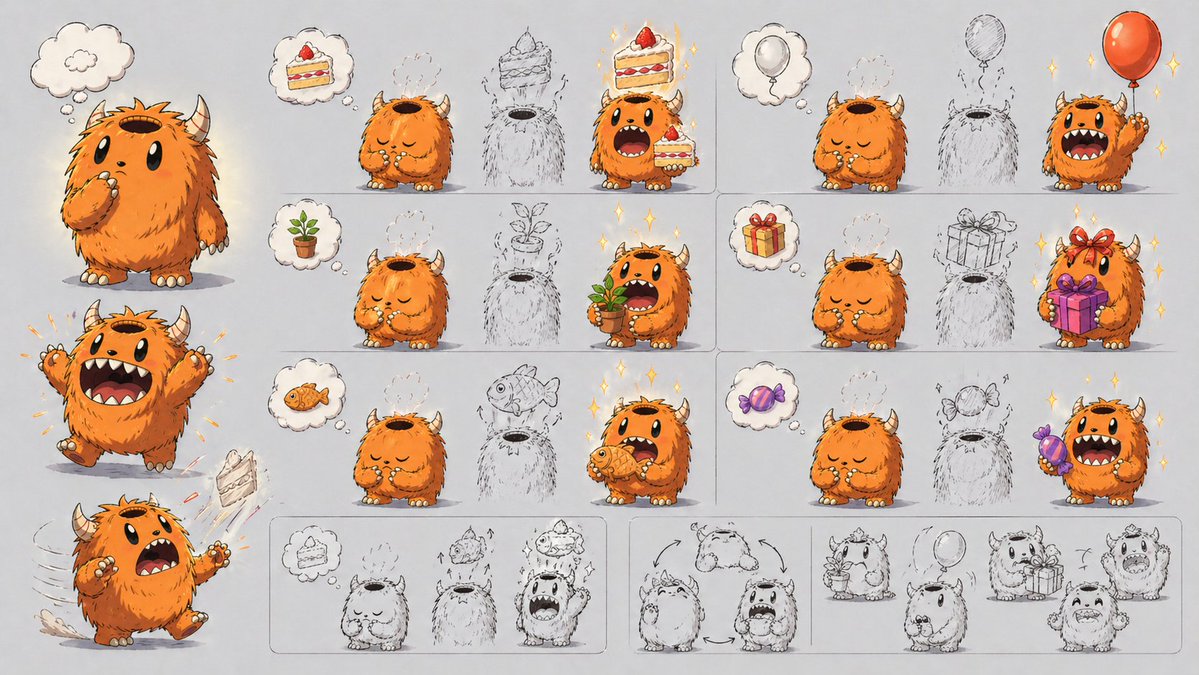
Ontwerpblad voor schattige monstervaardigheden
Een uitgebreid presentatieblad voor personageontwerp met een pluizig monster met hoorns en zes visuele voorbeelden van het mechanisme waarmee het monster voorwerpen kan oproepen door zijn kop te openen. Handig voor concepttekeningen en uitleg van personagevaardigheden.
Dit is een voorbeeld van een GPT Image 2 prompt voor Portret & Karakter . Gebruik de onderstaande kant-en-klare prompt om vergelijkbare afbeeldingen te genereren en controleer de Awesome GPT Image 2 Prompts en de rechten voor commercieel gebruik voordat u de afbeeldingen hergebruikt.
Free 1K preview
Generate one preview image instantly, no sign-up required.
Free text preview doesn’t preserve reference-image consistency.
Snel
Schrijfklare prompt
{
  "type": "character design mechanics sheet",
  "style": "cute storybook concept art, polished digital illustration mixed with rough pencil ideation, clean light gray paper background, soft shadows, subtle sparkles on successful transformations",
  "subject": {
    "species": "small fluffy horned monster",
    "name": "{argument name=\"character name\" default=\"orange fluffy monster\"}",
    "appearance": {
      "body": "round and squat, very fluffy fur, tiny arms and legs, cream claws and toenails",
      "fur_color": "{argument name=\"fur color\" default=\"bright orange\"}",
      "horns": "2 short curved beige horns",
      "face": "large black oval eyes, wide mouth with small fangs, expressive eyebrows",
      "top_opening": "large hollow opening on top of head like a container or pot"
    },
    "core_mechanic": "items imagined in a thought bubble can appear out of the opening on the character's head, then the character grabs or presents the item"
  },
  "layout": {
    "format": "wide horizontal character mechanic explainer sheet",
    "sections": [
      {
        "title": "left character poses",
        "position": "left column",
        "count": 3,
        "labels": [
          "thinking neutral standing pose",
          "excited jump with both arms raised",
          "surprised running pose with cake flying out"
        ]
      },
      {
        "title": "top row examples",
        "position": "upper right grid",
        "count": 2,
        "labels": [
          "cake to cake manifestation",
          "balloon to balloon manifestation"
        ]
      },
      {
        "title": "middle row examples",
        "position": "center right grid",
        "count": 2,
        "labels": [
          "potted plant to potted plant manifestation",
          "gift box to gift box manifestation"
        ]
      },
      {
        "title": "bottom row examples",
        "position": "lower right grid",
        "count": 2,
        "labels": [
          "fish to fish manifestation",
          "candy to candy manifestation"
        ]
      },
      {
        "title": "bottom sketch sequence strip",
        "position": "bottom band",
        "count": 4,
        "labels": [
          "cake transformation sequence",
          "turnaround rotation arrows",
          "plant and balloon rough concepts",
          "gift and excited expression rough concepts"
        ]
      }
    ],
    "grid_examples_total": 6,
    "thought_bubbles_total": 8,
    "manifested_object_types_total": 6
  },
  "objects": {
    "manifested_items": [
      {
        "item": "slice of strawberry cake",
        "count": 2
      },
      {
        "item": "red balloon",
        "count": 2
      },
      {
        "item": "small potted sprout plant",
        "count": 2
      },
      {
        "item": "wrapped present box with ribbon",
        "count": 2
      },
      {
        "item": "orange fish",
        "count": 2
      },
      {
        "item": "purple wrapped candy",
        "count": 2
      }
    ],
    "rough_outline_placeholders_in_grid": 6
  },
  "composition": "large full-color character poses stacked on the left, six boxed example panels arranged in 3 rows by 2 columns on the right, and a long row of rough monochrome concept sketches along the bottom",
  "rendering": {
    "linework": "inked outlines with visible sketch underdrawing in some areas",
    "color": "warm orange character against neutral gray background with colorful props",
    "mood": "playful, inventive, character design presentation for explaining an ability visually"
  }
}
Vraagvariabelen
Bewerkbare argumentplaceholders in de prompt, met hun standaardwaarden.
Best for
- - Portret & Karakter visual exploration
- - Image generation and reference-image edits
- - Reusable briefs that keep source attribution visible
Change these parts
- - Subject, product, character, or scene
- - Aspect ratio, camera, lighting, and background
- - Brand, text, color, and output constraints
Recommended model and settings
- - Model: gpt-image-2
- - Input mode: Afbeelding naar afbeelding
- - Aspect ratio: source
- - Commercial status: review original source
How to use this prompt
- 1. Copy the prompt and preserve its structure for the first test.
- 2. Replace the subject, context, and publishing channel.
- 3. Change one camera, lighting, or style variable per iteration.
- 4. Inspect the output, source, text, and rights before reuse.
Limitations, source, and reuse cautions
- - Generated output is an editable draft, not factual, legal, or rights evidence.
- - Review the linked source, people, brands, logos, text, and third-party media before commercial use.
Meer gevallen in deze categorie
Geprioriteerd op basis van categorie, compatibiliteit met invoermodus, kwaliteit en lager risico.






Hergebruik en bronvermeldingen
Gebruik deze prompt veilig nadat u de casus hebt bekeken.
- 1.Kopieer de prompt of open deze direct in Dovoo met de knop 'Genereren'.
- 2.Pas de variabelen, beeldverhouding en referentieafbeeldingen aan uw eigen toepassing aan.
- 3.Controleer vóór publicatie of betaald gebruik de auteursrechten, de vereisten voor naamsvermelding en de risico's met betrekking tot merk of beeltenis.