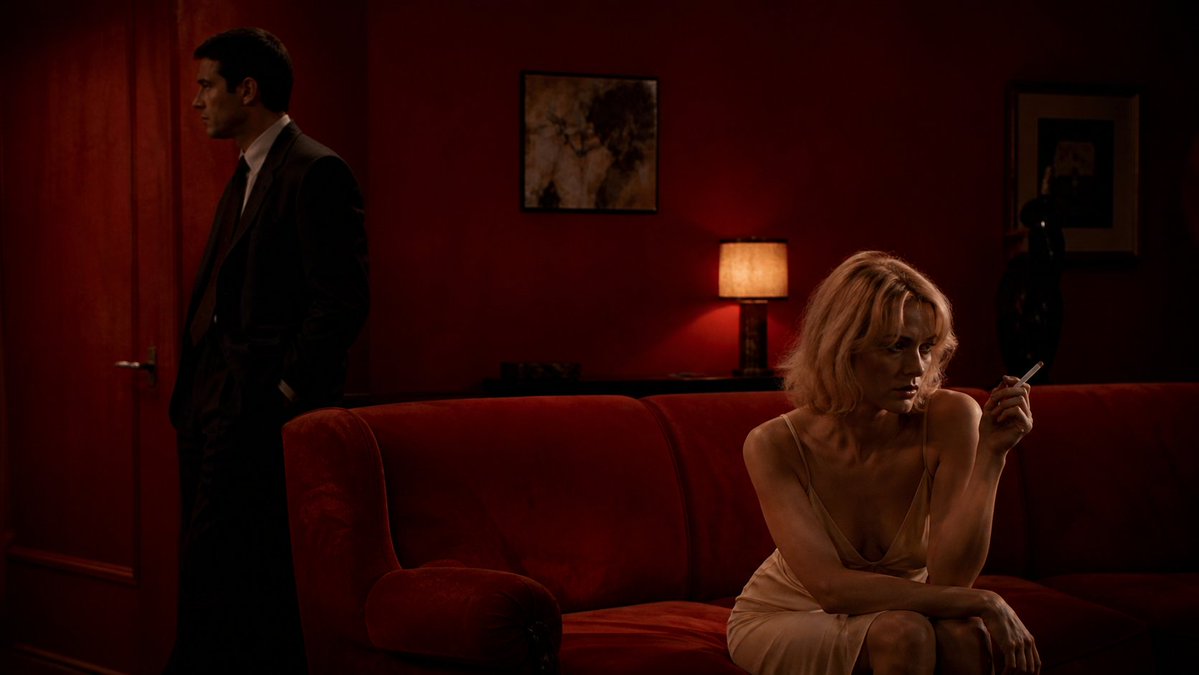
Crimson Noir Lounge Scene
Een filmische inspiratiebron voor het creëren van een spannende, schemerige neo-noir lounge-scène met twee anonieme figuren in een rood fluwelen interieur.
Dit is een voorbeeld van een GPT Image 2 prompt voor Interieur & Architectuur . Gebruik de onderstaande kant-en-klare prompt om vergelijkbare afbeeldingen te genereren en controleer de Awesome GPT Image 2 Prompts en de rechten voor commercieel gebruik voordat u de afbeeldingen hergebruikt.
Heb je de volledige set prompts nodig? Gebruik dan de Interieur & Architectuur Ga naar het themacentrum voor meer gerelateerde voorbeelden, of open de GPT Image 2 prompt catalogus Voor de volledige voorbeeldenindex, herbruikbare structuren en bronvermelding.
Free 1K preview
Generate one preview image instantly, no sign-up required.
1187/4000
Snel
Schrijfklare prompt
Create a cinematic neo-noir film still in a dark, intimate lounge with deep crimson walls and a plush red velvet sofa dominating the foreground. On the right, show {argument name="female subject" default="a blonde woman in a pale champagne silk slip dress"} seated on the sofa, leaning forward with one arm across her lap and holding a lit cigarette delicately in her raised hand; Show every face clearly with natural, detailed facial features. On the left, near a closed wooden door, place {argument name="male subject" default="a man in a dark suit and tie"} standing in profile with hands in his pockets, mostly in shadow, his face also obscured by a dark privacy block. The room should feel tense and secretive, with warm low-key lighting from a small table lamp behind the sofa casting amber light onto the red wall. Include two framed artworks on the wall, a dark statue or decorative object in the back right, heavy shadows, rich red and brown tones, soft film grain, shallow depth of field, and a widescreen 16:9 composition. Make it look like a moody 1970s psychological thriller scene, elegant but unsettling, with realistic photography, dramatic contrast, and no visible text.Vraagvariabelen
Bewerkbare argumentplaceholders in de prompt, met hun standaardwaarden.
Variabele
female subject
Standaard
a blonde woman in a pale champagne silk slip dress
Variabele
male subject
Standaard
a man in a dark suit and tie
Best for
- - Interieur & Architectuur visual exploration
- - Image generation and reference-image edits
- - Reusable briefs that keep source attribution visible
Change these parts
- - Subject, product, character, or scene
- - Aspect ratio, camera, lighting, and background
- - Brand, text, color, and output constraints
Recommended model and settings
- - Model: gpt-image-2
- - Input mode: Tekst naar afbeelding
- - Aspect ratio: source
- - Commercial status: review original source
How to use this prompt
- 1. Copy the prompt and preserve its structure for the first test.
- 2. Replace the subject, context, and publishing channel.
- 3. Change one camera, lighting, or style variable per iteration.
- 4. Inspect the output, source, text, and rights before reuse.
Limitations, source, and reuse cautions
- - Generated output is an editable draft, not factual, legal, or rights evidence.
- - Review the linked source, people, brands, logos, text, and third-party media before commercial use.
Geïmporteerd van Awesome GPT Image 2 Prompts . Naamsvermelding is vereist. Commercieel gebruik is toegestaan volgens de status allowed ; controleer de rechten van de bron voordat u het tegen betaling gebruikt.
Meer gevallen in deze categorie
Geprioriteerd op basis van categorie, compatibiliteit met invoermodus, kwaliteit en lager risico.

Female Clown Cyborg Portrait
Tekst naar afbeelding

Greyscale Puzzle Portrait with Color Accent
Tekst naar afbeelding

Manga Desert Radio Telescope Road Trip
Tekst naar afbeelding

Imperial Research Bunker on Volcanic Planet
Tekst naar afbeelding

Android Quantum Lab Workstation
Tekst naar afbeelding

Surreal 3D Chess Match Artwork
Tekst naar afbeelding
Hergebruik en bronvermeldingen
Gebruik deze prompt veilig nadat u de casus hebt bekeken.
- 1.Kopieer de prompt of open deze direct in Dovoo met de knop 'Genereren'.
- 2.Pas de variabelen, beeldverhouding en referentieafbeeldingen aan uw eigen toepassing aan.
- 3.Controleer vóór publicatie of betaald gebruik de auteursrechten, de vereisten voor naamsvermelding en de risico's met betrekking tot merk of beeltenis.