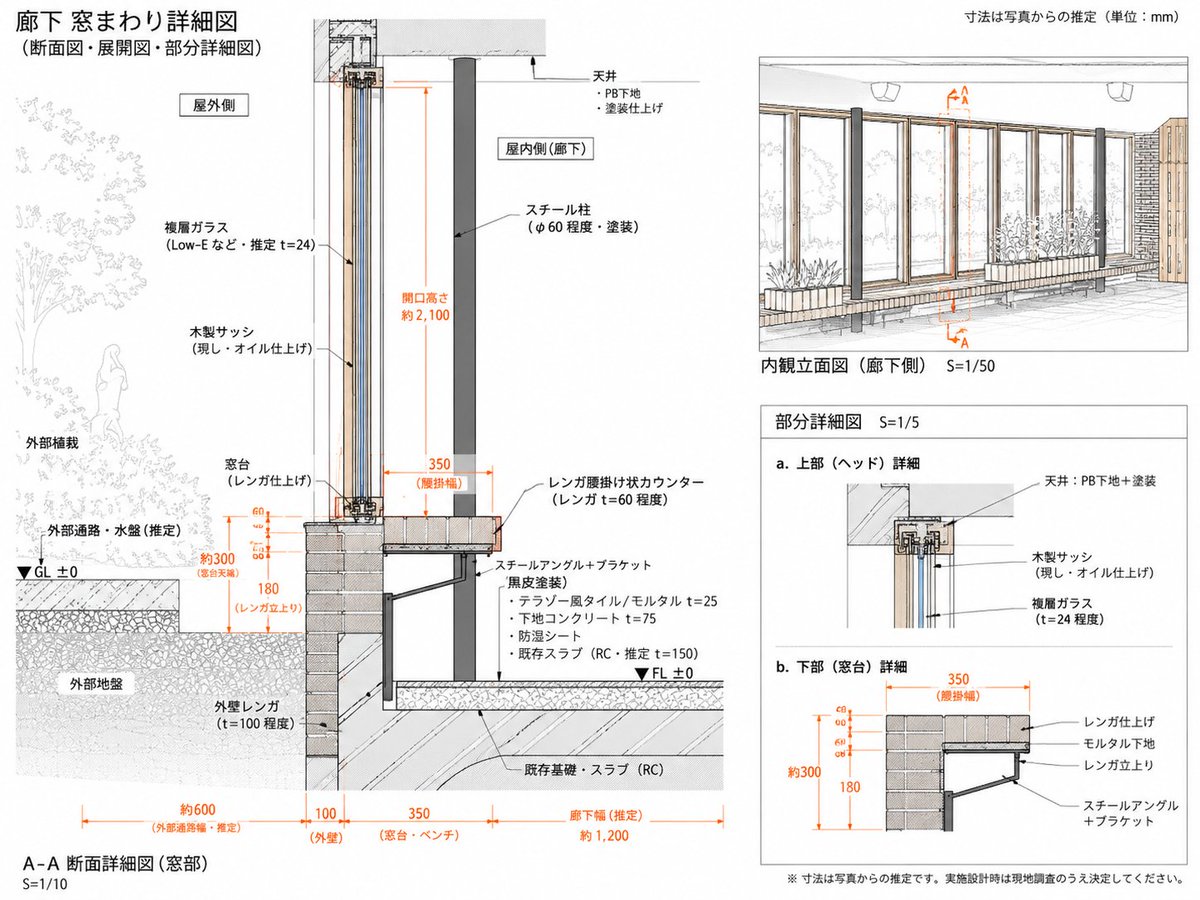
Japanese Corridor Window Detail Sheet
Generates a clean Japanese architectural detail sheet from a reference, focusing on inferred corridor window section, elevation, and partial construction details.
Dit is een voorbeeld van een GPT Image 2 prompt voor Interieur & Architectuur . Gebruik de onderstaande kant-en-klare prompt om vergelijkbare afbeeldingen te genereren en controleer de Awesome GPT Image 2 Prompts en de rechten voor commercieel gebruik voordat u de afbeeldingen hergebruikt.
Free 1K preview
Generate one preview image instantly, no sign-up required.
Free text preview doesn’t preserve reference-image consistency.
Snel
Schrijfklare prompt
Using REFERENCE_0 as the architectural source, reorganize it into a cleaner, more focused Japanese technical drawing sheet for the corridor window assembly. Keep the same subject and hand-drafted architectural illustration style, but simplify the page and redraw the construction details as an inferred measured detail rather than a broad explanatory board.

Goal: Create a detailed drawing titled {argument name="main title" default="廊下 窓まわり詳細図"} with subtitle {argument name="subtitle" default="(断面図・展開図・部分詳細図)"}. Treat all dimensions as estimates from the reference/photo and note that the unit is {argument name="unit note" default="mm"}.

Layout: Use exactly 4 drawing areas: 1 large A-A section detail on the left, 1 interior elevation view at the upper right, and 2 small partial detail diagrams at the lower right. Make the left section the dominant focus and include a small key plan/section marker at the top of it.

Left main section: Redraw the corridor window section at S=1/10 with clearer construction layers and orange dimension lines. Show exterior planting and exterior ground on the left, the tall wood sash/glass opening in the center, and the interior corridor side on the right. Include labels for exterior side, interior side, ceiling, steel column, wood sash, double glass, brick sill/window base, brick exterior wall, steel angle/bracket, floor build-up, existing RC slab/foundation, GL ±0 and FL ±0. Emphasize estimated dimensions including opening height about 2100, window base about 300, brick rise 180, brick ledge width 350, exterior passage about 600, wall 100, sill/bench 350, and corridor width about 1200.

Upper-right drawing: Create an interior elevation view labeled {argument name="elevation label" default="Interior elevation (corridor side) S=1/50"}. Show the corridor-side window wall with repeated vertical wooden frames, glass panes, brick/bench base, steel columns, exterior planting visible through the glass, and orange A-A section markers.

Lower-right details: Add exactly 2 partial detail diagrams labeled a and b: a. upper/head detail showing ceiling, PB substrate/paint finish, wood sash, and double glass; b. lower/sill detail showing brick finish, mortar substrate, brick support, and steel angle plus bracket, with orange dimensions 350, about 300, and 180.

Style and constraints: Maintain the reference’s clean Japanese architectural presentation: thin black linework, light gray hatching, muted wood and brick tones, orange dimensions, white background, precise leader lines, and a professional measured-drawing look. Use Japanese technical labels where shown, but avoid overcrowding. Add a bottom caution note {argument name="caution note" default="※寸法は写真からの推定です。実施設計時は現地調査のうえ決定してください。"}. Do not add unrelated photos, people in the interior, decorative icons, or extra drawing panels.
Vraagvariabelen
Bewerkbare argumentplaceholders in de prompt, met hun standaardwaarden.
Best for
- - Interieur & Architectuur visual exploration
- - Image generation and reference-image edits
- - Reusable briefs that keep source attribution visible
Change these parts
- - Subject, product, character, or scene
- - Aspect ratio, camera, lighting, and background
- - Brand, text, color, and output constraints
Recommended model and settings
- - Model: gpt-image-2
- - Input mode: Afbeelding naar afbeelding
- - Aspect ratio: source
- - Commercial status: review original source
How to use this prompt
- 1. Copy the prompt and preserve its structure for the first test.
- 2. Replace the subject, context, and publishing channel.
- 3. Change one camera, lighting, or style variable per iteration.
- 4. Inspect the output, source, text, and rights before reuse.
Limitations, source, and reuse cautions
- - Generated output is an editable draft, not factual, legal, or rights evidence.
- - Review the linked source, people, brands, logos, text, and third-party media before commercial use.
Meer gevallen in deze categorie
Geprioriteerd op basis van categorie, compatibiliteit met invoermodus, kwaliteit en lager risico.






Hergebruik en bronvermeldingen
Gebruik deze prompt veilig nadat u de casus hebt bekeken.
- 1.Kopieer de prompt of open deze direct in Dovoo met de knop 'Genereren'.
- 2.Pas de variabelen, beeldverhouding en referentieafbeeldingen aan uw eigen toepassing aan.
- 3.Controleer vóór publicatie of betaald gebruik de auteursrechten, de vereisten voor naamsvermelding en de risico's met betrekking tot merk of beeltenis.