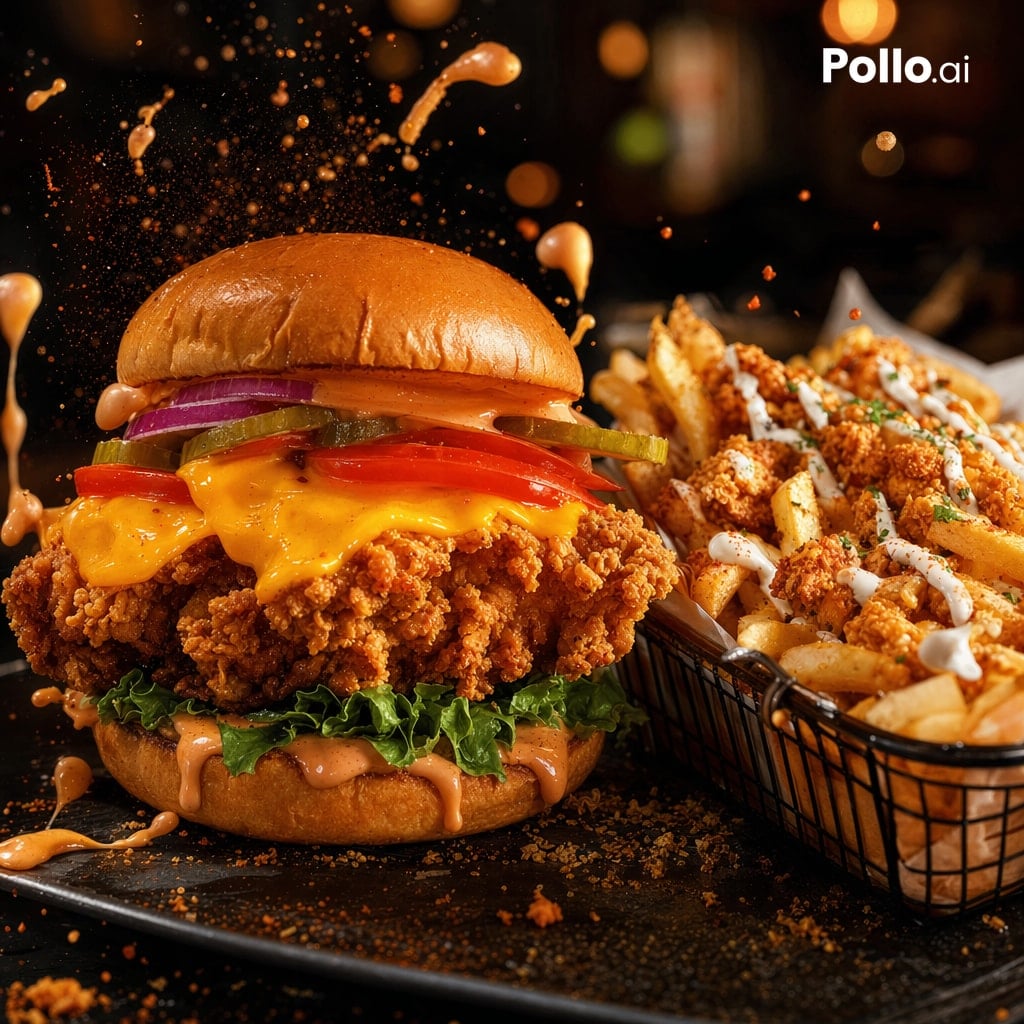
Filmische reclame voor een gefrituurde kipburger
Deze prompt genereert een fotorealistische reclameafbeelding in restaurantstijl van een knapperige kipburger met friet met toppings, ideaal voor fastfoodbranding en promotionele berichten op sociale media.
Dit is een voorbeeld van een GPT Image 2 prompt voor Eten en drinken . Gebruik de onderstaande kant-en-klare prompt om vergelijkbare afbeeldingen te genereren en controleer de Awesome GPT Image 2 Prompts en de rechten voor commercieel gebruik voordat u de afbeeldingen hergebruikt.
Heb je de volledige set prompts nodig? Gebruik dan de Eten en drinken Ga naar het themacentrum voor meer gerelateerde voorbeelden, of open de GPT Image 2 prompt catalogus Voor de volledige voorbeeldenindex, herbruikbare structuren en bronvermelding.
Free 1K preview
Generate one preview image instantly, no sign-up required.
1326/4000
Snel
Schrijfklare prompt
A dramatic photorealistic fast-food hero shot of a giant crispy fried chicken sandwich and a side basket of loaded fries on a dark restaurant table. The sandwich is centered slightly left and stacked tall with a glossy brioche bun, spicy orange sauce on the top bun, 2 purple-red onion rings, 3 pickle slices, 2 tomato slices, melted cheddar cheese dripping over an extra-crunchy fried chicken fillet, curly green leaf lettuce, and more creamy orange sauce dripping from the bottom bun. To the right, show a black wire basket filled with thick-cut fries topped with crunchy fried chicken bites, white drizzle sauce, and small green herb garnish. Freeze motion with multiple splashes and droplets of orange sauce exploding upward and around the burger, plus floating crumbs and seasoning particles in the air. Use warm cinematic lighting, deep shadows, high contrast, shallow depth of field, rich golden-brown textures, glossy highlights on the bun and sauce, and a moody blurred bokeh background in an upscale casual restaurant setting. Camera angle is low and close, 3/4 front view, sharp focus on the burger, fries slightly secondary but still detailed. Dark slate serving plate, scattered crumbs and sauce drips on the surface. Add a clean white {argument name="brand text" default="Pollo.ai"} logo in the top-right corner.Vraagvariabelen
Bewerkbare argumentplaceholders in de prompt, met hun standaardwaarden.
Variabele
brand text
Standaard
Pollo.ai
Best for
- - Eten en drinken visual exploration
- - Image generation and reference-image edits
- - Reusable briefs that keep source attribution visible
Change these parts
- - Subject, product, character, or scene
- - Aspect ratio, camera, lighting, and background
- - Brand, text, color, and output constraints
Recommended model and settings
- - Model: gpt-image-2
- - Input mode: Tekst naar afbeelding
- - Aspect ratio: source
- - Commercial status: review original source
How to use this prompt
- 1. Copy the prompt and preserve its structure for the first test.
- 2. Replace the subject, context, and publishing channel.
- 3. Change one camera, lighting, or style variable per iteration.
- 4. Inspect the output, source, text, and rights before reuse.
Limitations, source, and reuse cautions
- - Generated output is an editable draft, not factual, legal, or rights evidence.
- - Review the linked source, people, brands, logos, text, and third-party media before commercial use.
Geïmporteerd van Awesome GPT Image 2 Prompts . Naamsvermelding is vereist. Commercieel gebruik is toegestaan volgens de status allowed ; controleer de rechten van de bron voordat u het tegen betaling gebruikt.
Meer gevallen in deze categorie
Geprioriteerd op basis van categorie, compatibiliteit met invoermodus, kwaliteit en lager risico.

Transparent Earbuds on Stone Pedestal
Tekst naar afbeelding

Fashion Studio Portrait with Blue Rim Lighting
Tekst naar afbeelding

Pink Hijab Mirror Selfie Portrait
Tekst naar afbeelding

Overhead Pepperoni Pizza Photo
Tekst naar afbeelding

Greyscale Puzzle Portrait with Color Accent
Tekst naar afbeelding

Spring Editorial Fashion Collage
Tekst naar afbeelding
Hergebruik en bronvermeldingen
Gebruik deze prompt veilig nadat u de casus hebt bekeken.
- 1.Kopieer de prompt of open deze direct in Dovoo met de knop 'Genereren'.
- 2.Pas de variabelen, beeldverhouding en referentieafbeeldingen aan uw eigen toepassing aan.
- 3.Controleer vóór publicatie of betaald gebruik de auteursrechten, de vereisten voor naamsvermelding en de risico's met betrekking tot merk of beeltenis.