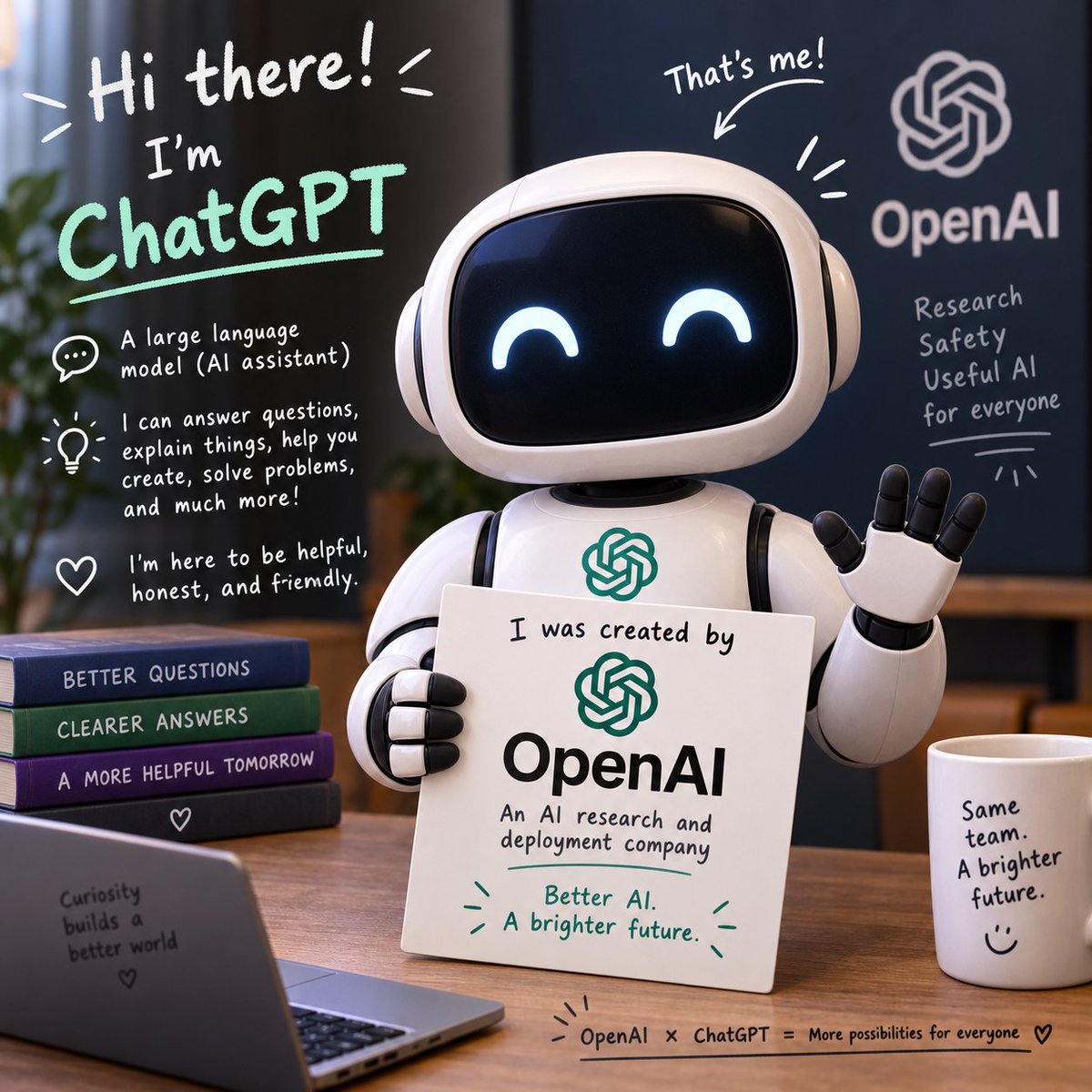
Friendly ChatGPT Robot Intro Scene
A square illustrated promo scene showing a cute ChatGPT robot explaining its OpenAI origin with friendly handwritten annotations.
Dit is een voorbeeld van een GPT Image 2 prompt voor Illustratie & Kunst . Gebruik de onderstaande kant-en-klare prompt om vergelijkbare afbeeldingen te genereren en controleer de Awesome GPT Image 2 Prompts en de rechten voor commercieel gebruik voordat u de afbeeldingen hergebruikt.
Heb je de volledige set prompts nodig? Gebruik dan de Illustratie & Kunst Ga naar het themacentrum voor meer gerelateerde voorbeelden, of open de GPT Image 2 prompt catalogus Voor de volledige voorbeeldenindex, herbruikbare structuren en bronvermelding.
Free 1K preview
Generate one preview image instantly, no sign-up required.
2997/4000
Snel
Schrijfklare prompt
Goal: Create a square, polished 3D promotional illustration introducing {argument name="character name" default="ChatGPT"} as a friendly AI assistant made by {argument name="company name" default="OpenAI"}.

Canvas: 1:1 square image, warm indoor office setting, shallow depth of field, soft cinematic lighting, realistic 3D toy-like render with handwritten whiteboard-style annotations overlaid on the scene.

Main subject: Center-right is a cute glossy white robot assistant with a rounded rectangular black screen face, glowing happy crescent eyes, rounded ear-like side pods, segmented arms, and a small OpenAI knot logo on its chest. The robot is waving with its right hand and holding a white placard with its left hand. The placard reads: “I was created by” above a green OpenAI logo, then “OpenAI” in large black type, then “An AI research and deployment company,” and at the bottom in green: “Better AI. A brighter future.” with small decorative emphasis marks.

Layout and objects: Place the robot behind a wooden desk. Include exactly 4 stacked books on the left side of the desk, labeled from top to bottom: “BETTER QUESTIONS,” “CLEARER ANSWERS,” “A MORE HELPFUL TOMORROW,” and a bottom dark book with a small heart icon. In the lower-left foreground, include an open laptop angled toward the viewer with text on its back: “Curiosity builds a better world” plus a small heart. On the right side of the desk, include 1 white coffee mug labeled: “Same team. A brighter future.” with a simple smiley face. Along the bottom edge of the desk, add a small handwritten caption: “OpenAI × ChatGPT = More possibilities for everyone” followed by a heart.

Background: Use a dark navy wall or board on the right with a large white OpenAI knot logo and the word “OpenAI.” Under it, handwritten text reads exactly 4 lines: “Research,” “Safety,” “Useful AI,” “for everyone,” with a small underline and decorative rays. Add a blurred plant on the far left and warm office furniture in the background.

Handwritten annotation overlays: Include a large top-left greeting in white: “Hi there!” with energetic lines. Below it, write “I’m” and then {argument name="headline text" default="ChatGPT"} in large mint-green handwritten letters with an underline. Add exactly 3 explanatory icon callouts down the left side: 1 speech bubble icon with “A large language model (AI assistant)”; 1 lightbulb icon with “I can answer questions, explain things, help you create, solve problems, and much more!”; 1 heart icon with “I’m here to be helpful, honest, and friendly.” Above the robot’s head, add “That’s me!” with an arrow pointing to the robot and a few emphasis strokes.

Visual style: friendly, optimistic, clean tech branding, rounded forms, glossy materials, white and mint-green marker typography, warm wood tones, deep blue background, professional but playful. Keep the OpenAI branding readable, preserve the exact text above, avoid extra logos, avoid misspelled words, and keep all typography legible.
Vraagvariabelen
Bewerkbare argumentplaceholders in de prompt, met hun standaardwaarden.
Variabele
character name
Standaard
ChatGPT
Variabele
company name
Standaard
OpenAI
Variabele
headline text
Standaard
ChatGPT
Best for
- - Illustratie & Kunst visual exploration
- - Image generation and reference-image edits
- - Reusable briefs that keep source attribution visible
Change these parts
- - Subject, product, character, or scene
- - Aspect ratio, camera, lighting, and background
- - Brand, text, color, and output constraints
Recommended model and settings
- - Model: gpt-image-2
- - Input mode: Tekst naar afbeelding
- - Aspect ratio: source
- - Commercial status: review original source
How to use this prompt
- 1. Copy the prompt and preserve its structure for the first test.
- 2. Replace the subject, context, and publishing channel.
- 3. Change one camera, lighting, or style variable per iteration.
- 4. Inspect the output, source, text, and rights before reuse.
Limitations, source, and reuse cautions
- - Generated output is an editable draft, not factual, legal, or rights evidence.
- - Review the linked source, people, brands, logos, text, and third-party media before commercial use.
Geïmporteerd van Awesome GPT Image 2 Prompts . Naamsvermelding is vereist. Commercieel gebruik is toegestaan volgens de status allowed ; controleer de rechten van de bron voordat u het tegen betaling gebruikt.
Meer gevallen in deze categorie
Geprioriteerd op basis van categorie, compatibiliteit met invoermodus, kwaliteit en lager risico.

Cute Focus Desk Flat Lay and Kawaii Illustration
Tekst naar afbeelding

Boisterous Shrimpers Entering Pub
Tekst naar afbeelding

Tuxedo Cat Photo and Line Art Diptych
Tekst naar afbeelding

Street Selfie with Cat in Matching Cap
Tekst naar afbeelding

Gray Denim Lace-Up Top Prompt for GPT Image 2
Tekst naar afbeelding

Morning Bed Stretching Legs Prompt
Tekst naar afbeelding
Hergebruik en bronvermeldingen
Gebruik deze prompt veilig nadat u de casus hebt bekeken.
- 1.Kopieer de prompt of open deze direct in Dovoo met de knop 'Genereren'.
- 2.Pas de variabelen, beeldverhouding en referentieafbeeldingen aan uw eigen toepassing aan.
- 3.Controleer vóór publicatie of betaald gebruik de auteursrechten, de vereisten voor naamsvermelding en de risico's met betrekking tot merk of beeltenis.