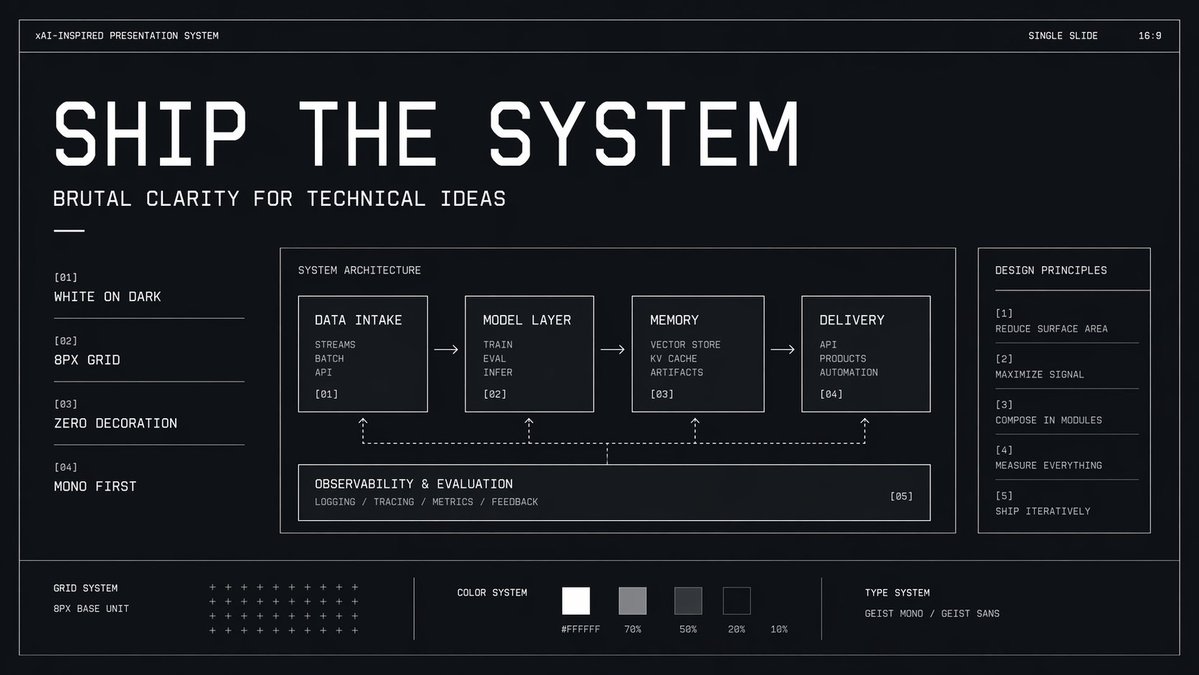
Brutalistisch technisch systeem dia
Een monochrome, futuristische presentatieslide voor product-, AI- of technische presentaties die de architectuur, principes en fundamenten van ontwerpsystemen laat zien.
Dit is een voorbeeld van een GPT Image 2 prompt voor Grafisch ontwerp & poster . Gebruik de onderstaande kant-en-klare prompt om vergelijkbare afbeeldingen te genereren en controleer de Awesome GPT Image 2 Prompts en de rechten voor commercieel gebruik voordat u de afbeeldingen hergebruikt.
Heb je de volledige set prompts nodig? Gebruik dan de Grafisch ontwerp & poster Ga naar het themacentrum voor meer gerelateerde voorbeelden, of open de GPT Image 2 prompt catalogus Voor de volledige voorbeeldenindex, herbruikbare structuren en bronvermelding.
Free 1K preview
Generate one preview image instantly, no sign-up required.
4000/4000
Snel
Schrijfklare prompt
{
  "type": "minimal monochrome presentation slide",
  "style": "high-contrast brutalist technical design, black background with subtle navy tint, thin white wireframe borders, zero decoration, strict grid, mono-first typography, futuristic industrial UI aesthetic",
  "canvas": {
    "aspect_ratio": "16:9",
    "background": "near-black with faint blue undertone and slight vignette"
  },
  "headline": {
    "text": "{argument name=\"headline text\" default=\"SHIP THE SYSTEM\"}",
    "position": "upper left",
    "style": "very large condensed geometric techno sans in white, all caps, widely tracked, dominant hero title"
  },
  "subheadline": {
    "text": "{argument name=\"subheadline text\" default=\"BRUTAL CLARITY FOR TECHNICAL IDEAS\"}",
    "position": "below headline",
    "style": "medium white monospace or mono-inspired sans, all caps"
  },
  "top_bar": {
    "count": 3,
    "items": [
      {
        "text": "xAI-INSPIRED PRESENTATION SYSTEM",
        "position": "upper left"
      },
      {
        "text": "SINGLE SLIDE",
        "position": "top right"
      },
      {
        "text": "16:9",
        "position": "far top right"
      }
    ]
  },
  "layout": {
    "outer_frame": true,
    "sections": [
      {
        "title": "left principles list",
        "position": "left column",
        "count": 4,
        "labels": [
          "[01] WHITE ON DARK",
          "[02] 8PX GRID",
          "[03] ZERO DECORATION",
          "[04] MONO FIRST"
        ]
      },
      {
        "title": "SYSTEM ARCHITECTURE",
        "position": "center large panel",
        "count": 5,
        "labels": [
          "DATA INTAKE",
          "MODEL LAYER",
          "MEMORY",
          "DELIVERY",
          "OBSERVABILITY & EVALUATION"
        ]
      },
      {
        "title": "DESIGN PRINCIPLES",
        "position": "right sidebar panel",
        "count": 5,
        "labels": [
          "[1] REDUCE SURFACE AREA",
          "[2] MAXIMIZE SIGNAL",
          "[3] COMPOSE IN MODULES",
          "[4] MEASURE EVERYTHING",
          "[5] SHIP ITERATIVELY"
        ]
      },
      {
        "title": "bottom system strip",
        "position": "bottom full width",
        "count": 3,
        "labels": [
          "GRID SYSTEM",
          "COLOR SYSTEM",
          "TYPE SYSTEM"
        ]
      }
    ]
  },
  "center_panel": {
    "bordered": true,
    "title": "SYSTEM ARCHITECTURE",
    "flow": {
      "count": 4,
      "boxes": [
        {
          "title": "DATA INTAKE",
          "index": "[01]",
          "lines": [
            "STREAMS",
            "BATCH",
            "API"
          ]
        },
        {
          "title": "MODEL LAYER",
          "index": "[02]",
          "lines": [
            "TRAIN",
            "EVAL",
            "INFER"
          ]
        },
        {
          "title": "MEMORY",
          "index": "[03]",
          "lines": [
            "VECTOR STORE",
            "KV CACHE",
            "ARTIFACTS"
          ]
        },
        {
          "title": "DELIVERY",
          "index": "[04]",
          "lines": [
            "API",
            "PRODUCTS",
            "AUTOMATION"
          ]
        }
      ],
      "connectors": "3 right-pointing arrows between the 4 top boxes"
    },
    "bottom_module": {
      "title": "OBSERVABILITY & EVALUATION",
      "index": "[05]",
      "lines": [
        "LOGGING / TRACING / METRICS / FEEDBACK"
      ],
      "connectors": "dashed feedback line spanning beneath the 4 boxes with 4 upward dotted arrows linking back into each top box"
    }
  },
  "bottom_strip": {
    "left_block": {
      "title": "GRID SYSTEM",
      "subtitle": "8PX BASE UNIT",
      "visual": "dense matrix of small white plus signs arranged in rows"
    },
    "middle_block": {
      "title": "COLOR SYSTEM",
      "swatch_count": 5,
      "swatches": [
        "#FFFFFF",
        "70%",
        "50%",
        "20%",
        "10%"
      ],
      "visual": "five grayscale square swatches from white to very dark gray"
    },
    "right_block": {
      "title": "TYPE SYSTEM",
      "text": "{argument name=\"type label\" default=\"GEIST MONO / GEIST SANS\"}"
    }
  },
  "composition": "clean generous spacing, all elements aligned to an 8px grid, mostly left-aligned text, thin divider lines, no photos, no gradients except extremely subtle background depth, technical pitch-deck cover slide look",
  "rendering": "crisp vector presentation mockup, ultra-sharp typography, polished design system board"
}
Vraagvariabelen
Bewerkbare argumentplaceholders in de prompt, met hun standaardwaarden.
Variabele
headline text
Standaard
SHIP THE SYSTEM
Variabele
subheadline text
Standaard
BRUTAL CLARITY FOR TECHNICAL IDEAS
Variabele
type label
Standaard
GEIST MONO / GEIST SANS
Best for
- - Grafisch ontwerp & poster visual exploration
- - Image generation and reference-image edits
- - Reusable briefs that keep source attribution visible
Change these parts
- - Subject, product, character, or scene
- - Aspect ratio, camera, lighting, and background
- - Brand, text, color, and output constraints
Recommended model and settings
- - Model: gpt-image-2
- - Input mode: Tekst naar afbeelding
- - Aspect ratio: source
- - Commercial status: review original source
How to use this prompt
- 1. Copy the prompt and preserve its structure for the first test.
- 2. Replace the subject, context, and publishing channel.
- 3. Change one camera, lighting, or style variable per iteration.
- 4. Inspect the output, source, text, and rights before reuse.
Limitations, source, and reuse cautions
- - Generated output is an editable draft, not factual, legal, or rights evidence.
- - Review the linked source, people, brands, logos, text, and third-party media before commercial use.
Geïmporteerd van Awesome GPT Image 2 Prompts . Naamsvermelding is vereist. Commercieel gebruik is toegestaan volgens de status allowed ; controleer de rechten van de bron voordat u het tegen betaling gebruikt.
Meer gevallen in deze categorie
Geprioriteerd op basis van categorie, compatibiliteit met invoermodus, kwaliteit en lager risico.

Surreal 3D Chess Match Artwork
Tekst naar afbeelding

Female Clown Cyborg Portrait
Tekst naar afbeelding

Imperial Research Bunker on Volcanic Planet
Tekst naar afbeelding

Android Quantum Lab Workstation
Tekst naar afbeelding

Transparent Earbuds on Stone Pedestal
Tekst naar afbeelding

Wet Transparent Earbud Macro
Tekst naar afbeelding
Hergebruik en bronvermeldingen
Gebruik deze prompt veilig nadat u de casus hebt bekeken.
- 1.Kopieer de prompt of open deze direct in Dovoo met de knop 'Genereren'.
- 2.Pas de variabelen, beeldverhouding en referentieafbeeldingen aan uw eigen toepassing aan.
- 3.Controleer vóór publicatie of betaald gebruik de auteursrechten, de vereisten voor naamsvermelding en de risico's met betrekking tot merk of beeltenis.