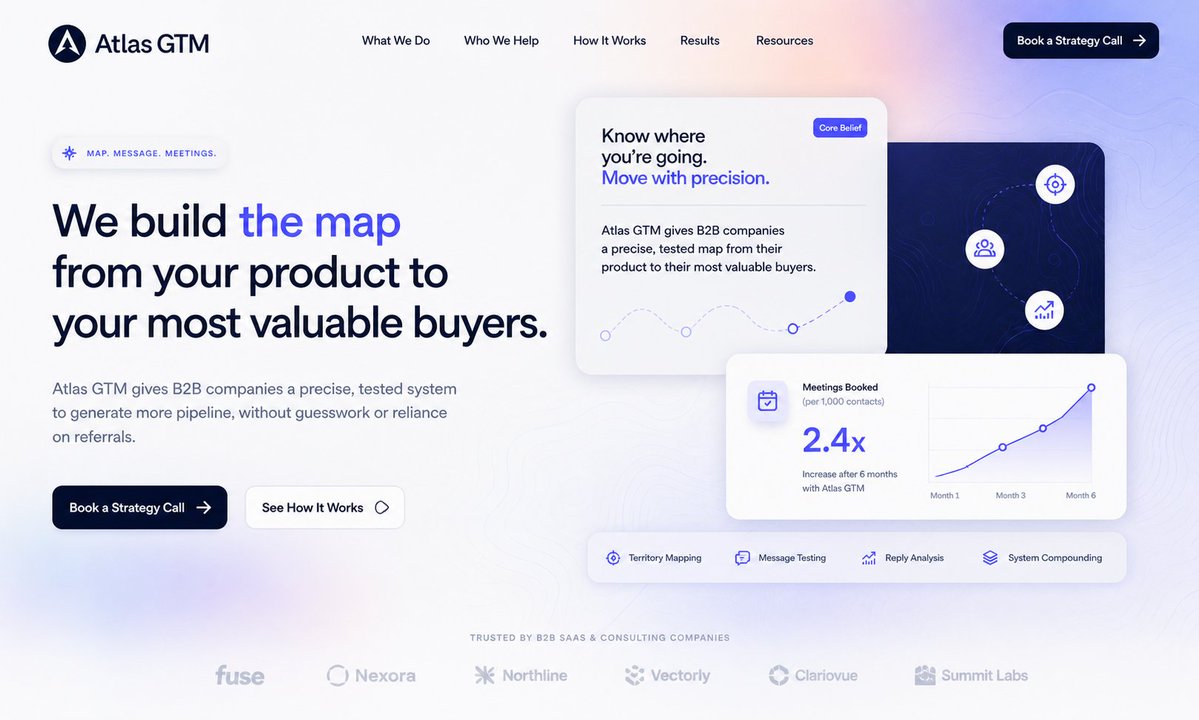
Atlas GTM SaaS Hero landingspagina
Genereert een professionele hero-sectie voor de B2B SaaS-homepage met navigatie, conversiegerichte teksten, analysekaarten, een functiebalk en logo's van het merk.
Dit is een voorbeeld van een GPT Image 2 prompt voor Andere inspiratie . Gebruik de onderstaande kant-en-klare prompt om vergelijkbare afbeeldingen te genereren en controleer de Awesome GPT Image 2 Prompts en de rechten voor commercieel gebruik voordat u de afbeeldingen hergebruikt.
Heb je de volledige set prompts nodig? Gebruik dan de Andere inspiratie Ga naar het themacentrum voor meer gerelateerde voorbeelden, of open de GPT Image 2 prompt catalogus Voor de volledige voorbeeldenindex, herbruikbare structuren en bronvermelding.
Free 1K preview
Generate one preview image instantly, no sign-up required.
3874/4000
Snel
Schrijfklare prompt
{
  "type": "modern B2B SaaS landing page hero design",
  "brand": {
    "name": "{argument name=\"company name\" default=\"Atlas GTM\"}",
    "logo": "dark navy circular mark with a white abstract compass/letter A icon",
    "visual_style": "premium, minimal, conversion-focused, soft white background with pale lavender and peach gradient glow, subtle topographic contour lines, rounded glassmorphism cards, deep navy typography, electric blue accent color"
  },
  "layout": {
    "canvas": "wide desktop website screenshot, 16:9 aspect ratio, generous whitespace, polished Figma-style web design",
    "header": {
      "position": "top",
      "count": 6,
      "items": [
        "logo and Atlas GTM wordmark on the left",
        "What We Do",
        "Who We Help",
        "How It Works",
        "Results",
        "Resources"
      ],
      "cta": "Book a Strategy Call with right arrow, dark navy rounded pill button at top right"
    },
    "hero_left": {
      "position": "left half",
      "eyebrow": "MAP. MESSAGE. MEETINGS.",
      "headline": "{argument name=\"headline text\" default=\"We build the map from your product to your most valuable buyers.\"}",
      "headline_treatment": "large bold dark navy sans serif, with the words 'the map' highlighted in vivid blue",
      "body": "{argument name=\"body text\" default=\"Atlas GTM gives B2B companies a precise, tested system to generate more pipeline, without guesswork or reliance on referrals.\"}",
      "buttons": {
        "count": 2,
        "items": [
          "Book a Strategy Call, dark navy filled button with arrow",
          "See How It Works, white outlined button with small diamond icon"
        ]
      }
    },
    "hero_right": {
      "position": "right half",
      "card_count": 4,
      "cards": [
        {
          "description": "large white core belief card near upper center",
          "text": "Know where you’re going. Move with precision.",
          "badge": "Core Belief",
          "graphic": "dotted curved path with small circular nodes and one filled blue endpoint"
        },
        {
          "description": "dark navy map panel behind the cards on the right",
          "icons_count": 3,
          "icons": [
            "target/crosshair icon",
            "audience/group icon",
            "growth chart icon"
          ],
          "graphic": "subtle contour map lines and dotted route"
        },
        {
          "description": "white analytics card in front lower right",
          "metric": "2.4x",
          "title": "Meetings Booked",
          "subtitle": "(per 1,000 contacts)",
          "caption": "Increase after 6 months with Atlas GTM",
          "chart": "blue rising line chart labeled Month 1, Month 3, Month 6"
        },
        {
          "description": "horizontal feature strip below analytics card",
          "feature_count": 4,
          "features": [
            "Territory Mapping",
            "Message Testing",
            "Reply Analysis",
            "System Compounding"
          ]
        }
      ]
    },
    "trust_bar": {
      "position": "bottom center",
      "heading": "TRUSTED BY B2B SAAS & CONSULTING COMPANIES",
      "logo_count": 6,
      "logos": [
        "fuse",
        "Nexora",
        "Northline",
        "Vectorly",
        "Clariovue",
        "Summit Labs"
      ]
    }
  },
  "typography": {
    "font": "clean modern sans serif similar to Inter or Satoshi",
    "colors": "dark navy, muted slate gray, bright royal blue, soft lavender"
  },
  "rendering_instructions": "Create a high-fidelity SaaS website landing page mockup, not a browser frame. Keep text crisp and readable, align elements precisely to a grid, use soft shadows, rounded corners, subtle blur, and a premium venture-backed startup aesthetic. The overall feeling should be strategic, precise, trustworthy, and modern."
}
Vraagvariabelen
Bewerkbare argumentplaceholders in de prompt, met hun standaardwaarden.
Variabele
company name
Standaard
Atlas GTM
Variabele
headline text
Standaard
We build the map from your product to your most valuable buyers.
Variabele
body text
Standaard
Atlas GTM gives B2B companies a precise, tested system to generate more pipeline, without guesswork or reliance on referrals.
Best for
- - Andere inspiratie visual exploration
- - Image generation and reference-image edits
- - Reusable briefs that keep source attribution visible
Change these parts
- - Subject, product, character, or scene
- - Aspect ratio, camera, lighting, and background
- - Brand, text, color, and output constraints
Recommended model and settings
- - Model: gpt-image-2
- - Input mode: Tekst naar afbeelding
- - Aspect ratio: source
- - Commercial status: review original source
How to use this prompt
- 1. Copy the prompt and preserve its structure for the first test.
- 2. Replace the subject, context, and publishing channel.
- 3. Change one camera, lighting, or style variable per iteration.
- 4. Inspect the output, source, text, and rights before reuse.
Limitations, source, and reuse cautions
- - Generated output is an editable draft, not factual, legal, or rights evidence.
- - Review the linked source, people, brands, logos, text, and third-party media before commercial use.
Geïmporteerd van Awesome GPT Image 2 Prompts . Naamsvermelding is vereist. Commercieel gebruik is toegestaan volgens de status allowed ; controleer de rechten van de bron voordat u het tegen betaling gebruikt.
Meer gevallen in deze categorie
Geprioriteerd op basis van categorie, compatibiliteit met invoermodus, kwaliteit en lager risico.

MotoGP POV Cornering Shot
Tekst naar afbeelding

Matte Black B.AI Keyboard Keycap
Tekst naar afbeelding

Luxury Travel Fashion Portrait Prompt
Tekst naar afbeelding

Autumn Cozy Casual Outfit Prompt
Tekst naar afbeelding

Studio Portrait of Woman with Sunglasses
Tekst naar afbeelding

Gray Denim Lace-Up Top Prompt for GPT Image 2
Tekst naar afbeelding
Hergebruik en bronvermeldingen
Gebruik deze prompt veilig nadat u de casus hebt bekeken.
- 1.Kopieer de prompt of open deze direct in Dovoo met de knop 'Genereren'.
- 2.Pas de variabelen, beeldverhouding en referentieafbeeldingen aan uw eigen toepassing aan.
- 3.Controleer vóór publicatie of betaald gebruik de auteursrechten, de vereisten voor naamsvermelding en de risico's met betrekking tot merk of beeltenis.