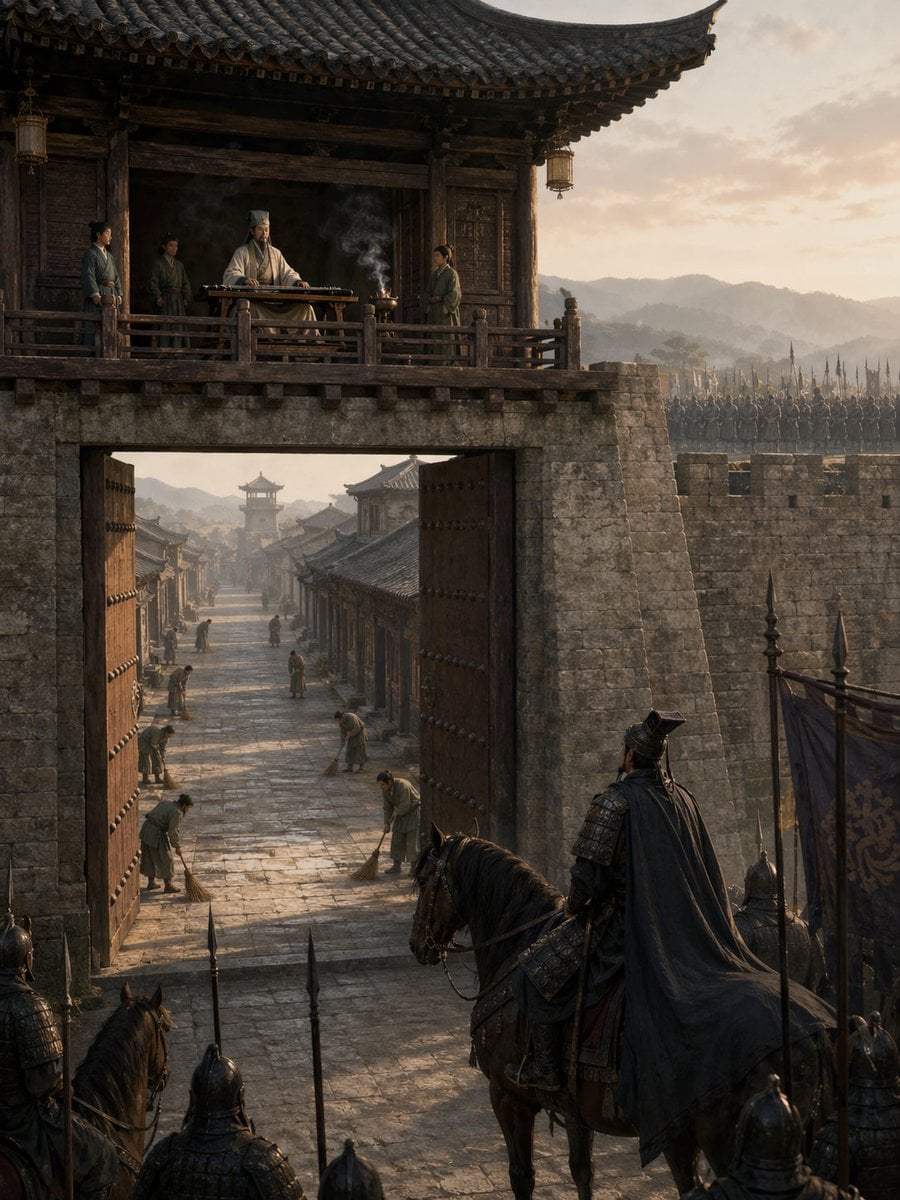
空城计
Source-attributed GPT Image 2 image prompt from the Awesome GPT Image 2 Prompts repository.
Dit is een voorbeeld van een GPT Image 2 prompt voor Landschap & Natuur . Gebruik de onderstaande kant-en-klare prompt om vergelijkbare afbeeldingen te genereren en controleer de Awesome GPT Image 2 Prompts en de rechten voor commercieel gebruik voordat u de afbeeldingen hergebruikt.
Heb je de volledige set prompts nodig? Gebruik dan de Landschap & Natuur Ga naar het themacentrum voor meer gerelateerde voorbeelden, of open de GPT Image 2 prompt catalogus Voor de volledige voorbeeldenindex, herbruikbare structuren en bronvermelding.
Free 1K preview
Generate one preview image instantly, no sign-up required.
369/4000
Snel
Schrijfklare prompt
一幅极具电影感的中国历史场景,描绘了黎明时分的“空城计”,视角从巨大的古代城门外望去。前景中,一位身披黑色斗篷的暗甲将军骑在马上,背影示人,他与几名持矛士兵及旗手停下脚步,疑虑地注视着敞开的城门。巨大的木质城门大开,露出城内长长的石板街道。城内清晰可见 6 名平民,他们正从容地扫着地,沿街道分布,营造出一种诡异的平静感。城门上方,在传统瓦顶城楼的木质露台上,一位身着白袍、头戴高冠的谋士正从容地坐在古琴桌后,桌上香炉升起缕缕青烟。露台上还有 3 名侍从环绕在他身边。城墙由古老的灰石砌成,背景中的城垛上排列着手持长矛的士兵。采用真实的三国时代建筑风格、风化的木材、层叠的瓦片、柔和的大地色调、清晨的金色暖光、远处的朦胧山峦、长长的阴影、大气层雾气、超精细纹理、极具戏剧性的纵向构图、史诗般的历史写实感、电影级取景,以及紧张而静谧的氛围。
Best for
- - Landschap & Natuur visual exploration
- - Image generation and reference-image edits
- - Reusable briefs that keep source attribution visible
Change these parts
- - Subject, product, character, or scene
- - Aspect ratio, camera, lighting, and background
- - Brand, text, color, and output constraints
Recommended model and settings
- - Model: gpt-image-2
- - Input mode: Tekst naar afbeelding
- - Aspect ratio: source
- - Commercial status: restricted
How to use this prompt
- 1. Copy the prompt and preserve its structure for the first test.
- 2. Replace the subject, context, and publishing channel.
- 3. Change one camera, lighting, or style variable per iteration.
- 4. Inspect the output, source, text, and rights before reuse.
Limitations, source, and reuse cautions
- - Generated output is an editable draft, not factual, legal, or rights evidence.
- - Review the linked source, people, brands, logos, text, and third-party media before commercial use.
Geïmporteerd van Awesome GPT Image 2 Prompts . Naamsvermelding is vereist. Commercieel gebruik is toegestaan volgens de status allowed ; controleer de rechten van de bron voordat u het tegen betaling gebruikt.
Meer gevallen in deze categorie
Geprioriteerd op basis van categorie, compatibiliteit met invoermodus, kwaliteit en lager risico.

MotoGP POV Cornering Shot
Tekst naar afbeelding

Street Selfie with Cat in Matching Cap
Tekst naar afbeelding

Hiker in Red Jacket
Tekst naar afbeelding

Orange Rooftop Fashion Photo Prompt
Tekst naar afbeelding

GPT Image 2 Real-Life Character Street Snap
Tekst naar afbeelding

Luxury Travel Fashion Portrait Prompt
Tekst naar afbeelding
Hergebruik en bronvermeldingen
Gebruik deze prompt veilig nadat u de casus hebt bekeken.
- 1.Kopieer de prompt of open deze direct in Dovoo met de knop 'Genereren'.
- 2.Pas de variabelen, beeldverhouding en referentieafbeeldingen aan uw eigen toepassing aan.
- 3.Controleer vóór publicatie of betaald gebruik de auteursrechten, de vereisten voor naamsvermelding en de risico's met betrekking tot merk of beeltenis.