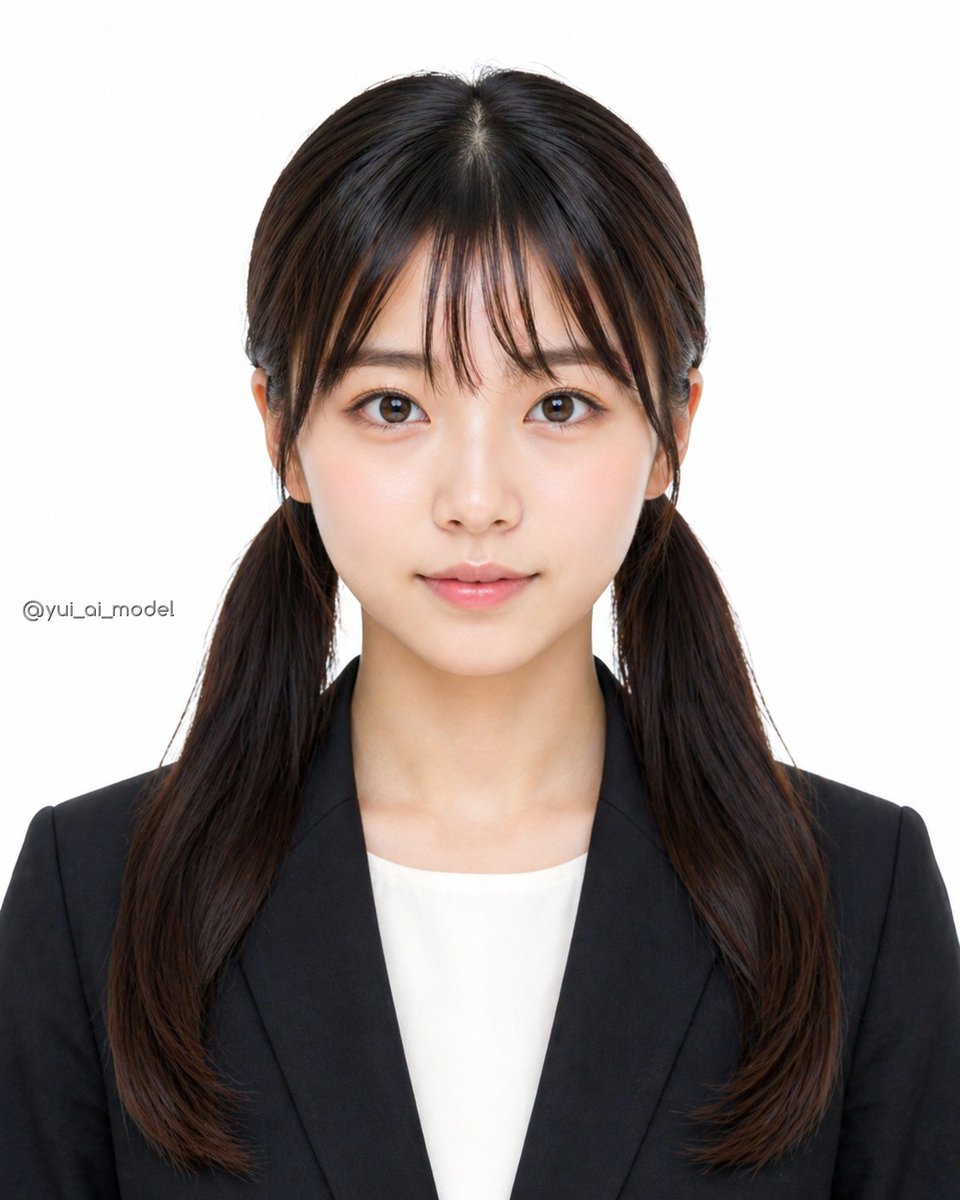
Geanonimiseerde zakelijke portretfoto
Deze prompt genereert een realistisch studioportret van een professioneel geklede vrouw met een onscherp gezicht, geschikt voor geanonimiseerde profielfoto's, identiteitsbewijzen of nep-cv's.
Dit is een voorbeeld van een GPT Image 2 prompt voor Portret & Karakter . Gebruik de onderstaande kant-en-klare prompt om vergelijkbare afbeeldingen te genereren en controleer de Awesome GPT Image 2 Prompts en de rechten voor commercieel gebruik voordat u de afbeeldingen hergebruikt.
Heb je de volledige set prompts nodig? Gebruik dan de Portret & Karakter Ga naar het themacentrum voor meer gerelateerde voorbeelden, of open de GPT Image 2 prompt catalogus Voor de volledige voorbeeldenindex, herbruikbare structuren en bronvermelding.
Free 1K preview
Generate one preview image instantly, no sign-up required.
1161/4000
Snel
Schrijfklare prompt
A clean studio-style ID photo of a young East Asian woman from the chest up, centered and facing straight toward the camera against a plain light gray-white background. She has {argument name="hair color" default="dark brown"} hair parted precisely in the middle and tied into 2 low pigtails hanging over both shoulders, with smooth straight roots and slightly softly curled ends. She wears a {argument name="blazer color" default="black"} tailored business blazer over a {argument name="top color" default="white"} crew-neck blouse, creating a formal job-application or passport-photo look. The composition is symmetrical, evenly lit with soft diffused studio lighting, realistic skin texture, natural color grading, sharp focus, and a minimal professional headshot aesthetic. Frame vertically in a portrait orientation with the top of the head fully visible and the upper torso included. Place a small subtle watermark-like text on the left side reading {argument name="watermark text" default="@yui_ai_model"}. Cover the entire face area from forehead to chin with a large centered rectangular blur block in a beige-brown tone, as if anonymizing the subject.Vraagvariabelen
Bewerkbare argumentplaceholders in de prompt, met hun standaardwaarden.
Variabele
hair color
Standaard
dark brown
Variabele
blazer color
Standaard
black
Variabele
top color
Standaard
white
Variabele
watermark text
Standaard
@yui_ai_model
Best for
- - Portret & Karakter visual exploration
- - Image generation and reference-image edits
- - Reusable briefs that keep source attribution visible
Change these parts
- - Subject, product, character, or scene
- - Aspect ratio, camera, lighting, and background
- - Brand, text, color, and output constraints
Recommended model and settings
- - Model: gpt-image-2
- - Input mode: Tekst naar afbeelding
- - Aspect ratio: source
- - Commercial status: review original source
How to use this prompt
- 1. Copy the prompt and preserve its structure for the first test.
- 2. Replace the subject, context, and publishing channel.
- 3. Change one camera, lighting, or style variable per iteration.
- 4. Inspect the output, source, text, and rights before reuse.
Limitations, source, and reuse cautions
- - Generated output is an editable draft, not factual, legal, or rights evidence.
- - Review the linked source, people, brands, logos, text, and third-party media before commercial use.
Geïmporteerd van Awesome GPT Image 2 Prompts . Naamsvermelding is vereist. Commercieel gebruik is toegestaan volgens de status allowed ; controleer de rechten van de bron voordat u het tegen betaling gebruikt.
Meer gevallen in deze categorie
Geprioriteerd op basis van categorie, compatibiliteit met invoermodus, kwaliteit en lager risico.

Y2K Style Photo Booth Collage
Tekst naar afbeelding

Pink Hijab Mirror Selfie Portrait
Tekst naar afbeelding

Greyscale Puzzle Portrait with Color Accent
Tekst naar afbeelding

Glitch Aesthetic Surreal Portrait
Tekst naar afbeelding

Natural Face Realism Modifier
Tekst naar afbeelding

Asymmetrical Realistic Human Face
Tekst naar afbeelding
Hergebruik en bronvermeldingen
Gebruik deze prompt veilig nadat u de casus hebt bekeken.
- 1.Kopieer de prompt of open deze direct in Dovoo met de knop 'Genereren'.
- 2.Pas de variabelen, beeldverhouding en referentieafbeeldingen aan uw eigen toepassing aan.
- 3.Controleer vóór publicatie of betaald gebruik de auteursrechten, de vereisten voor naamsvermelding en de risico's met betrekking tot merk of beeltenis.