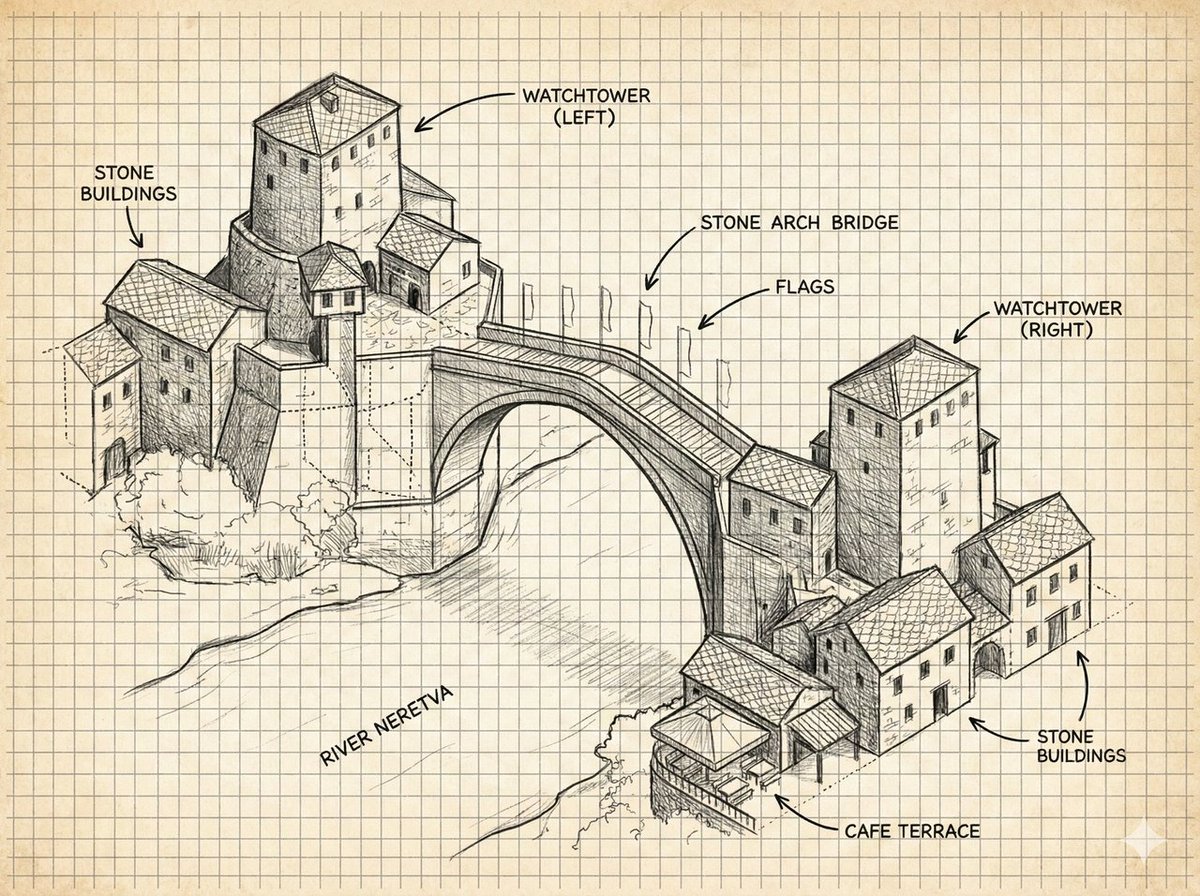
Schets van een stenen boogbrug met aantekeningen
Hiermee creëer je een gelabelde illustratie van een historische stenen boogbrug in een architectuurnotitieboekje, handig voor concepttekeningen, reisplattegronden of educatieve visuele referenties.
Dit is een voorbeeld van een GPT Image 2 prompt voor Illustratie & Kunst . Gebruik de onderstaande kant-en-klare prompt om vergelijkbare afbeeldingen te genereren en controleer de Awesome GPT Image 2 Prompts en de rechten voor commercieel gebruik voordat u de afbeeldingen hergebruikt.
Heb je de volledige set prompts nodig? Gebruik dan de Illustratie & Kunst Ga naar het themacentrum voor meer gerelateerde voorbeelden, of open de GPT Image 2 prompt catalogus Voor de volledige voorbeeldenindex, herbruikbare structuren en bronvermelding.
Free 1K preview
Generate one preview image instantly, no sign-up required.
3624/4000
Snel
Schrijfklare prompt
{
  "type": "annotated architectural concept sketch",
  "subject": "a hand-drawn isometric ink illustration of the historic Mostar-style stone arch bridge spanning a river, with clustered medieval stone buildings on both banks and two square watchtowers",
  "style": {
    "medium": "black graphite and technical pen linework",
    "look": "architectural field notebook, concept art, detailed hatching, crosshatching, visible construction lines, rough perspective guide marks",
    "paper": "aged cream graph paper with evenly spaced square grid, slightly yellowed background",
    "color": "monochrome black and gray ink only, no watercolor except subtle paper tone"
  },
  "scene": {
    "main landmark": "{argument name=\"bridge name\" default=\"stone arch bridge\"}",
    "river": "{argument name=\"river name\" default=\"River Neretva\"}",
    "architecture": "Balkan Ottoman-era stone buildings with tiled roofs, small rectangular windows, arched doorways, stacked hillside masonry, one cafe terrace at the lower right riverbank",
    "composition": "wide landscape canvas, three-quarter aerial isometric view, left village cluster higher on the page, right village cluster lower on the page, large single-span arch bridge centered diagonally across the river",
    "details": "arched bridge deck with parapets, flagpoles with small flags along the bridge, stone textures, roof tile patterns, riverbank vegetation scribbles, light shadows beneath the bridge"
  },
  "layout": {
    "labels": {
      "count": 8,
      "items": [
        {
          "text": "STONE BUILDINGS",
          "position": "top left",
          "points_to": "left cluster of stone houses"
        },
        {
          "text": "WATCHTOWER (LEFT)",
          "position": "top center-left",
          "points_to": "tall square tower above the left bank"
        },
        {
          "text": "stone arch bridge",
          "position": "upper center-right",
          "points_to": "main bridge span"
        },
        {
          "text": "FLAGS",
          "position": "upper right of bridge",
          "points_to": "row of flagpoles on bridge"
        },
        {
          "text": "WATCHTOWER (RIGHT)",
          "position": "top right",
          "points_to": "tall square tower on the right bank"
        },
        {
          "text": "STONE BUILDINGS",
          "position": "right middle",
          "points_to": "right cluster of stone houses"
        },
        {
          "text": "CAFE TERRACE",
          "position": "bottom right",
          "points_to": "small covered terrace by the river"
        },
        {
          "text": "River Neretva",
          "position": "lower left river area",
          "points_to": "river flowing under the bridge"
        }
      ]
    },
    "annotation_style": "uppercase sans-serif handwritten labels with curved arrow callouts, clean black lettering",
    "grid": "full-page visible square grid behind all drawing elements"
  },
  "text_parameters": {
    "left watchtower label": "{argument name=\"left tower label\" default=\"WATCHTOWER (LEFT)\"}",
    "right watchtower label": "{argument name=\"right tower label\" default=\"WATCHTOWER (RIGHT)\"}",
    "cafe label": "{argument name=\"cafe label\" default=\"CAFE TERRACE\"}"
  },
  "rendering_instructions": "Generate a precise but hand-sketched architectural diagram, not a photorealistic image. Keep the background clean and uncluttered, preserve the graph-paper notebook aesthetic, use strong line hierarchy for the bridge and buildings, lighter sketch lines for terrain and river flow, and make every label legible in English."
}
Vraagvariabelen
Bewerkbare argumentplaceholders in de prompt, met hun standaardwaarden.
Variabele
bridge name
Standaard
stone arch bridge
Variabele
river name
Standaard
River Neretva
Variabele
left tower label
Standaard
WATCHTOWER (LEFT)
Variabele
right tower label
Standaard
WATCHTOWER (RIGHT)
Variabele
cafe label
Standaard
CAFE TERRACE
Best for
- - Illustratie & Kunst visual exploration
- - Image generation and reference-image edits
- - Reusable briefs that keep source attribution visible
Change these parts
- - Subject, product, character, or scene
- - Aspect ratio, camera, lighting, and background
- - Brand, text, color, and output constraints
Recommended model and settings
- - Model: gpt-image-2
- - Input mode: Tekst naar afbeelding
- - Aspect ratio: source
- - Commercial status: review original source
How to use this prompt
- 1. Copy the prompt and preserve its structure for the first test.
- 2. Replace the subject, context, and publishing channel.
- 3. Change one camera, lighting, or style variable per iteration.
- 4. Inspect the output, source, text, and rights before reuse.
Limitations, source, and reuse cautions
- - Generated output is an editable draft, not factual, legal, or rights evidence.
- - Review the linked source, people, brands, logos, text, and third-party media before commercial use.
Geïmporteerd van Awesome GPT Image 2 Prompts . Naamsvermelding is vereist. Commercieel gebruik is toegestaan volgens de status allowed ; controleer de rechten van de bron voordat u het tegen betaling gebruikt.
Meer gevallen in deze categorie
Geprioriteerd op basis van categorie, compatibiliteit met invoermodus, kwaliteit en lager risico.

Boisterous Shrimpers Entering Pub
Tekst naar afbeelding

Tuxedo Cat Photo and Line Art Diptych
Tekst naar afbeelding

Cute Focus Desk Flat Lay and Kawaii Illustration
Tekst naar afbeelding

Anime Girl Heterochromia Portrait
Tekst naar afbeelding

Street Selfie with Cat in Matching Cap
Tekst naar afbeelding

Hell Hound Character Sheet Infographic
Tekst naar afbeelding
Hergebruik en bronvermeldingen
Gebruik deze prompt veilig nadat u de casus hebt bekeken.
- 1.Kopieer de prompt of open deze direct in Dovoo met de knop 'Genereren'.
- 2.Pas de variabelen, beeldverhouding en referentieafbeeldingen aan uw eigen toepassing aan.
- 3.Controleer vóór publicatie of betaald gebruik de auteursrechten, de vereisten voor naamsvermelding en de risico's met betrekking tot merk of beeltenis.