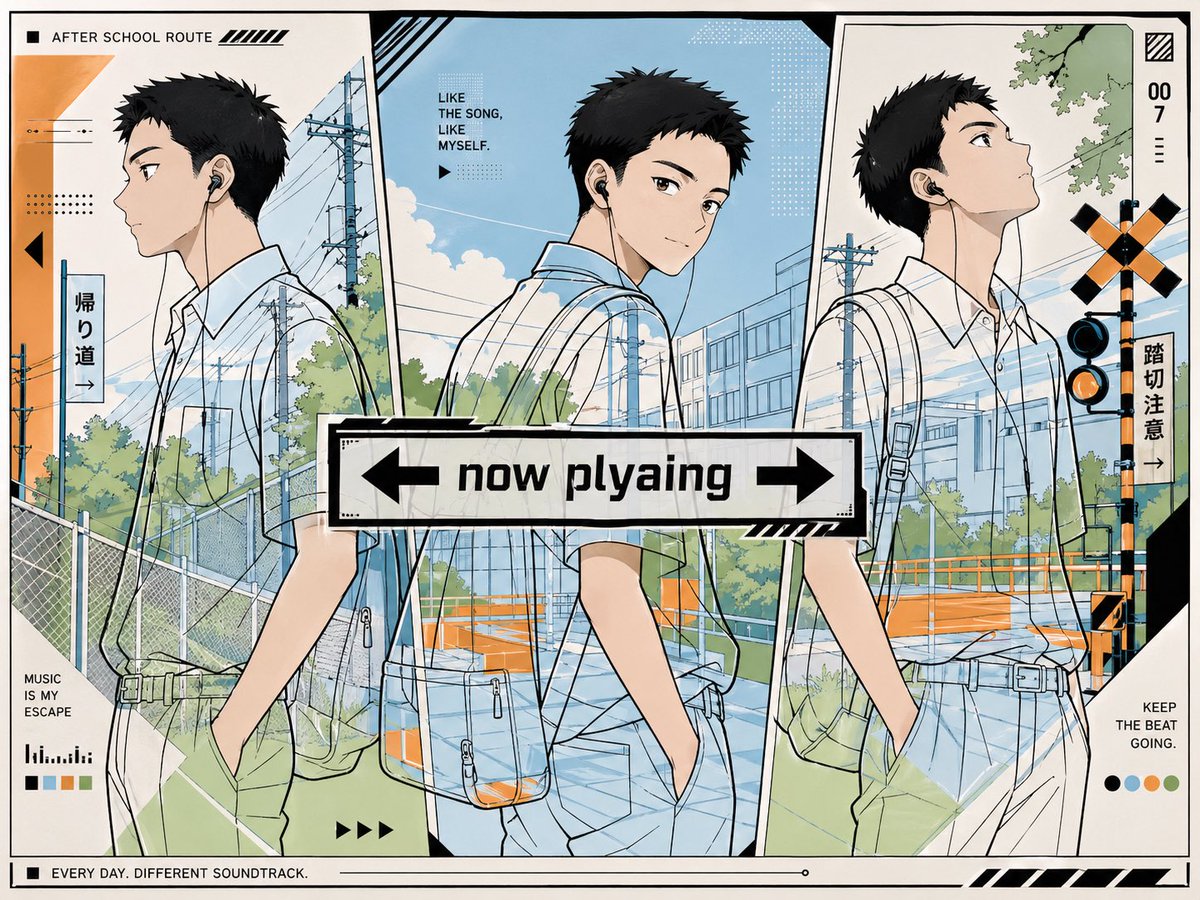
Anime nu te zien: School Route poster
Deze prompt genereert een stijlvolle animeposter van een schooljongen die met oordopjes naar huis loopt, in een redactionele lay-out met drie panelen, ideaal voor sociale media-berichten met een muziekthema of als coverafbeelding voor een afspeellijst.
Dit is een voorbeeld van een GPT Image 2 prompt voor Grafisch ontwerp & poster . Gebruik de onderstaande kant-en-klare prompt om vergelijkbare afbeeldingen te genereren en controleer de Awesome GPT Image 2 Prompts en de rechten voor commercieel gebruik voordat u de afbeeldingen hergebruikt.
Free 1K preview
Generate one preview image instantly, no sign-up required.
Snel
Schrijfklare prompt
A clean, graphic anime illustration poster in a modern Japanese pop-design style, showing a handsome high school boy commuting home while listening to music. The composition is split into 3 tall vertical panels with slightly angled borders, each panel showing the same boy from a different side profile or three-quarter side view as if walking through the same suburban route. He has {argument name="hair color" default="black"} short spiky hair, fair skin, a calm cool expression, wired earphones, and wears a white short-sleeve school shirt tucked into light blue-gray slacks with a belt. A semi-transparent crossbody bag with visible contents hangs at his side, and one hand is in his pocket in each pose. His face area is intentionally obscured by a soft square blur block in all 3 panels. The background is a bright summer after-school street scene in Japan with blue sky, white clouds, utility poles and power lines, chain-link fencing, green trees, a school building, a roadside path, and a railroad crossing signal. Use crisp line art, flat cel shading, pale blue and mint-green tones with black accents and small orange safety details. Overlay the whole image with stylish magazine-like typography, graphic stripes, dots, arrows, and signage. At the center, place a bold white rectangular sign with black border reading {argument name="center text" default="now playing"}, with a left arrow on the left and a right arrow on the right. Include visible English and Japanese text elements placed around the layout: top left "AFTER SCHOOL ROUTE", left vertical sign "帰り道→", upper middle text "LIKE THE SONG, LIKE MYSELF.", right vertical text "007 :::", right-side vertical sign "踏切注意→", bottom left "MUSIC IS MY ESCAPE", bottom right "KEEP THE BEAT GOING.", and bottom border text "EVERY DAY. DIFFERENT SOUNDTRACK." Add 4 small color dots at the lower right, 4 small rectangular color swatches at the lower left, and decorative black striping in multiple corners. The overall feel is stylish, youthful, urban, refreshing, and slightly editorial, like a playlist cover or social-media music post.Vraagvariabelen
Bewerkbare argumentplaceholders in de prompt, met hun standaardwaarden.
Best for
- - Grafisch ontwerp & poster visual exploration
- - Image generation and reference-image edits
- - Reusable briefs that keep source attribution visible
Change these parts
- - Subject, product, character, or scene
- - Aspect ratio, camera, lighting, and background
- - Brand, text, color, and output constraints
Recommended model and settings
- - Model: gpt-image-2
- - Input mode: Tekst naar afbeelding
- - Aspect ratio: source
- - Commercial status: review original source
How to use this prompt
- 1. Copy the prompt and preserve its structure for the first test.
- 2. Replace the subject, context, and publishing channel.
- 3. Change one camera, lighting, or style variable per iteration.
- 4. Inspect the output, source, text, and rights before reuse.
Limitations, source, and reuse cautions
- - Generated output is an editable draft, not factual, legal, or rights evidence.
- - Review the linked source, people, brands, logos, text, and third-party media before commercial use.
Meer gevallen in deze categorie
Geprioriteerd op basis van categorie, compatibiliteit met invoermodus, kwaliteit en lager risico.






Hergebruik en bronvermeldingen
Gebruik deze prompt veilig nadat u de casus hebt bekeken.
- 1.Kopieer de prompt of open deze direct in Dovoo met de knop 'Genereren'.
- 2.Pas de variabelen, beeldverhouding en referentieafbeeldingen aan uw eigen toepassing aan.
- 3.Controleer vóór publicatie of betaald gebruik de auteursrechten, de vereisten voor naamsvermelding en de risico's met betrekking tot merk of beeltenis.