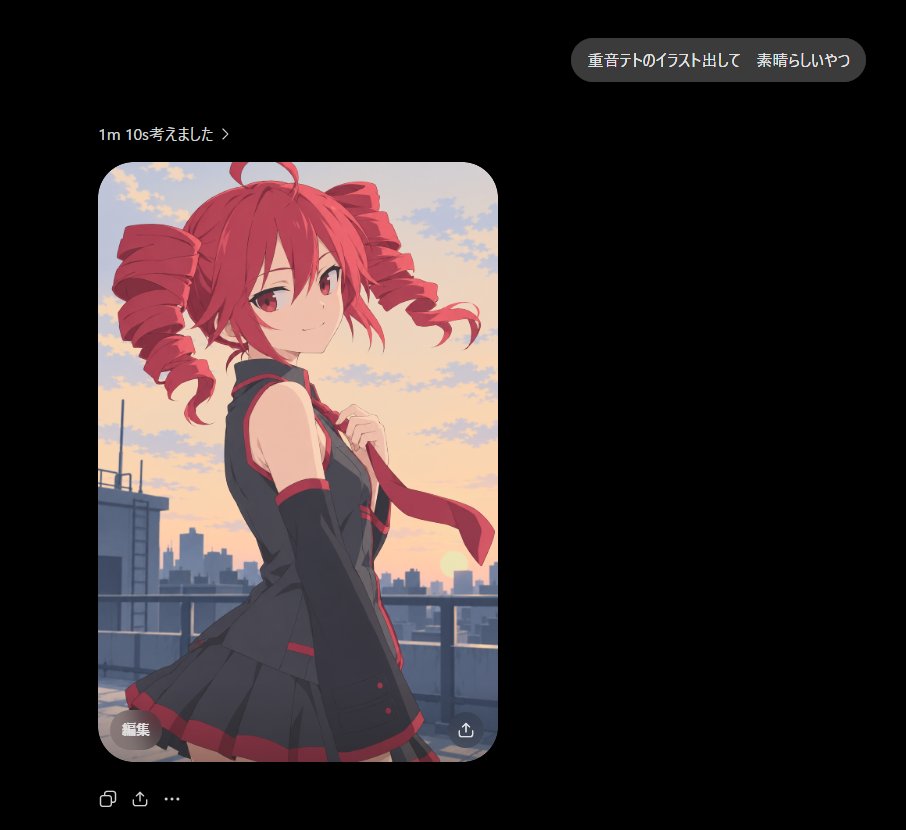
Dark Chat Anime Generation Screenshot
Creates a dark-mode AI chat screenshot featuring a generated anime illustration card of a red-haired character on a sunset rooftop.
Dit is een voorbeeld van een GPT Image 2 prompt voor Andere inspiratie . Gebruik de onderstaande kant-en-klare prompt om vergelijkbare afbeeldingen te genereren en controleer de Awesome GPT Image 2 Prompts en de rechten voor commercieel gebruik voordat u de afbeeldingen hergebruikt.
Heb je de volledige set prompts nodig? Gebruik dan de Andere inspiratie Ga naar het themacentrum voor meer gerelateerde voorbeelden, of open de GPT Image 2 prompt catalogus Voor de volledige voorbeeldenindex, herbruikbare structuren en bronvermelding.
Free 1K preview
Generate one preview image instantly, no sign-up required.
Free text preview doesn’t preserve reference-image consistency.
2459/4000
Snel
Schrijfklare prompt
Goal: Create a dark-mode chat/app screenshot showing an AI image generation result for {argument name="character name" default="Astra"}, with a polished anime illustration embedded in the conversation.

Canvas: Square 1:1 screenshot, approximately 920×920 px, black background, lots of negative space on the right and lower areas. Use a realistic mobile/desktop chat UI aesthetic with clean spacing and soft rounded elements.

Layout: Place 3 main UI elements: 1 rounded gray user message bubble near the upper right, 1 small generation status line above the image on the left, and 1 large rounded-corner image card below it on the left. Under the image card, add 3 small action icons in a row: copy icon, share/upload icon, and ellipsis menu. Inside the image card add 2 small overlay controls: a gray rounded “edit” pill at bottom left and a circular download/share icon at bottom right.

Text content: The user bubble must read exactly 「重音テトのイラスト出して 素晴らしいやつ」. The status line must read exactly 「1m 10s考えました ›」. The image overlay button must read exactly 「編集」. Keep all text crisp, white or light gray, in a modern sans-serif UI font.

Image card subject: A high-quality clean anime illustration of {argument name="anime character" default="Kasane Teto"}, shown from about mid-thigh up on a rooftop at sunset. She is a youthful anime girl with vivid {argument name="hair color" default="red"} hair in two large drill twin-tails, red eyes, a small confident smile, and a slight over-the-shoulder pose looking at the viewer. Outfit: black sleeveless school-idol style top with red trim, matching black pleated skirt with red accents, long black arm warmers, and a red necktie being held lightly in one hand. The wind lifts her tie and hair ribbons slightly.

Background inside image: Rooftop railing in the foreground, distant city skyline silhouettes, warm orange-pink sunset sky with scattered soft clouds and the sun low near the horizon. Lighting is soft and cinematic with smooth cel-shaded anime rendering, clean linework, subtle gradients, no gritty artifacts, no harsh malformed highlights, and no painterly blotches.

Visual style: The surrounding chat UI should look like a real screenshot in dark mode. The anime image should have rounded corners, about 400 px wide and 600 px tall, placed around x=98 y=162, with a 28 px corner radius. Keep the UI minimal and do not add extra messages, watermarks, timestamps, or labels beyond the specified text.
Vraagvariabelen
Bewerkbare argumentplaceholders in de prompt, met hun standaardwaarden.
Variabele
character name
Standaard
Astra
Variabele
anime character
Standaard
Kasane Teto
Variabele
hair color
Standaard
red
Best for
- - Andere inspiratie visual exploration
- - Image generation and reference-image edits
- - Reusable briefs that keep source attribution visible
Change these parts
- - Subject, product, character, or scene
- - Aspect ratio, camera, lighting, and background
- - Brand, text, color, and output constraints
Recommended model and settings
- - Model: gpt-image-2
- - Input mode: Afbeelding naar afbeelding
- - Aspect ratio: source
- - Commercial status: review original source
How to use this prompt
- 1. Copy the prompt and preserve its structure for the first test.
- 2. Replace the subject, context, and publishing channel.
- 3. Change one camera, lighting, or style variable per iteration.
- 4. Inspect the output, source, text, and rights before reuse.
Limitations, source, and reuse cautions
- - Generated output is an editable draft, not factual, legal, or rights evidence.
- - Review the linked source, people, brands, logos, text, and third-party media before commercial use.
Geïmporteerd van Awesome GPT Image 2 Prompts . Naamsvermelding is vereist. Commercieel gebruik is toegestaan volgens de status allowed ; controleer de rechten van de bron voordat u het tegen betaling gebruikt.
Meer gevallen in deze categorie
Geprioriteerd op basis van categorie, compatibiliteit met invoermodus, kwaliteit en lager risico.

Sci-Fi Cyan Lighting Effect
Afbeelding naar afbeelding

MotoGP POV Cornering Shot
Tekst naar afbeelding

Stylish Man Street Lamp Portrait
Afbeelding naar afbeelding

Oversized Head Cartoon Caricature Prompt
Afbeelding naar afbeeldingGemiddeld risico

Luxury Travel Fashion Portrait Prompt
Tekst naar afbeelding

Anime Girl Heterochromia Portrait
Tekst naar afbeelding
Hergebruik en bronvermeldingen
Gebruik deze prompt veilig nadat u de casus hebt bekeken.
- 1.Kopieer de prompt of open deze direct in Dovoo met de knop 'Genereren'.
- 2.Pas de variabelen, beeldverhouding en referentieafbeeldingen aan uw eigen toepassing aan.
- 3.Controleer vóór publicatie of betaald gebruik de auteursrechten, de vereisten voor naamsvermelding en de risico's met betrekking tot merk of beeltenis.