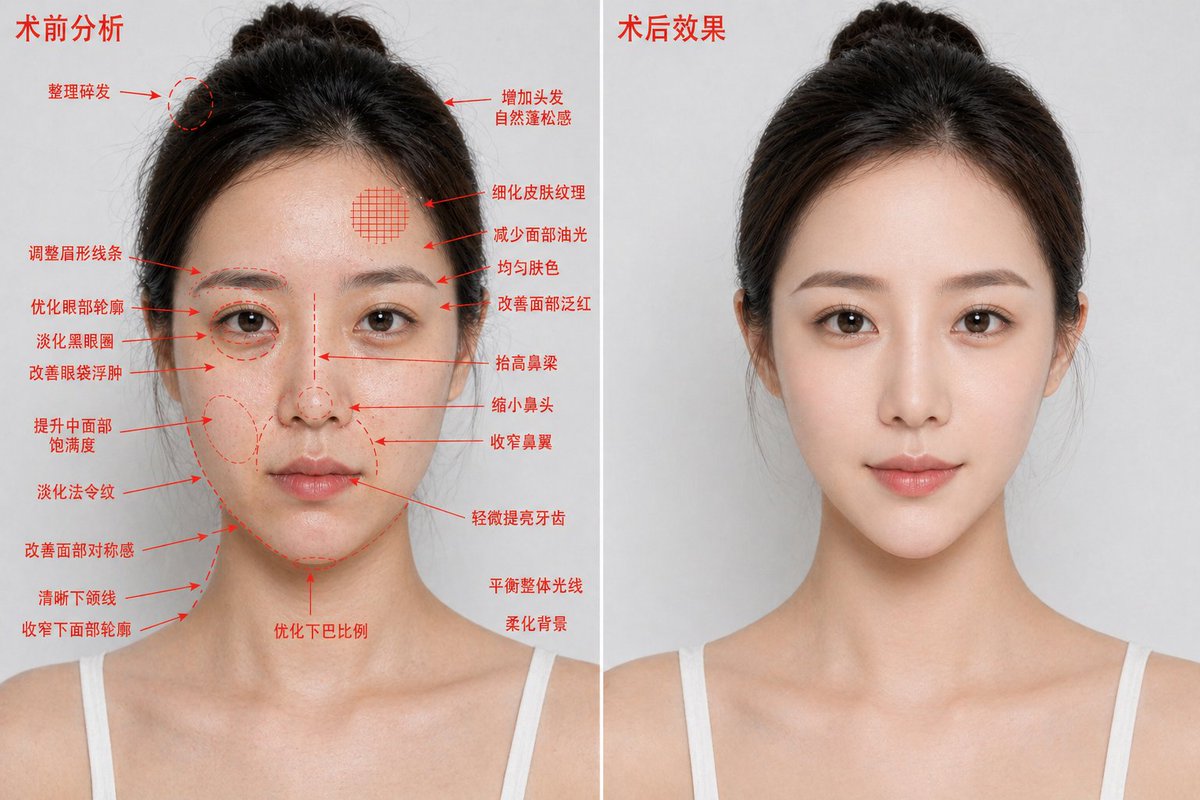
Poster met voor- en nafoto's van esthetische chirurgie
Deze prompt genereert een fotorealistische afbeelding met twee panelen ter vergelijking van cosmetische ingrepen, bedoeld voor reclamecampagnes voor medische schoonheidsbehandelingen of visualisaties van behandelingen.
Dit is een voorbeeld van een GPT Image 2 prompt voor Product & Commercieel . Gebruik de onderstaande kant-en-klare prompt om vergelijkbare afbeeldingen te genereren en controleer de Awesome GPT Image 2 Prompts en de rechten voor commercieel gebruik voordat u de afbeeldingen hergebruikt.
Heb je de volledige set prompts nodig? Gebruik dan de Product & Commercieel Ga naar het themacentrum voor meer gerelateerde voorbeelden, of open de GPT Image 2 prompt catalogus Voor de volledige voorbeeldenindex, herbruikbare structuren en bronvermelding.
Free 1K preview
Generate one preview image instantly, no sign-up required.
2685/4000
Snel
Schrijfklare prompt
{
  "type": "medical aesthetic before-and-after comparison poster",
  "style": "photorealistic high-definition cosmetic surgery analysis blueprint, premium clinic advertising look",
  "subject": {
    "gender_presentation": "female",
    "age_appearance": "young adult",
    "ethnicity": "East Asian",
    "pose": "front-facing bust portrait, shoulders visible, same angle and same neutral expression on both sides",
    "hair": {
      "color": "dark brown to black",
      "style": "center-parted hair pulled back into a loose bun with a few flyaways"
    },
    "clothing": "white thin-strap camisole",
    "identity_masking": "large rectangular mosaic blur covering the full face area in both panels"
  },
  "composition": {
    "aspect_ratio": "16:9 horizontal",
    "background": "clean light gray studio background",
    "divider": "1 vertical white dividing line centered between the two panels",
    "panels": [
      {
        "title": "Preoperative analysis",
        "position": "left",
        "count": 1,
        "image": "same woman with slightly rougher, shinier, less refined appearance",
        "annotations": {
          "color": "red",
          "count": 19,
          "items": [
            "Tidy up flyaway hairs",
            "Adjust eyebrow shape",
            "Optimize the eye contour",
            "Reduce dark circles",
            "Improve puffy eyes",
            "Enhance mid-face volume",
            "Diminish nasolabial folds",
            "Improve facial symmetry",
            "Define jawline",
            "Slim lower facial contour",
            "Add natural volume to hair",
            "Refine skin texture",
            "Reduce facial oiliness",
            "Evens skin tone",
            "Improve facial redness",
            "Raise the bridge of the nose",
            "Reduce the size of the nose",
            "Narrow the nostrils",
            "Slightly brighten teeth"
          ]
        },
        "extra_notes": {
          "count": 3,
          "items": [
            "Optimize chin proportions",
            "Balance overall lighting",
            "Soften background"
          ]
        }
      },
      {
        "title": "Post-operative effect",
        "position": "right",
        "count": 1,
        "image": "same woman, same lighting and same framing, but cleaner and more polished, smoother skin, subtly lifted features, more refined contour and nose, brighter overall complexion, no annotation arrows"
      }
    ]
  },
  "rendering": {
    "lighting": "soft even studio lighting",
    "detail_level": "sharp skin texture but naturally retouched",
    "camera": "85mm portrait lens look, straight-on, chest-up crop"
  }
}
Best for
- - Product & Commercieel visual exploration
- - Image generation and reference-image edits
- - Reusable briefs that keep source attribution visible
Change these parts
- - Subject, product, character, or scene
- - Aspect ratio, camera, lighting, and background
- - Brand, text, color, and output constraints
Recommended model and settings
- - Model: gpt-image-2
- - Input mode: Tekst naar afbeelding
- - Aspect ratio: source
- - Commercial status: review original source
How to use this prompt
- 1. Copy the prompt and preserve its structure for the first test.
- 2. Replace the subject, context, and publishing channel.
- 3. Change one camera, lighting, or style variable per iteration.
- 4. Inspect the output, source, text, and rights before reuse.
Limitations, source, and reuse cautions
- - Generated output is an editable draft, not factual, legal, or rights evidence.
- - Review the linked source, people, brands, logos, text, and third-party media before commercial use.
Geïmporteerd van Awesome GPT Image 2 Prompts . Naamsvermelding is vereist. Commercieel gebruik is toegestaan volgens de status allowed ; controleer de rechten van de bron voordat u het tegen betaling gebruikt.
Meer gevallen in deze categorie
Geprioriteerd op basis van categorie, compatibiliteit met invoermodus, kwaliteit en lager risico.

Overhead Pepperoni Pizza Photo
Tekst naar afbeelding

Transparent Earbuds on Stone Pedestal
Tekst naar afbeelding

Wet Transparent Earbud Macro
Tekst naar afbeelding

Fashion Studio Portrait with Blue Rim Lighting
Tekst naar afbeelding

Spring Editorial Fashion Collage
Tekst naar afbeelding

New Chinese-Style Editorial Portrait
Tekst naar afbeelding
Hergebruik en bronvermeldingen
Gebruik deze prompt veilig nadat u de casus hebt bekeken.
- 1.Kopieer de prompt of open deze direct in Dovoo met de knop 'Genereren'.
- 2.Pas de variabelen, beeldverhouding en referentieafbeeldingen aan uw eigen toepassing aan.
- 3.Controleer vóór publicatie of betaald gebruik de auteursrechten, de vereisten voor naamsvermelding en de risico's met betrekking tot merk of beeltenis.