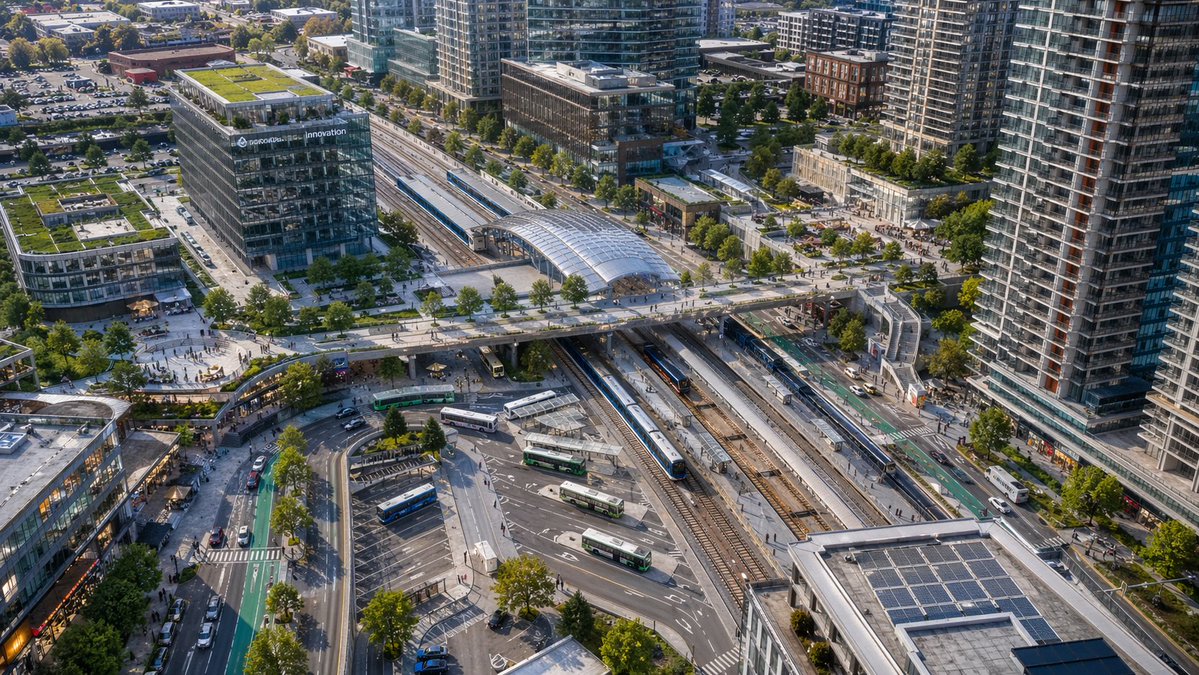
Luchtfoto van een modern openbaarvervoersknooppunt
Deze prompt genereert een realistische stadsvisualisatie vanuit vogelperspectief van een modern treinstation en busstation, ideaal voor stedenbouwkundige visualisaties, architectuurpresentaties of beelden van op openbaar vervoer gerichte stadsontwikkeling.
Dit is een voorbeeld van een GPT Image 2 prompt voor Landschap & Natuur . Gebruik de onderstaande kant-en-klare prompt om vergelijkbare afbeeldingen te genereren en controleer de Awesome GPT Image 2 Prompts en de rechten voor commercieel gebruik voordat u de afbeeldingen hergebruikt.
Free 1K preview
Generate one preview image instantly, no sign-up required.
Snel
Schrijfklare prompt
A high-angle aerial drone photograph of a modern urban transit hub in a dense mixed-use city district, captured in crisp late-afternoon sunlight with realistic architectural detail. The scene centers on a large multi-track rail station running diagonally through the frame, with 6 visible railway tracks, 2 long passenger trains at platforms, and a glass-covered station canopy near the upper middle. A broad pedestrian bridge crosses above the tracks from left to right, connecting plazas on both sides. In the lower middle is a bus interchange with 7 visible buses parked or moving through curved lanes and marked bays. Surround the station with tall contemporary residential towers, mid-rise office buildings, retail frontages, tree-lined streets, bike lanes, sidewalks, parked cars, and small groups of pedestrians. Include one prominent glass office building on the left with rooftop greenery and a visible corporate sign reading {argument name="building sign text" default="innovation"}. Add multiple green roofs and rooftop solar panels, especially on the lower-right building. Composition should feel like a clean, realistic North American transit-oriented development, viewed from an oblique bird's-eye perspective, ultra-detailed, natural colors, sharp focus, professional city-planning photography, no stylization.Vraagvariabelen
Bewerkbare argumentplaceholders in de prompt, met hun standaardwaarden.
Best for
- - Landschap & Natuur visual exploration
- - Image generation and reference-image edits
- - Reusable briefs that keep source attribution visible
Change these parts
- - Subject, product, character, or scene
- - Aspect ratio, camera, lighting, and background
- - Brand, text, color, and output constraints
Recommended model and settings
- - Model: gpt-image-2
- - Input mode: Tekst naar afbeelding
- - Aspect ratio: source
- - Commercial status: review original source
How to use this prompt
- 1. Copy the prompt and preserve its structure for the first test.
- 2. Replace the subject, context, and publishing channel.
- 3. Change one camera, lighting, or style variable per iteration.
- 4. Inspect the output, source, text, and rights before reuse.
Limitations, source, and reuse cautions
- - Generated output is an editable draft, not factual, legal, or rights evidence.
- - Review the linked source, people, brands, logos, text, and third-party media before commercial use.
Meer gevallen in deze categorie
Geprioriteerd op basis van categorie, compatibiliteit met invoermodus, kwaliteit en lager risico.






Hergebruik en bronvermeldingen
Gebruik deze prompt veilig nadat u de casus hebt bekeken.
- 1.Kopieer de prompt of open deze direct in Dovoo met de knop 'Genereren'.
- 2.Pas de variabelen, beeldverhouding en referentieafbeeldingen aan uw eigen toepassing aan.
- 3.Controleer vóór publicatie of betaald gebruik de auteursrechten, de vereisten voor naamsvermelding en de risico's met betrekking tot merk of beeltenis.