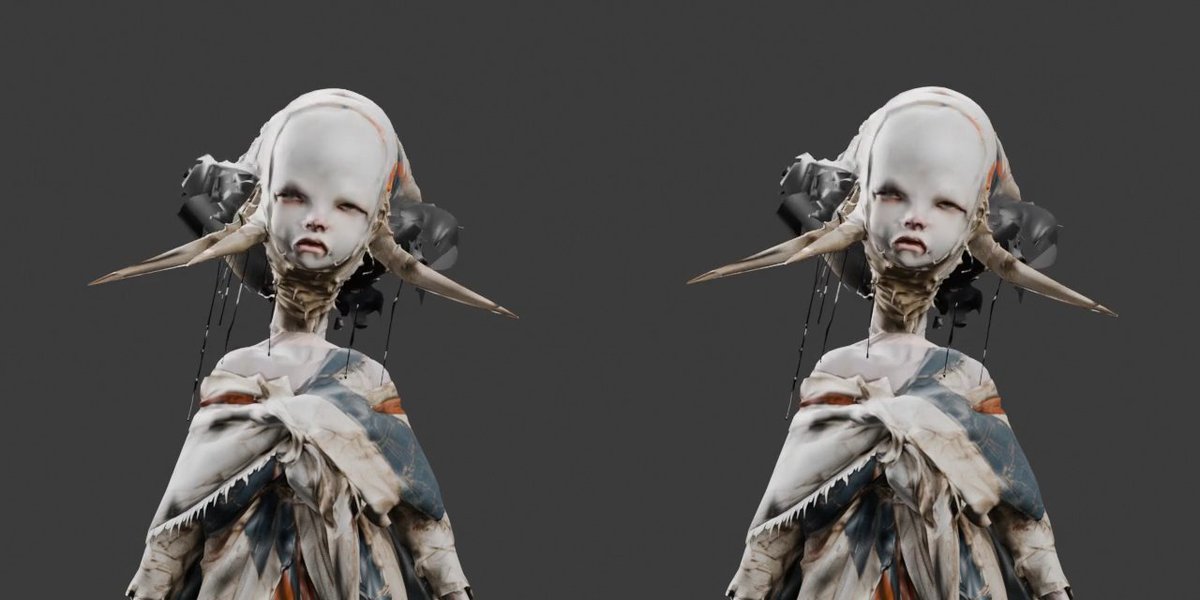
Side-by-Side 3D Character Bust Preview
Creates two matching front-facing 3D-style bust previews from a reference character for testing head and body joining workflows.
Dit is een voorbeeld van een GPT Image 2 prompt voor Anime & Game . Gebruik de onderstaande kant-en-klare prompt om vergelijkbare afbeeldingen te genereren en controleer de Awesome GPT Image 2 Prompts en de rechten voor commercieel gebruik voordat u de afbeeldingen hergebruikt.
Heb je de volledige set prompts nodig? Gebruik dan de Anime & Game Ga naar het themacentrum voor meer gerelateerde voorbeelden, of open de GPT Image 2 prompt catalogus Voor de volledige voorbeeldenindex, herbruikbare structuren en bronvermelding.
Free 1K preview
Generate one preview image instantly, no sign-up required.
917/4000
Snel
Schrijfklare prompt
Using REFERENCE_0 as the character base, convert the subject into a clean 3D-model preview suitable for head-and-body joining tests. Repose the character to a mostly front-facing upper-body bust, simplify the silhouette, and make the head/neck connection clearly visible while preserving the unsettling doll-like face, horn-like side spikes, wrapped textile outfit, dangling cords, and worn fabric textures from the reference. Place exactly 2 identical copies of the resulting character render side by side, one on the left and one on the right, with matching scale and pose for comparison. Use a plain {argument name="background color" default="dark charcoal gray"} background, soft studio lighting, and a slightly rendered/photogrammetry look rather than a polished illustration. Crop to a wide landscape frame showing the head, shoulders, and upper torso only. Avoid adding text, logos, props, or extra characters.Vraagvariabelen
Bewerkbare argumentplaceholders in de prompt, met hun standaardwaarden.
Variabele
background color
Standaard
dark charcoal gray
Best for
- - Anime & Game visual exploration
- - Image generation and reference-image edits
- - Reusable briefs that keep source attribution visible
Change these parts
- - Subject, product, character, or scene
- - Aspect ratio, camera, lighting, and background
- - Brand, text, color, and output constraints
Recommended model and settings
- - Model: gpt-image-2
- - Input mode: Tekst naar afbeelding
- - Aspect ratio: source
- - Commercial status: review original source
How to use this prompt
- 1. Copy the prompt and preserve its structure for the first test.
- 2. Replace the subject, context, and publishing channel.
- 3. Change one camera, lighting, or style variable per iteration.
- 4. Inspect the output, source, text, and rights before reuse.
Limitations, source, and reuse cautions
- - Generated output is an editable draft, not factual, legal, or rights evidence.
- - Review the linked source, people, brands, logos, text, and third-party media before commercial use.
Geïmporteerd van Awesome GPT Image 2 Prompts . Naamsvermelding is vereist. Commercieel gebruik is toegestaan volgens de status allowed ; controleer de rechten van de bron voordat u het tegen betaling gebruikt.
Meer gevallen in deze categorie
Geprioriteerd op basis van categorie, compatibiliteit met invoermodus, kwaliteit en lager risico.

Anime Girl Heterochromia Portrait
Tekst naar afbeelding

Studio Portrait of Woman with Sunglasses
Tekst naar afbeelding

Matte Black B.AI Keyboard Keycap
Tekst naar afbeelding

Hell Hound Character Sheet Infographic
Tekst naar afbeelding

Cute Speech Bubble Mascot Profile Icon
Tekst naar afbeelding

Tuxedo Cat Photo and Line Art Diptych
Tekst naar afbeelding
Hergebruik en bronvermeldingen
Gebruik deze prompt veilig nadat u de casus hebt bekeken.
- 1.Kopieer de prompt of open deze direct in Dovoo met de knop 'Genereren'.
- 2.Pas de variabelen, beeldverhouding en referentieafbeeldingen aan uw eigen toepassing aan.
- 3.Controleer vóór publicatie of betaald gebruik de auteursrechten, de vereisten voor naamsvermelding en de risico's met betrekking tot merk of beeltenis.