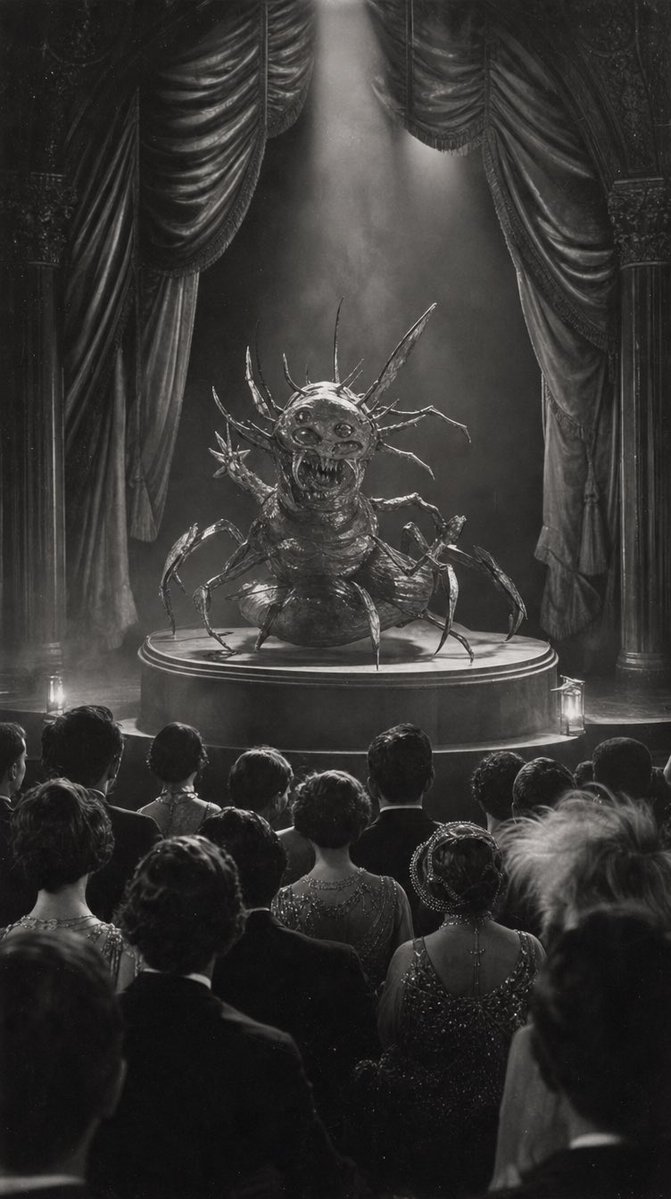
Sketch to Vintage Horror Theater Scene
Transforms a rough creature sketch into a dramatic black-and-white vintage theater photograph with audience, curtains, and spotlight.
Dette er et tilfelle av en GPT Image 2 -ledetekst for Illustrasjon og kunst . Bruk den kopieringsklare ledeteksten nedenfor for å generere lignende visuelle elementer, og gjennomgå Awesome GPT Image 2 Prompts -attribusjonen pluss kommersielle bruksrettigheter før gjenbruk.
Trenger du hele settet med ledetekster? Bruk Illustrasjon og kunst emnehub for flere relaterte eksempler, eller åpne GPT Image 2 rask katalog for den fullstendige eksempelindeksen, gjenbrukbare strukturer og kildeattribusjon.
Free 1K preview
Generate one preview image instantly, no sign-up required.
Free text preview doesn’t preserve reference-image consistency.
1095/4000
Spørsmål
Klar til kopiering
Using the provided sketch as the composition and creature-design base, transform it into a finished cinematic scene: render the sketched monster as a realistic grotesque insect-spider stage creature on the same circular pedestal, keeping the central pose, multiple legs, spikes, open mouth, and domed display/stage concept. Change the rough notebook drawing into {argument name="visual style" default="dramatic black-and-white vintage horror photography"} with high contrast, film grain, smoky atmosphere, and a strong overhead spotlight. Replace the simple sketched arch with an ornate theater proscenium: exactly 2 tall side curtains, 2 carved side columns, and 2 small floor lanterns near the stage. Add a formal theater audience in the foreground, seen from behind, with exactly 20 visible spectators in period eveningwear watching the creature. Make the image vertical, like a staged performance photograph from {argument name="era" default="the 1930s"}. Keep the mood eerie, theatrical, and grand; do not include notebook paper, pencil lines, handwritten symbols, modern objects, or color.Promptvariabler
Redigerbare argumentplassholdere funnet i ledeteksten, med standardverdiene.
Variabel
visual style
Misligholde
dramatic black-and-white vintage horror photography
Variabel
era
Misligholde
the 1930s
Best for
- - Illustrasjon og kunst visual exploration
- - Image generation and reference-image edits
- - Reusable briefs that keep source attribution visible
Change these parts
- - Subject, product, character, or scene
- - Aspect ratio, camera, lighting, and background
- - Brand, text, color, and output constraints
Recommended model and settings
- - Model: gpt-image-2
- - Input mode: Bilde til bilde
- - Aspect ratio: source
- - Commercial status: review original source
How to use this prompt
- 1. Copy the prompt and preserve its structure for the first test.
- 2. Replace the subject, context, and publishing channel.
- 3. Change one camera, lighting, or style variable per iteration.
- 4. Inspect the output, source, text, and rights before reuse.
Limitations, source, and reuse cautions
- - Generated output is an editable draft, not factual, legal, or rights evidence.
- - Review the linked source, people, brands, logos, text, and third-party media before commercial use.
Importert fra Awesome GPT Image 2 Prompts . Attribusjon kreves. Status for kommersiell bruk er allowed ; sjekk kilderettighetene før betalt bruk.
Flere saker i denne kategorien
Prioritert etter kategori, kompatibilitet med inndatamodus, kvalitet og lavere risiko.

Sci-Fi Cyan Lighting Effect
Bilde til bilde

Stylish Man Street Lamp Portrait
Bilde til bilde

Boisterous Shrimpers Entering Pub
Tekst til bilde

Tuxedo Cat Photo and Line Art Diptych
Tekst til bilde

Oversized Head Cartoon Caricature Prompt
Bilde til bildeMiddels risiko

Cute Focus Desk Flat Lay and Kawaii Illustration
Tekst til bilde
Gjenbruk og kildenotater
Bruk denne ledeteksten på en trygg måte etter at du har forhåndsvist saken.
- 1.Kopier ledeteksten eller åpne den direkte i Dovoo med genereringsknappen.
- 2.Juster variabler, sideforhold og referansebilder for ditt eget brukstilfelle.
- 3.Før publisering eller betalt bruk, kontroller kilderettigheter, krav til kreditering og risikoer knyttet til merkevare eller likhet.