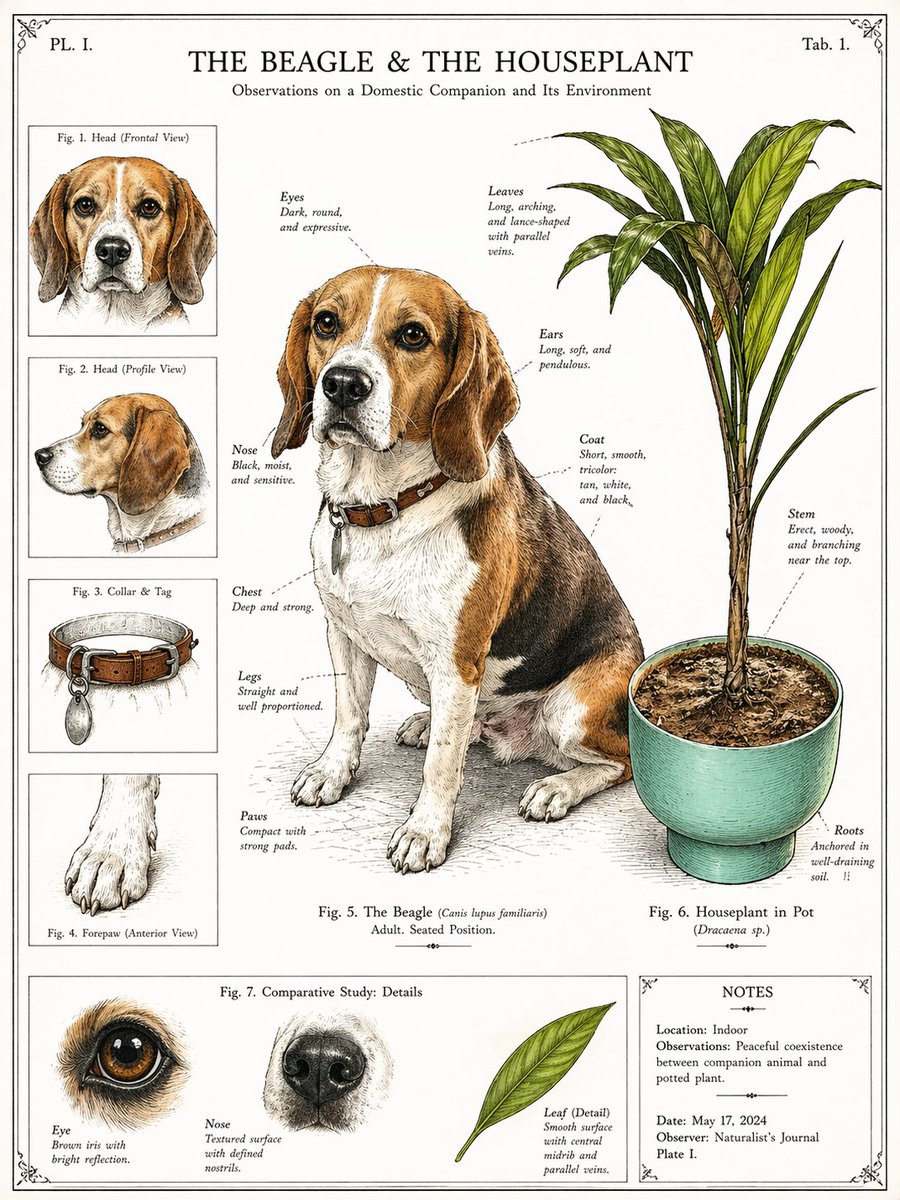
Vintage Beagle botanisk tallerken
Denne oppfordringen forvandler et kjæledyrbilde med en potteplante til en antikk naturhistorisk infografikkplate, nyttig for dekorative kjæledyrportretter i vitenskapelig stil.
Dette er et tilfelle av en GPT Image 2 -ledetekst for Illustrasjon og kunst . Bruk den kopieringsklare ledeteksten nedenfor for å generere lignende visuelle elementer, og gjennomgå Awesome GPT Image 2 Prompts -attribusjonen pluss kommersielle bruksrettigheter før gjenbruk.
Trenger du hele settet med ledetekster? Bruk Illustrasjon og kunst emnehub for flere relaterte eksempler, eller åpne GPT Image 2 rask katalog for den fullstendige eksempelindeksen, gjenbrukbare strukturer og kildeattribusjon.
Free 1K preview
Generate one preview image instantly, no sign-up required.
Free text preview doesn’t preserve reference-image consistency.
1799/4000
Spørsmål
Klar til kopiering
Using the provided reference image, transform the photo into a vintage naturalist encyclopedia plate in the style of a 19th-century scientific animal-and-botany illustration. Keep the same beagle and the same potted houseplant from the reference as the main subjects, but redraw them as finely inked and lightly hand-colored specimen illustrations on an aged off-white page. Preserve the dog's seated pose, collar and tag, and the plant's pot and overall structure. Add a formal infographic layout with 8 labeled figure areas total: 1 large central full-body beagle study, 1 large right-side plant study, 4 left-column inset studies labeled “Fig. 1. Head (Frontal View)”, “Fig. 2. Head (Profile View)”, “Fig. 3. Collar & Tag”, and “Fig. 4. Forepaw (Anterior View)”, 3 bottom comparative detail studies labeled “Eye”, “Nose”, and “Leaf (Detail)”, plus 1 bottom-right notes panel. Add delicate dotted annotation callouts around the main dog and plant identifying features such as eyes, ears, nose, chest, legs, paws, coat, leaves, stem, and roots. Include the page title “THE BEAGLE & THE HOUSEPLANT” at the top, the subtitle “Observations on a Domestic Companion and Its Environment”, corner plate markings “PL. I.” and “Tab. 1.”, a central caption “Fig. 5. The Beagle (Canis lupus familiaris) Adult. Seated Position.”, a plant caption “Fig. 6. Houseplant in Pot (Dracaena sp.)”, a bottom section title “Fig. 7. Comparative Study: Details”, and a notes box containing 5 lines: “Location: Indoor”, “Observations: Peaceful coexistence between companion animal and potted plant.”, “Date: May 17, 2024”, “Observer: Naturalist’s Journal”, and “Plate I.” Use clean engraved linework, restrained watercolor washes, subtle paper texture, decorative border corners, and a symmetrical museum-plate composition.
Best for
- - Illustrasjon og kunst visual exploration
- - Image generation and reference-image edits
- - Reusable briefs that keep source attribution visible
Change these parts
- - Subject, product, character, or scene
- - Aspect ratio, camera, lighting, and background
- - Brand, text, color, and output constraints
Recommended model and settings
- - Model: gpt-image-2
- - Input mode: Bilde til bilde
- - Aspect ratio: source
- - Commercial status: review original source
How to use this prompt
- 1. Copy the prompt and preserve its structure for the first test.
- 2. Replace the subject, context, and publishing channel.
- 3. Change one camera, lighting, or style variable per iteration.
- 4. Inspect the output, source, text, and rights before reuse.
Limitations, source, and reuse cautions
- - Generated output is an editable draft, not factual, legal, or rights evidence.
- - Review the linked source, people, brands, logos, text, and third-party media before commercial use.
Importert fra Awesome GPT Image 2 Prompts . Attribusjon kreves. Status for kommersiell bruk er allowed ; sjekk kilderettighetene før betalt bruk.
Flere saker i denne kategorien
Prioritert etter kategori, kompatibilitet med inndatamodus, kvalitet og lavere risiko.






Gjenbruk og kildenotater
Bruk denne ledeteksten på en trygg måte etter at du har forhåndsvist saken.
- 1.Kopier ledeteksten eller åpne den direkte i Dovoo med genereringsknappen.
- 2.Juster variabler, sideforhold og referansebilder for ditt eget brukstilfelle.
- 3.Før publisering eller betalt bruk, kontroller kilderettigheter, krav til kreditering og risikoer knyttet til merkevare eller likhet.