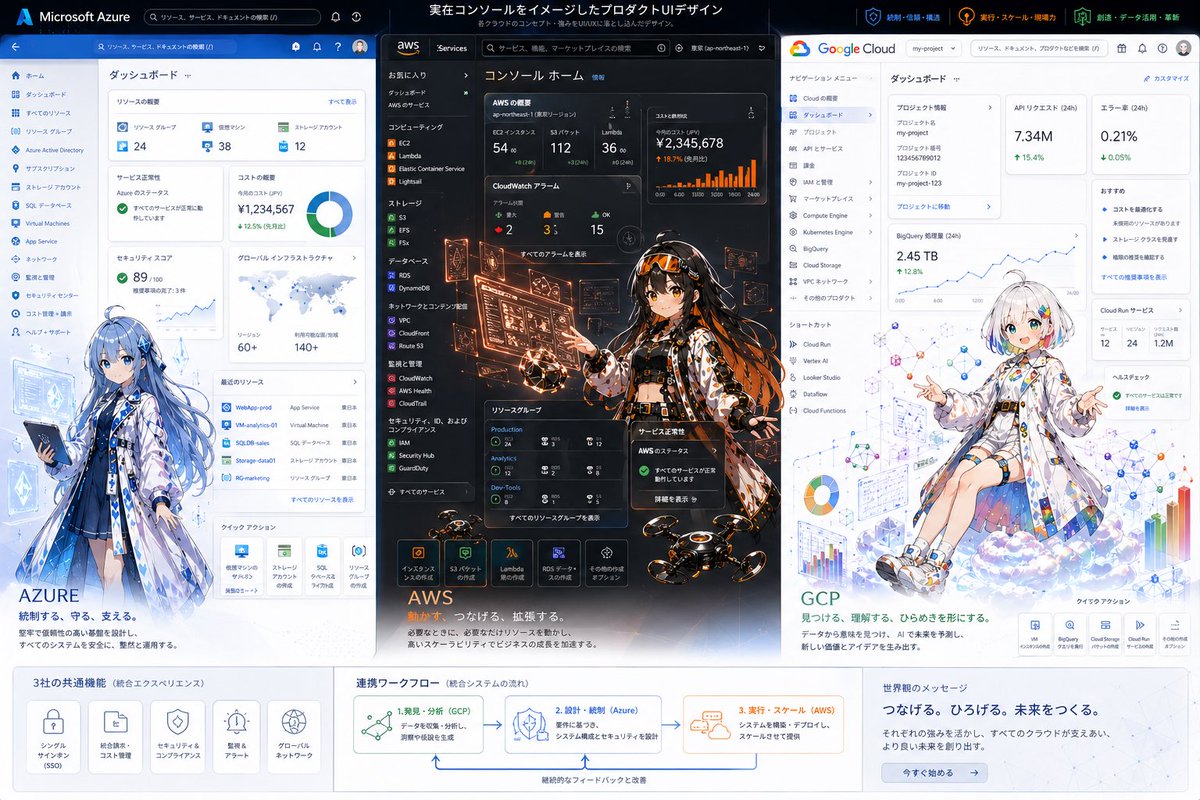
Tri-Cloud UI Anime-infografikk
En polert markedsføringsvisual i bredt format som viser Azure, AWS og Google Cloud som realistiske dashbord-UI-konsepter fusjonert med distinkte anime-maskoter, egnet for hovedpresentasjoner, sosiale innlegg og produktdesignpresentasjoner.
Dette er et tilfelle av en GPT Image 2 -ledetekst for Grafikk og plakat . Bruk den kopieringsklare ledeteksten nedenfor for å generere lignende visuelle elementer, og gjennomgå Awesome GPT Image 2 Prompts -attribusjonen pluss kommersielle bruksrettigheter før gjenbruk.
Free 1K preview
Generate one preview image instantly, no sign-up required.
Spørsmål
Klar til kopiering
{
  "type": "tri-cloud platform hero infographic illustration",
  "style": "high-end product UI concept art combining real dashboard interfaces with anime character illustrations, clean corporate tech presentation, crisp vector-like UI mixed with detailed painterly characters, polished marketing key visual",
  "canvas": {
    "aspect_ratio": "16:9",
    "background": "light gray presentation board with three vertical product panels and a bottom information band"
  },
  "headline": {
    "text": "実在コンソールをイメージしたプロダクトUIデザイン",
    "subtext": "各クラウドのコンセプト・思想をUI体験に落とし込んだイメージデザイン"
  },
  "layout": {
    "columns": 3,
    "sections": [
      {
        "title": "Microsoft Azure",
        "position": "left panel",
        "count": 1,
        "labels": [
          "ダッシュボード"
        ]
      },
      {
        "title": "aws",
        "position": "center panel",
        "count": 1,
        "labels": [
          "コンソール ホーム"
        ]
      },
      {
        "title": "Google Cloud",
        "position": "right panel",
        "count": 1,
        "labels": [
          "ダッシュボード"
        ]
      },
      {
        "title": "3社の共通機能",
        "position": "bottom left band",
        "count": 5,
        "labels": [
          "シングルサインオン (SSO)",
          "統合請求・コスト管理",
          "セキュリティ&コンプライアンス",
          "監視&アラート",
          "グローバルネットワーク"
        ]
      },
      {
        "title": "連携ワークフロー",
        "position": "bottom center band",
        "count": 3,
        "labels": [
          "1. 発見・分析(GCP)",
          "2. 設計・統制(Azure)",
          "3. 実行・スケール(AWS)"
        ]
      },
      {
        "title": "世界へのメッセージ",
        "position": "bottom right band",
        "count": 1,
        "labels": [
          "つなげる。ひろげる。未来をつくる。"
        ]
      }
    ],
    "panel_order": [
      "Azure",
      "AWS",
      "GCP"
    ]
  },
  "panels": {
    "left": {
      "brand": "{argument name=\"left cloud brand\" default=\"Azure\"}",
      "theme_color": "blue and white",
      "ui": "a realistic cloud management dashboard screenshot style interface with a top blue bar, a left navigation rail, and 8 analytics cards visible: resource overview, service health, cost summary, donut chart, security risk score, global infrastructure map, recent resources table, quick actions; small icons, Japanese labels, dense enterprise admin layout",
      "character": "full-body anime girl standing in front of the lower-left area of the dashboard, long flowing blue hair, white and blue translucent coat over a dark outfit, holding a tablet, calm and protective posture, futuristic cloud-admin mage vibe",
      "tagline": "AZURE",
      "subline": "統制する、守る、支える。"
    },
    "center": {
      "brand": "{argument name=\"center cloud brand\" default=\"AWS\"}",
      "theme_color": "black and orange",
      "ui": "a dark realistic cloud console home screen with left sidebar navigation, top search bar, and 7 prominent monitoring cards showing KPIs, bar charts, alarms, status widgets, resource groups, and service launch icons; high-density console layout with Japanese labels",
      "character": "centered anime girl in a dynamic standing pose, long dark hair with orange accents, black futuristic outfit under a patterned coat, surrounded by glowing orange holographic admin panels and floating monitoring screens, hands interacting with the UI, energetic operations-engineer vibe",
      "effects": "orange holograms, sparks, illuminated data overlays, several small hovering drones near the bottom foreground",
      "tagline": "AWS",
      "subline": "計算力で、つなげる、拡張する。"
    },
    "right": {
      "brand": "{argument name=\"right cloud brand\" default=\"GCP\"}",
      "theme_color": "white with Google accent colors",
      "ui": "a realistic cloud dashboard with a white top bar, left navigation menu, and 8 cards visible: project information, API requests, error rate, BigQuery metrics, trend line chart, recommendations, Cloud Run services, help/health check; clean minimalist enterprise UI with Japanese labels",
      "character": "anime girl seated on a soft cloud near the lower-right area, short white bob haircut with subtle rainbow-colored streak accents, oversized white tech coat decorated with colorful geometric symbols, relaxed open-arm pose, bright analytical and playful mood",
      "background_graphics": "floating charts, network diagrams, colorful nodes, bar graphs, pie chart, schematic data visualizations integrated around the character",
      "tagline": "GCP",
      "subline": "見つける、理解する、ひらめきを形にする。"
    }
  },
  "bottom_band": {
    "style": "white information strip with subtle gray separators",
    "left_block": "five rounded icon cards for shared features",
    "center_block": "workflow diagram with arrows connecting GCP to Azure to AWS and a loop-back improvement arrow",
    "right_block": "message area with a blue call-to-action button reading 今すぐ始める"
  },
  "branding": {
    "top_right_badges": 3,
    "badge_labels": [
      "統制・信頼・構築",
      "実行・スケール・現場力",
      "創造・データ活用・革新"
    ]
  },
  "rendering_notes": "keep all three panels vertically aligned and equal width, with the AWS center panel slightly more visually intense and darker; preserve readable Japanese-style UI typography without requiring exact legibility; emphasize the contrast between each cloud provider through color palette, interface language, and character design; corporate presentation quality, highly detailed, sharp, elegant, meaningful integration of data structure and illustration"
}
Promptvariabler
Redigerbare argumentplassholdere funnet i ledeteksten, med standardverdiene.
Best for
- - Grafikk og plakat visual exploration
- - Image generation and reference-image edits
- - Reusable briefs that keep source attribution visible
Change these parts
- - Subject, product, character, or scene
- - Aspect ratio, camera, lighting, and background
- - Brand, text, color, and output constraints
Recommended model and settings
- - Model: gpt-image-2
- - Input mode: Tekst til bilde
- - Aspect ratio: source
- - Commercial status: review original source
How to use this prompt
- 1. Copy the prompt and preserve its structure for the first test.
- 2. Replace the subject, context, and publishing channel.
- 3. Change one camera, lighting, or style variable per iteration.
- 4. Inspect the output, source, text, and rights before reuse.
Limitations, source, and reuse cautions
- - Generated output is an editable draft, not factual, legal, or rights evidence.
- - Review the linked source, people, brands, logos, text, and third-party media before commercial use.
Flere saker i denne kategorien
Prioritert etter kategori, kompatibilitet med inndatamodus, kvalitet og lavere risiko.






Gjenbruk og kildenotater
Bruk denne ledeteksten på en trygg måte etter at du har forhåndsvist saken.
- 1.Kopier ledeteksten eller åpne den direkte i Dovoo med genereringsknappen.
- 2.Juster variabler, sideforhold og referansebilder for ditt eget brukstilfelle.
- 3.Før publisering eller betalt bruk, kontroller kilderettigheter, krav til kreditering og risikoer knyttet til merkevare eller likhet.