Teamtegning Japan Illustrasjon
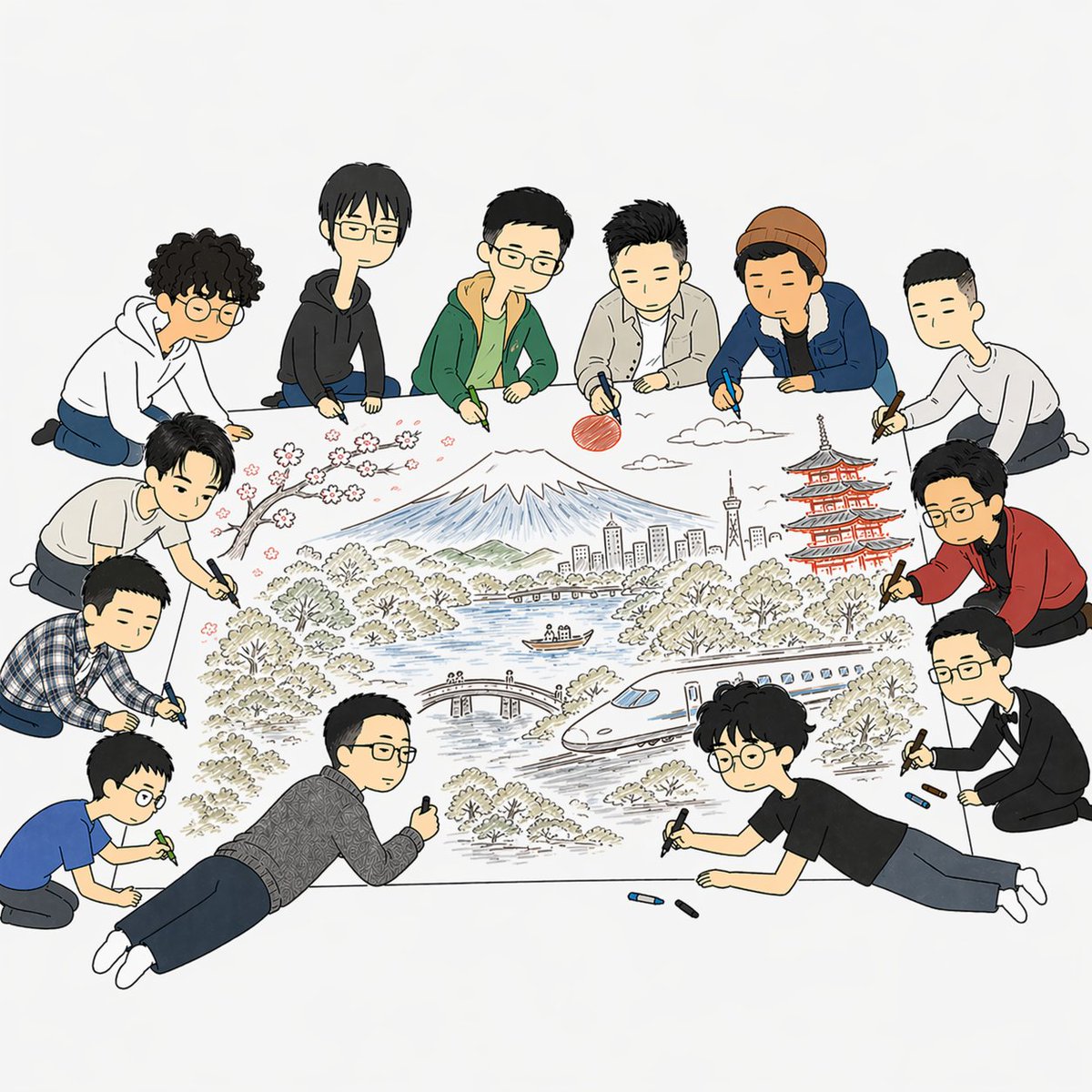
Denne oppgaven genererer en myk, tegneserieaktig redaksjonell scene med 11 personer som i fellesskap skisserer en detaljert landskapsplakat med Japan-tema, egnet for artikler om samarbeid, AI-kreativitet, design eller samarbeidende skapelse.
Dette er et tilfelle av en GPT Image 2 -ledetekst for Illustrasjon og kunst . Bruk den kopieringsklare ledeteksten nedenfor for å generere lignende visuelle elementer, og gjennomgå Awesome GPT Image 2 Prompts -attribusjonen pluss kommersielle bruksrettigheter før gjenbruk.
Trenger du hele settet med ledetekster? Bruk Illustrasjon og kunst emnehub for flere relaterte eksempler, eller åpne GPT Image 2 rask katalog for den fullstendige eksempelindeksen, gjenbrukbare strukturer og kildeattribusjon.
Free 1K preview
Generate one preview image instantly, no sign-up required.
1795/4000
Spørsmål
Klar til kopiering
A clean editorial-style illustration on a light gray-white background showing exactly 11 young people gathered around a huge sheet of paper on the floor, collaboratively drawing a detailed Japan travel scene. The composition is viewed from slightly above, centered on the artwork, with the people forming a loose ring around it. Use a simple hand-drawn cartoon style with thin black outlines, soft muted colors, minimal shading, and a friendly modern magazine aesthetic. The central drawing on the paper includes 8 distinct scenic elements: snow-capped Mount Fuji in the middle background, a red sun to the upper right of the mountain, a few white clouds, pink cherry blossoms on a dark branch at upper left, a red multi-tier pagoda on the right, a tall city skyline with a tower near the center-right, a blue lake with a small boat, and a sleek white bullet train curving across the lower right. Add trees and bushes throughout, plus a small arched bridge near the lower middle. The 11 people are casually dressed in varied outfits and are all holding markers or crayons while leaning, kneeling, or lying around the paper. Include 6 people across the top edge, 3 along the left side, and 2 along the lower-right side. Their clothing should vary: hoodies, jackets, a knit beanie, a plaid shirt, a patterned sweater, a blue T-shirt, a black T-shirt, and one person in a red cardigan over dark clothes. One person on the right should wear glasses and a red cardigan, another at the bottom right should have curly dark hair, round glasses, a black T-shirt, and be lying on his stomach while drawing. Scatter a few loose crayons in blue and dark colors near the bottom edge of the paper. Keep the mood collaborative, creative, and playful, with the large illustrated poster as the clear focal point.
Best for
- - Illustrasjon og kunst visual exploration
- - Image generation and reference-image edits
- - Reusable briefs that keep source attribution visible
Change these parts
- - Subject, product, character, or scene
- - Aspect ratio, camera, lighting, and background
- - Brand, text, color, and output constraints
Recommended model and settings
- - Model: gpt-image-2
- - Input mode: Tekst til bilde
- - Aspect ratio: source
- - Commercial status: review original source
How to use this prompt
- 1. Copy the prompt and preserve its structure for the first test.
- 2. Replace the subject, context, and publishing channel.
- 3. Change one camera, lighting, or style variable per iteration.
- 4. Inspect the output, source, text, and rights before reuse.
Limitations, source, and reuse cautions
- - Generated output is an editable draft, not factual, legal, or rights evidence.
- - Review the linked source, people, brands, logos, text, and third-party media before commercial use.
Importert fra Awesome GPT Image 2 Prompts . Attribusjon kreves. Status for kommersiell bruk er allowed ; sjekk kilderettighetene før betalt bruk.
Flere saker i denne kategorien
Prioritert etter kategori, kompatibilitet med inndatamodus, kvalitet og lavere risiko.






Gjenbruk og kildenotater
Bruk denne ledeteksten på en trygg måte etter at du har forhåndsvist saken.
- 1.Kopier ledeteksten eller åpne den direkte i Dovoo med genereringsknappen.
- 2.Juster variabler, sideforhold og referansebilder for ditt eget brukstilfelle.
- 3.Før publisering eller betalt bruk, kontroller kilderettigheter, krav til kreditering og risikoer knyttet til merkevare eller likhet.