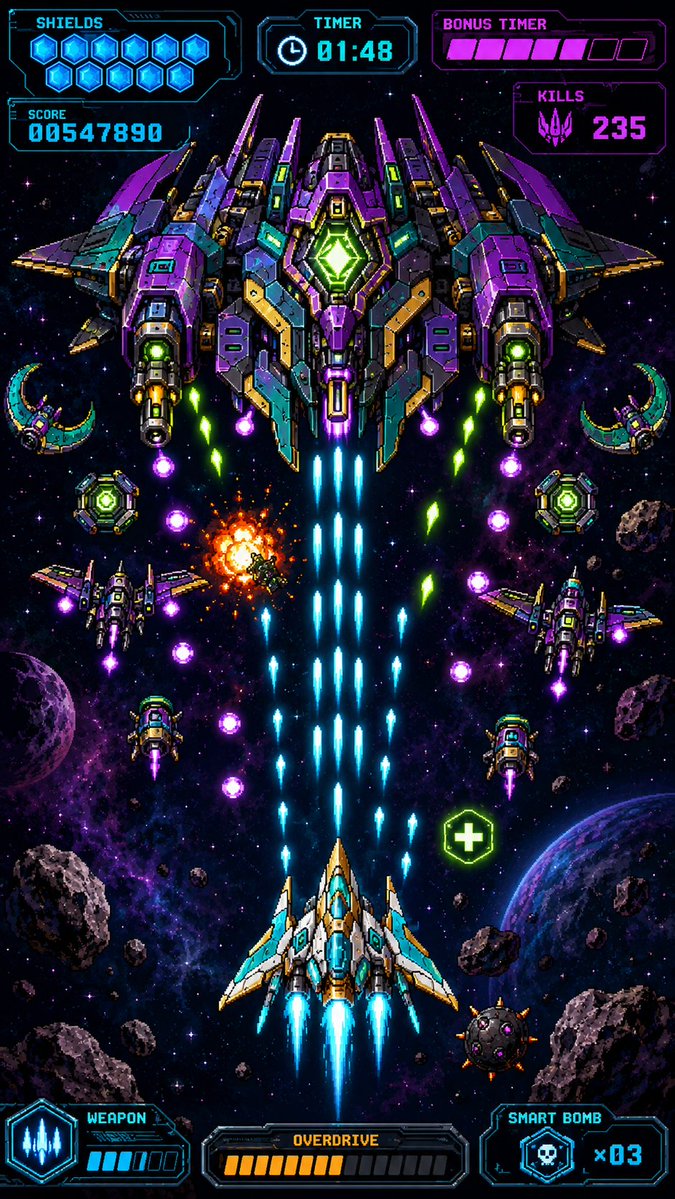
Retro piksel-romskytespill HUD
Genererer et vertikalt pikselkunst-skjermbilde av et mobilspill som viser en neonkule-helvete-bosskamp i romskytespill med detaljerte HUD-elementer.
Dette er et tilfelle av en GPT Image 2 -ledetekst for Anime og spill . Bruk den kopieringsklare ledeteksten nedenfor for å generere lignende visuelle elementer, og gjennomgå Awesome GPT Image 2 Prompts -attribusjonen pluss kommersielle bruksrettigheter før gjenbruk.
Trenger du hele settet med ledetekster? Bruk Anime og spill emnehub for flere relaterte eksempler, eller åpne GPT Image 2 rask katalog for den fullstendige eksempelindeksen, gjenbrukbare strukturer og kildeattribusjon.
Free 1K preview
Generate one preview image instantly, no sign-up required.
2671/4000
Spørsmål
Klar til kopiering
Create a premium vertical mobile game screenshot for a retro pixel-art space shooter, portrait 9:16. The image must look like an actual in-game scene, not a poster or asset sheet. Use crisp high-resolution pixel art with dense neon detail, black space background, purple nebula clouds, star field, scattered asteroids, and two visible planets near the lower left and lower right edges. Center the action vertically: at the bottom center is the player ship, a white, cyan, and gold angular fighter with three bright cyan engine flames and blue cockpit glass, firing a thick central stream of cyan laser bullets upward. At the top center is one enormous symmetrical boss battleship in purple, teal, dark gray, gold, and neon green, with wide wings, many armor panels, two large side cannons, glowing green core diamond in the middle, and blue exhaust trails beneath it. The scene shows intense bullet-hell combat: exactly 1 player ship, exactly 1 giant boss ship, exactly 4 smaller enemy fighters around the middle area, exactly 2 crescent-shaped drones near the upper left and upper right sides, exactly 2 round green shield drones near the mid-left and mid-right, exactly 1 orange explosion slightly left of center, exactly 1 green health pickup icon with a plus sign on the lower right, many cyan player shots rising in columns, and multiple purple and green enemy projectiles descending diagonally. Overlay a futuristic cyan and magenta pixel HUD with transparent dark panels and sharp sci-fi borders. Top left HUD: label “SHIELDS” with exactly 10 glowing blue hex shield icons, and below it a score panel reading “SCORE” and {argument name="score value" default="00547890"}. Top center HUD: label “TIMER” with a clock icon and {argument name="timer value" default="01:48"}. Top right HUD: label “BONUS TIMER” with a segmented magenta bar showing exactly 6 filled pink segments and 3 empty dark segments, and below it a “KILLS” panel with a purple alien skull icon and {argument name="kills value" default="235"}. Bottom left HUD: “WEAPON” panel with a cyan three-shot weapon icon and a small charge meter with exactly 4 filled cyan bars and 2 empty bars. Bottom center HUD: “OVERDRIVE” panel with exactly 10 filled orange bars and 8 empty dark bars. Bottom right HUD: “SMART BOMB” panel with a skull bomb icon and {argument name="smart bomb count" default="x03"}. Keep all UI text pixelated, legible, and aligned to the screen edges like a real mobile arcade game interface. Use vibrant cyan, violet, magenta, green, and orange glow effects, strong contrast, symmetrical composition, no watermark, no extra logos, no realistic 3D rendering, no blurred painterly style.Promptvariabler
Redigerbare argumentplassholdere funnet i ledeteksten, med standardverdiene.
Variabel
score value
Misligholde
00547890
Variabel
timer value
Misligholde
01:48
Variabel
kills value
Misligholde
235
Variabel
smart bomb count
Misligholde
x03
Best for
- - Anime og spill visual exploration
- - Image generation and reference-image edits
- - Reusable briefs that keep source attribution visible
Change these parts
- - Subject, product, character, or scene
- - Aspect ratio, camera, lighting, and background
- - Brand, text, color, and output constraints
Recommended model and settings
- - Model: gpt-image-2
- - Input mode: Tekst til bilde
- - Aspect ratio: source
- - Commercial status: review original source
How to use this prompt
- 1. Copy the prompt and preserve its structure for the first test.
- 2. Replace the subject, context, and publishing channel.
- 3. Change one camera, lighting, or style variable per iteration.
- 4. Inspect the output, source, text, and rights before reuse.
Limitations, source, and reuse cautions
- - Generated output is an editable draft, not factual, legal, or rights evidence.
- - Review the linked source, people, brands, logos, text, and third-party media before commercial use.
Importert fra Awesome GPT Image 2 Prompts . Attribusjon kreves. Status for kommersiell bruk er allowed ; sjekk kilderettighetene før betalt bruk.
Flere saker i denne kategorien
Prioritert etter kategori, kompatibilitet med inndatamodus, kvalitet og lavere risiko.






Gjenbruk og kildenotater
Bruk denne ledeteksten på en trygg måte etter at du har forhåndsvist saken.
- 1.Kopier ledeteksten eller åpne den direkte i Dovoo med genereringsknappen.
- 2.Juster variabler, sideforhold og referansebilder for ditt eget brukstilfelle.
- 3.Før publisering eller betalt bruk, kontroller kilderettigheter, krav til kreditering og risikoer knyttet til merkevare eller likhet.