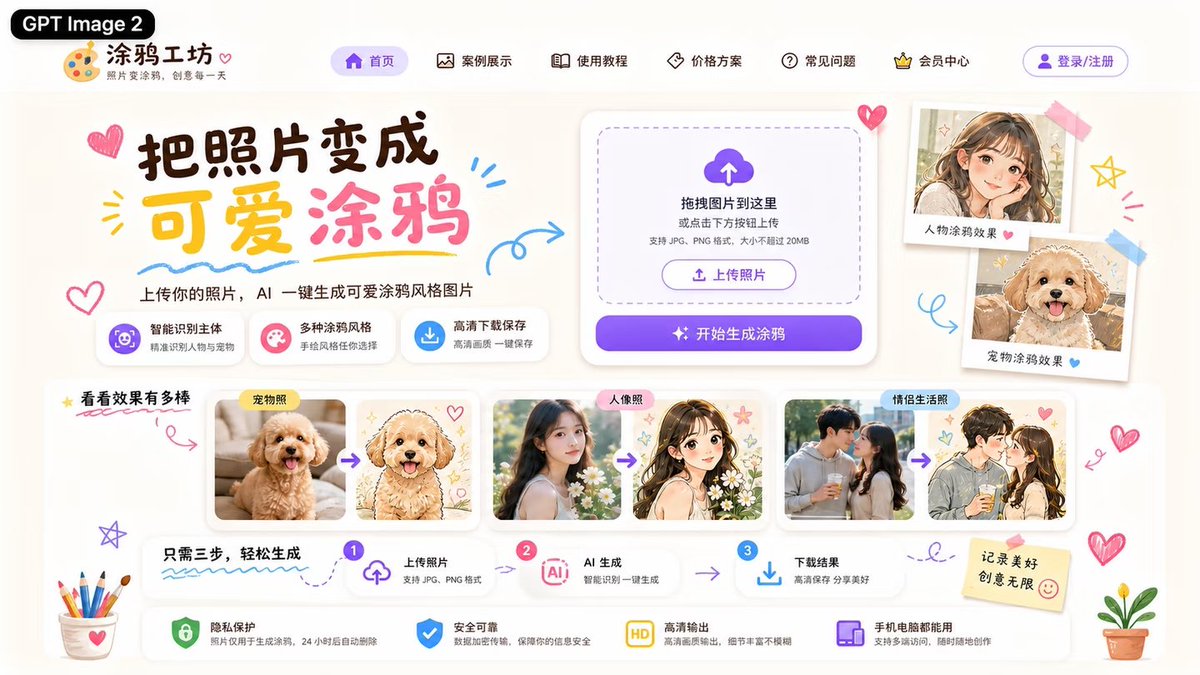
Cute AI Doodle Generator Landing Page
A polished Chinese web landing page mockup for an AI tool that converts photos into cute doodle-style illustrations.
Dette er et tilfelle av en GPT Image 2 -ledetekst for Grafikk og plakat . Bruk den kopieringsklare ledeteksten nedenfor for å generere lignende visuelle elementer, og gjennomgå Awesome GPT Image 2 Prompts -attribusjonen pluss kommersielle bruksrettigheter før gjenbruk.
Denne ledeteksten er utformet for flere referansebilder. Vi åpner Dovoo med ledeteksten og det tilgjengelige forhåndsvisningsbildet; legg til de resterende referansene i Dovoo før generering.
Free 1K preview
Generate one preview image instantly, no sign-up required.
Free text preview doesn’t preserve reference-image consistency.
Spørsmål
Klar til kopiering
Objective: Create a lovely Chinese landing page UI model for an AI website that converts photos into cute hand-drawn doodle illustrations, with the brand name {argument name="product name" default="Doodle Workshop"}, and attach a black capsule label with {argument name="model label" default="GPT Image 2"} written on it.

Canvas: A widescreen 16:9 webpage screenshot, approximately 1200x675 in size, with a warm, off-white paper background, soft shadows, rounded cards, and decorated with light purple, pink, yellow, and sky blue. Adopt a playful and cute stationery style, with edges decorated with doodle hearts, arrows, stars, scribbles, stickers, tape, colored pencils, and small potted plants.

Header: Place a black rounded label “GPT Image 2” in the upper left corner, followed by a palette icon Logo and the website name “Doodle Workshop”, with a small subtitle “Turn Photos into Doodles, Creativity Every Day” below. The top navigation bar displays 6 menu items with simple line icons: “Homepage” (highlighted in purple capsule), “Case Showcase”, “Usage Tutorial”, “Pricing Plans”, “FAQ”, and “Membership Center”. Add a purple-outlined “Login/Register” button on the far right.

First Screen Area: Create a large brush-style title {argument name="headline text" default="Turn Photos into Cute Doodles"} on the left side, with “Cute” in yellow and “Doodle” in pink, surrounded by doodle hearts and underlined strokes. Add a subtitle below: “Upload your photo, and AI will instantly generate cute doodle-style images.” Below the subtitle, place 3 feature labels: 1) Purple icon “Smart Subject Recognition / Accurately Identify People and Pets”, 2) Pink icon “Multiple Doodle Styles / Choose Your Hand-Drawn Style”, 3) Blue download icon “High-Definition Download and Save / Save High-Quality Images with One Click”.

Upload Card: Place a large white rounded upload panel in the middle right, including a dashed rounded drag-and-drop area, a purple cloud upload icon, and the text “Drag images here or click the button below to upload”, with a small note “Supports JPG, PNG formats, and a size of no more than 20MB”. Inside, include a small outline button “Upload Photo”, followed by a purple gradient main button with a flashing icon, reading “Start Generating Doodles”.

Right-Side Sticker Display: To the right of the upload card, display 2 Polaroid-style sample cards taped onto the page: 1) A cute anime-style girl portrait, labeled “Character Doodle Effect”, with a pink heart; 2) A fluffy dog doodle portrait, labeled “Pet Doodle Effect”, with a blue heart.

Case Gallery: Below the first screen, create an area titled “See How Amazing the Effects Are”, with yellow stars and a red underline. Display 3 sets of white rounded cards in the form of comparison images, each set containing two images separated by purple arrows: 1) Labeled “Pet Photo”, converting a real photo of a fluffy apricot dog into a cute hand-drawn dog illustration with hearts; 2) Labeled “Portrait Photo”, converting a real photo of a young woman into a soft anime girl illustration with flowers and stars; 3) Labeled “Couple Life Photo”, converting a couple’s photo into a romantic anime couple doodle. Ensure the generated images have a fresh, cute style and soft tones.

Process Bar: Below the gallery, create a three-step horizontal guide titled “Just Three Steps to Easily Generate”. Display 3 numbered steps connected by arrows: Step 1 “Upload Photo / Supports JPG, PNG format” (with upload icon), Step 2 “AI Generation / Smart Recognition, One-Click Generation” (with AI chip icon), Step 3 “Download Results / Save in High Definition, Share Beauty” (with download icon).

Bottom Security Bar: At the bottom, place 4 trust function cards with icons: 1) Green shield “Privacy Protection / Photos are only used for generating doodles and are automatically deleted after 24 hours”, 2) Blue shield checkmark “Safe and Reliable / Data encryption transmission, protecting your information security”, 3) Yellow HD badge “High-Definition Output / High-quality output, rich details and no blur”, 4) Purple device icon “Available on Mobile and Computer / Supports multi-end access, create anytime, anywhere”. Add a sticky note with {argument name="sticky note text" default="Record Beautiful Moments, Infinite Creativity"} written on it on the right, with a smiley face.

Visual Style: Modern and sophisticated UI/UX design, clear and readable Chinese typography, playful hand-drawn decorations, soft cream-colored background, glass-textured rounded white cards, delicate shadows, purple CTA gradients, and cute doodle illustration aesthetics. Avoid browser borders, watermarks, or additional areas not listed.
Promptvariabler
Redigerbare argumentplassholdere funnet i ledeteksten, med standardverdiene.
Best for
- - Grafikk og plakat visual exploration
- - Image generation and reference-image edits
- - Reusable briefs that keep source attribution visible
Change these parts
- - Subject, product, character, or scene
- - Aspect ratio, camera, lighting, and background
- - Brand, text, color, and output constraints
Recommended model and settings
- - Model: gpt-image-2
- - Input mode: Flerbilde til bilde
- - Aspect ratio: source
- - Commercial status: review original source
How to use this prompt
- 1. Copy the prompt and preserve its structure for the first test.
- 2. Replace the subject, context, and publishing channel.
- 3. Change one camera, lighting, or style variable per iteration.
- 4. Inspect the output, source, text, and rights before reuse.
Limitations, source, and reuse cautions
- - Generated output is an editable draft, not factual, legal, or rights evidence.
- - Review the linked source, people, brands, logos, text, and third-party media before commercial use.
Flere saker i denne kategorien
Prioritert etter kategori, kompatibilitet med inndatamodus, kvalitet og lavere risiko.






Gjenbruk og kildenotater
Bruk denne ledeteksten på en trygg måte etter at du har forhåndsvist saken.
- 1.Kopier ledeteksten eller åpne den direkte i Dovoo med genereringsknappen.
- 2.Juster variabler, sideforhold og referansebilder for ditt eget brukstilfelle.
- 3.Før publisering eller betalt bruk, kontroller kilderettigheter, krav til kreditering og risikoer knyttet til merkevare eller likhet.