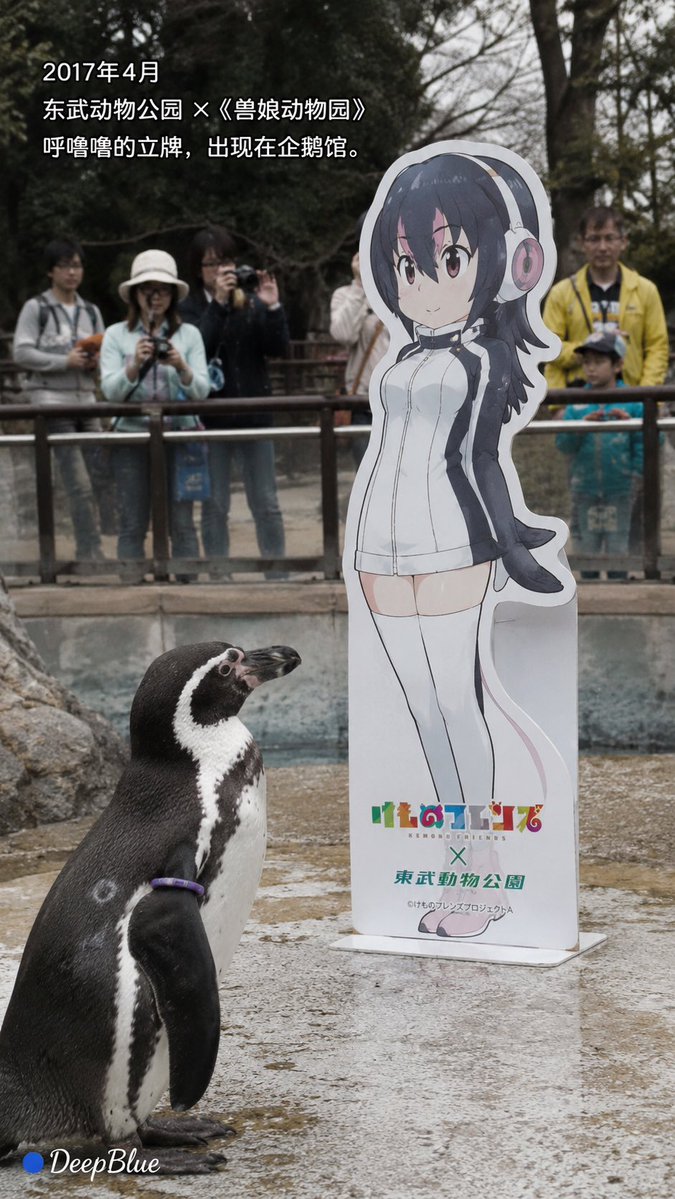
Documentary Photo Sequence of Penguin Story
A documentary-style photo sequence based on the real story of Grape-kun, a penguin who bonded with an anime character cutout.
Dette er et tilfelle av en GPT Image 2 -ledetekst for Landskap og natur . Bruk den kopieringsklare ledeteksten nedenfor for å generere lignende visuelle elementer, og gjennomgå Awesome GPT Image 2 Prompts -attribusjonen pluss kommersielle bruksrettigheter før gjenbruk.
Trenger du hele settet med ledetekster? Bruk Landskap og natur emnehub for flere relaterte eksempler, eller åpne GPT Image 2 rask katalog for den fullstendige eksempelindeksen, gjenbrukbare strukturer og kildeattribusjon.
Free 1K preview
Generate one preview image instantly, no sign-up required.
2571/4000
Spørsmål
Klar til kopiering
Realistic news documentary photography, {argument name="location" default="Real Humboldt penguin Grape-kun"}; realistic {argument name="penguin name" default="Humboldt penguin Grape-kun"}, adult male, black and white feathers, purple individual identification ring naturally visible; realistic penguin habitat, pool, rocks, metal fence, trees, visitors; {argument name="character" default="Kemono Friends character Hululu"} cardboard standee, realistic cardboard material and base; natural environmental light, candid shot, realistic feather texture, slight natural grain, low saturation, natural atmosphere, restrained and gentle.

[Image 1 | April 2017]
During the collaboration between Kemono Friends and Tobu Zoo, Hululu's standee appeared in the penguin area; Grape-kun naturally appeared near the standee; visitors watched and took pictures through the fence; a realistic zoo scene.
Text:
“April 2017”
“Tobu Zoo x Kemono Friends”
“Hululu's standee appeared in the penguin habitat.”

[Image 2 | Observation]
Grape-kun stood quietly next to Hululu's standee, his body naturally facing the standee and continuously observing it; showing the behavior noticed by visitors and the zoo at the time; no anthropomorphism, no human-like emotional expression; natural background blur, like a casually captured news photo.
Text:
“Grape-kun seemed particularly interested in this standee.”
“‘Love’ is people's interpretation of his behavior.”

[Image 3 | Retention]
After the collaboration ended, the standees of other characters were removed, but Hululu's standee remained in the penguin area; natural voids were left in other locations; Grape-kun still appeared near the standee; quiet penguin habitat, natural soft light.
Text:
“The collaboration has ended.”
“Other standees were removed, and Hululu was left behind.”

[Image 4 | Farewell]
Time point after Grape-kun passed away on October 12, 2017; the penguin habitat is quiet and empty, Grape-kun is no longer there, but Hululu's standee still exists; pool, rocks, fence, and empty activity space; soft natural light, expressing absence through space, not showing death scenes.
Text:
“October 12, 2017”
“Grape-kun passed away at the age of 21.”
“We do not know what he considered that standee to be.”

Strictly based on real events, no fictionalization of Grape-kun's psychology, dialogue, memories, or motivations; “falling in love with 2D” or “liking Hululu” are human interpretations of his behavior.

Each corner has a “● DeepBlue” logo; the circle is #0B3D91 dark blue, and DeepBlue is white natural handwritten font.
Promptvariabler
Redigerbare argumentplassholdere funnet i ledeteksten, med standardverdiene.
Variabel
location
Misligholde
Real Humboldt penguin Grape-kun
Variabel
penguin name
Misligholde
Humboldt penguin Grape-kun
Variabel
character
Misligholde
Kemono Friends character Hululu
Best for
- - Landskap og natur visual exploration
- - Image generation and reference-image edits
- - Reusable briefs that keep source attribution visible
Change these parts
- - Subject, product, character, or scene
- - Aspect ratio, camera, lighting, and background
- - Brand, text, color, and output constraints
Recommended model and settings
- - Model: gpt-image-2
- - Input mode: Tekst til bilde
- - Aspect ratio: source
- - Commercial status: review original source
How to use this prompt
- 1. Copy the prompt and preserve its structure for the first test.
- 2. Replace the subject, context, and publishing channel.
- 3. Change one camera, lighting, or style variable per iteration.
- 4. Inspect the output, source, text, and rights before reuse.
Limitations, source, and reuse cautions
- - Generated output is an editable draft, not factual, legal, or rights evidence.
- - Review the linked source, people, brands, logos, text, and third-party media before commercial use.
Importert fra Awesome GPT Image 2 Prompts . Attribusjon kreves. Status for kommersiell bruk er allowed ; sjekk kilderettighetene før betalt bruk.
Flere saker i denne kategorien
Prioritert etter kategori, kompatibilitet med inndatamodus, kvalitet og lavere risiko.

GPT Image 2 Real-Life Character Street Snap
Tekst til bilde

Street Selfie with Cat in Matching Cap
Tekst til bilde

Gray Denim Lace-Up Top Prompt for GPT Image 2
Tekst til bilde

Hiker in Red Jacket
Tekst til bilde

MotoGP POV Cornering Shot
Tekst til bilde

GPT Image 2 Prompt: Garden Dappled Light
Tekst til bilde
Gjenbruk og kildenotater
Bruk denne ledeteksten på en trygg måte etter at du har forhåndsvist saken.
- 1.Kopier ledeteksten eller åpne den direkte i Dovoo med genereringsknappen.
- 2.Juster variabler, sideforhold og referansebilder for ditt eget brukstilfelle.
- 3.Før publisering eller betalt bruk, kontroller kilderettigheter, krav til kreditering og risikoer knyttet til merkevare eller likhet.