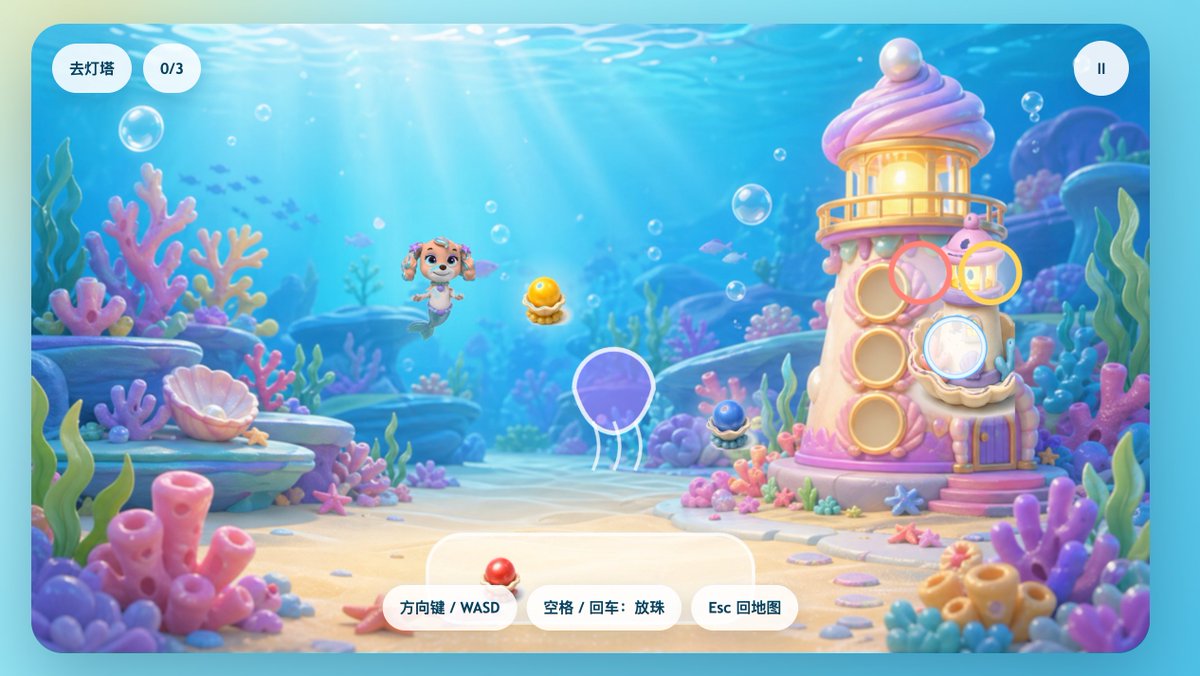
Pastell Undervanns Havfrue Valpe Spill Brukergrensesnitt
En lunefull undervanns-spillskjerm med en havfruevalp, et korallfyrtårn og lekne kinesiske brukergrensesnittelementer, egnet for barns vanlige spillskjermer eller nivåscener.
Dette er et tilfelle av en GPT Image 2 -ledetekst for Anime og spill . Bruk den kopieringsklare ledeteksten nedenfor for å generere lignende visuelle elementer, og gjennomgå Awesome GPT Image 2 Prompts -attribusjonen pluss kommersielle bruksrettigheter før gjenbruk.
Trenger du hele settet med ledetekster? Bruk Anime og spill emnehub for flere relaterte eksempler, eller åpne GPT Image 2 rask katalog for den fullstendige eksempelindeksen, gjenbrukbare strukturer og kildeattribusjon.
Free 1K preview
Generate one preview image instantly, no sign-up required.
2287/4000
Spørsmål
Klar til kopiering
A charming side-view underwater casual game start screen, rendered in a soft 3D cartoon style, designed like a refined children's web game interface. The scene depicts a bright seabed, with sunlight streaming through clear blue water, accompanied by floating bubbles, distant silhouettes of small fish, and a dreamy coral reef environment filled with rounded pink, purple, blue, and mint green corals, seagrass, shells, rocks, and sand. In the center-left of the image, a mermaid puppy character inspired by rescue dog cartoons floats happily underwater, with a dog face, sparkling large eyes, drooping ears, a small crown-shaped ornament on her head, and a fish tail instead of hind legs, facing forward with a cheerful expression. To the right stands a quirky candy-colored coral lighthouse, shaped like a pink and white shell tower, with a glowing lantern room on top, a pearl embedded in the roof, round shell windows, a small balcony, a purple door, and coral details at the base. Game UI elements are directly overlaid on the scene: two rounded white capsule buttons in the upper left corner, the first reading “Go to Lighthouse,” the second displaying “0/3”; and a circular white pause button with a pause icon in the upper right corner. Near the lighthouse, display 4 floating semi-transparent colored target rings around interaction points: a pink ring near the upper-middle window, a yellow ring near the upper-right lantern area, a light blue ring covering the lower-right shell window, and a ring with a white outline around a purple jellyfish in the lower-left center. 3 collectible shell pearl items are visible in the scene: a glowing golden pearl in an open shell in the center, a dark blue small pearl shell at the base of the lighthouse, and a red pearl shell placed on the UI panel at the bottom center. At the bottom center, place 3 rounded white operation prompt buttons, with the text: “Arrow Keys / WASD,” “Space / Enter: Drop Pearls,” and “Esc to Map.” Add a large semi-transparent rounded white panel behind the bottom operation buttons. The overall image should evoke a happy, safe, colorful, and magical feeling, with a high degree of refinement, soft depth of field, soft lighting, glossy toy texture, and a mobile or web game aesthetic suitable for children.
Best for
- - Anime og spill visual exploration
- - Image generation and reference-image edits
- - Reusable briefs that keep source attribution visible
Change these parts
- - Subject, product, character, or scene
- - Aspect ratio, camera, lighting, and background
- - Brand, text, color, and output constraints
Recommended model and settings
- - Model: gpt-image-2
- - Input mode: Tekst til bilde
- - Aspect ratio: source
- - Commercial status: review original source
How to use this prompt
- 1. Copy the prompt and preserve its structure for the first test.
- 2. Replace the subject, context, and publishing channel.
- 3. Change one camera, lighting, or style variable per iteration.
- 4. Inspect the output, source, text, and rights before reuse.
Limitations, source, and reuse cautions
- - Generated output is an editable draft, not factual, legal, or rights evidence.
- - Review the linked source, people, brands, logos, text, and third-party media before commercial use.
Importert fra Awesome GPT Image 2 Prompts . Attribusjon kreves. Status for kommersiell bruk er allowed ; sjekk kilderettighetene før betalt bruk.
Flere saker i denne kategorien
Prioritert etter kategori, kompatibilitet med inndatamodus, kvalitet og lavere risiko.

Anime Girl Heterochromia Portrait
Tekst til bilde

Hell Hound Character Sheet Infographic
Tekst til bilde

Cute Speech Bubble Mascot Profile Icon
Tekst til bilde

Autumn Cozy Casual Outfit Prompt
Tekst til bilde

Cute Focus Desk Flat Lay and Kawaii Illustration
Tekst til bilde

Street Selfie with Cat in Matching Cap
Tekst til bilde
Gjenbruk og kildenotater
Bruk denne ledeteksten på en trygg måte etter at du har forhåndsvist saken.
- 1.Kopier ledeteksten eller åpne den direkte i Dovoo med genereringsknappen.
- 2.Juster variabler, sideforhold og referansebilder for ditt eget brukstilfelle.
- 3.Før publisering eller betalt bruk, kontroller kilderettigheter, krav til kreditering og risikoer knyttet til merkevare eller likhet.