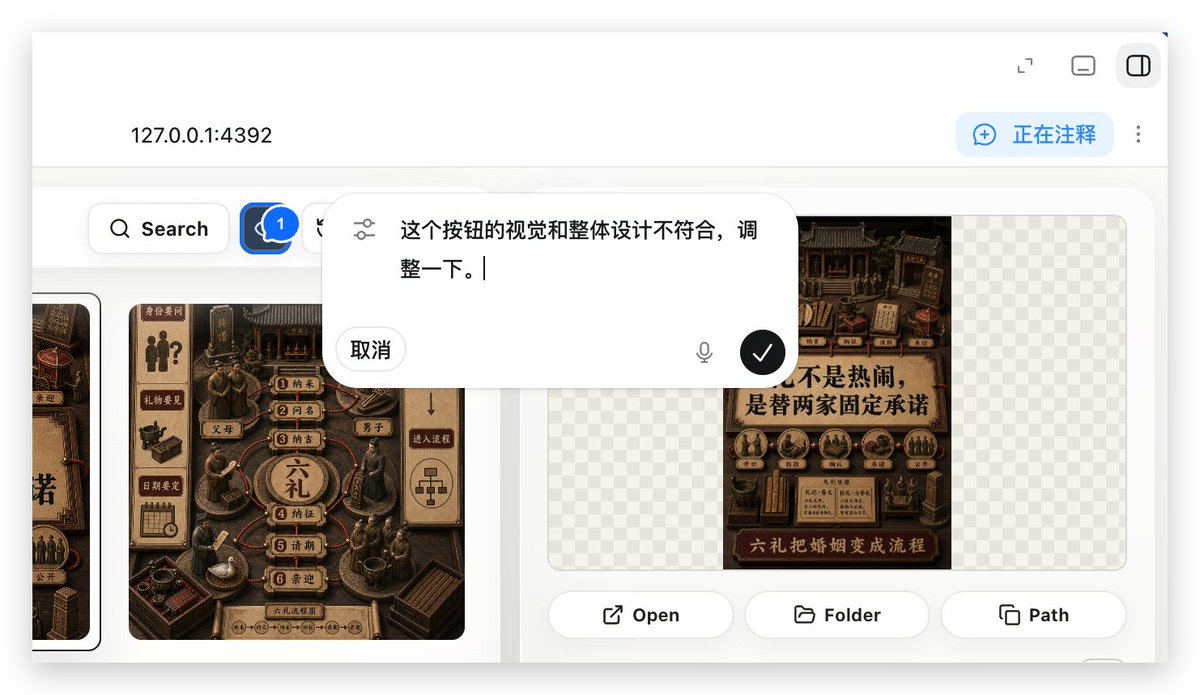
Demo av annotering av lokale webapper
Genererer en realistisk forhåndsvisning av localhost-webappen som viser et annotasjonsoverlegg som brukes til å be om justeringer av brukergrensesnittet i en arbeidsflyt for webappbygging.
Dette er et tilfelle av en GPT Image 2 -ledetekst for Annen inspirasjon . Bruk den kopieringsklare ledeteksten nedenfor for å generere lignende visuelle elementer, og gjennomgå Awesome GPT Image 2 Prompts -attribusjonen pluss kommersielle bruksrettigheter før gjenbruk.
Trenger du hele settet med ledetekster? Bruk Annen inspirasjon emnehub for flere relaterte eksempler, eller åpne GPT Image 2 rask katalog for den fullstendige eksempelindeksen, gjenbrukbare strukturer og kildeattribusjon.
Free 1K preview
Generate one preview image instantly, no sign-up required.
1900/4000
Spørsmål
Klar til kopiering
With REFERENCE_0 as context, create a follow-up screenshot demonstrating the “Build Web Apps” tool running as a local web app preview. Replace the plugin list view with a browser-style localhost workspace for {argument name="local address" default="127.0.0.1:4392"}, employing a clean white UI, soft shadows, and rounded corner panels.

Key Changes: Showcase an app building/annotation interface instead of the original plugin directory. Add a top bar with the local address displayed on the left and 3 small window/control icons on the right. Include a blue annotation status capsule in the upper right corner with the text {argument name="annotation status" default="Commenting"}, accompanied by a vertical three-dot menu.

Content Area: Create a gallery-style UI showcasing Chinese poster/card designs within rounded white panels. Include a left-side toolbar row with a search button and a blue comment/annotation button marked with “1”. Display at least two visible poster/card thumbnails in a dark brown, traditional Chinese visual style, while maintaining some grid-pattern transparent placeholder areas on the right panel.

Overlay: Position a large, floating, rounded corner annotation input bubble centered in the upper-middle of the content area. It should resemble an embedded AI comment editor, with slider/settings icons on the left, containing Chinese instruction text {argument name="comment text" default="The visual and overall design of this button doesn't align, please adjust it."}, a “Cancel” button, a microphone icon, and a black circular confirmation button with a white checkmark.

Bottom of the right preview panel: Add 3 operation buttons labeled “Open”, “Folder”, and “Path”, each accompanied by a simple line icon. Maintain the realism of the screenshot, as if it were a product demo requesting UI optimization using Build Web Apps combined with built-in HTML annotation.
Promptvariabler
Redigerbare argumentplassholdere funnet i ledeteksten, med standardverdiene.
Variabel
local address
Misligholde
127.0.0.1:4392
Variabel
annotation status
Misligholde
Commenting
Variabel
comment text
Misligholde
The visual and overall design of this button doesn't align, please adjust it.
Best for
- - Annen inspirasjon visual exploration
- - Image generation and reference-image edits
- - Reusable briefs that keep source attribution visible
Change these parts
- - Subject, product, character, or scene
- - Aspect ratio, camera, lighting, and background
- - Brand, text, color, and output constraints
Recommended model and settings
- - Model: gpt-image-2
- - Input mode: Tekst til bilde
- - Aspect ratio: source
- - Commercial status: review original source
How to use this prompt
- 1. Copy the prompt and preserve its structure for the first test.
- 2. Replace the subject, context, and publishing channel.
- 3. Change one camera, lighting, or style variable per iteration.
- 4. Inspect the output, source, text, and rights before reuse.
Limitations, source, and reuse cautions
- - Generated output is an editable draft, not factual, legal, or rights evidence.
- - Review the linked source, people, brands, logos, text, and third-party media before commercial use.
Importert fra Awesome GPT Image 2 Prompts . Attribusjon kreves. Status for kommersiell bruk er allowed ; sjekk kilderettighetene før betalt bruk.
Related prompt packs
Flere saker i denne kategorien
Prioritert etter kategori, kompatibilitet med inndatamodus, kvalitet og lavere risiko.






Gjenbruk og kildenotater
Bruk denne ledeteksten på en trygg måte etter at du har forhåndsvist saken.
- 1.Kopier ledeteksten eller åpne den direkte i Dovoo med genereringsknappen.
- 2.Juster variabler, sideforhold og referansebilder for ditt eget brukstilfelle.
- 3.Før publisering eller betalt bruk, kontroller kilderettigheter, krav til kreditering og risikoer knyttet til merkevare eller likhet.