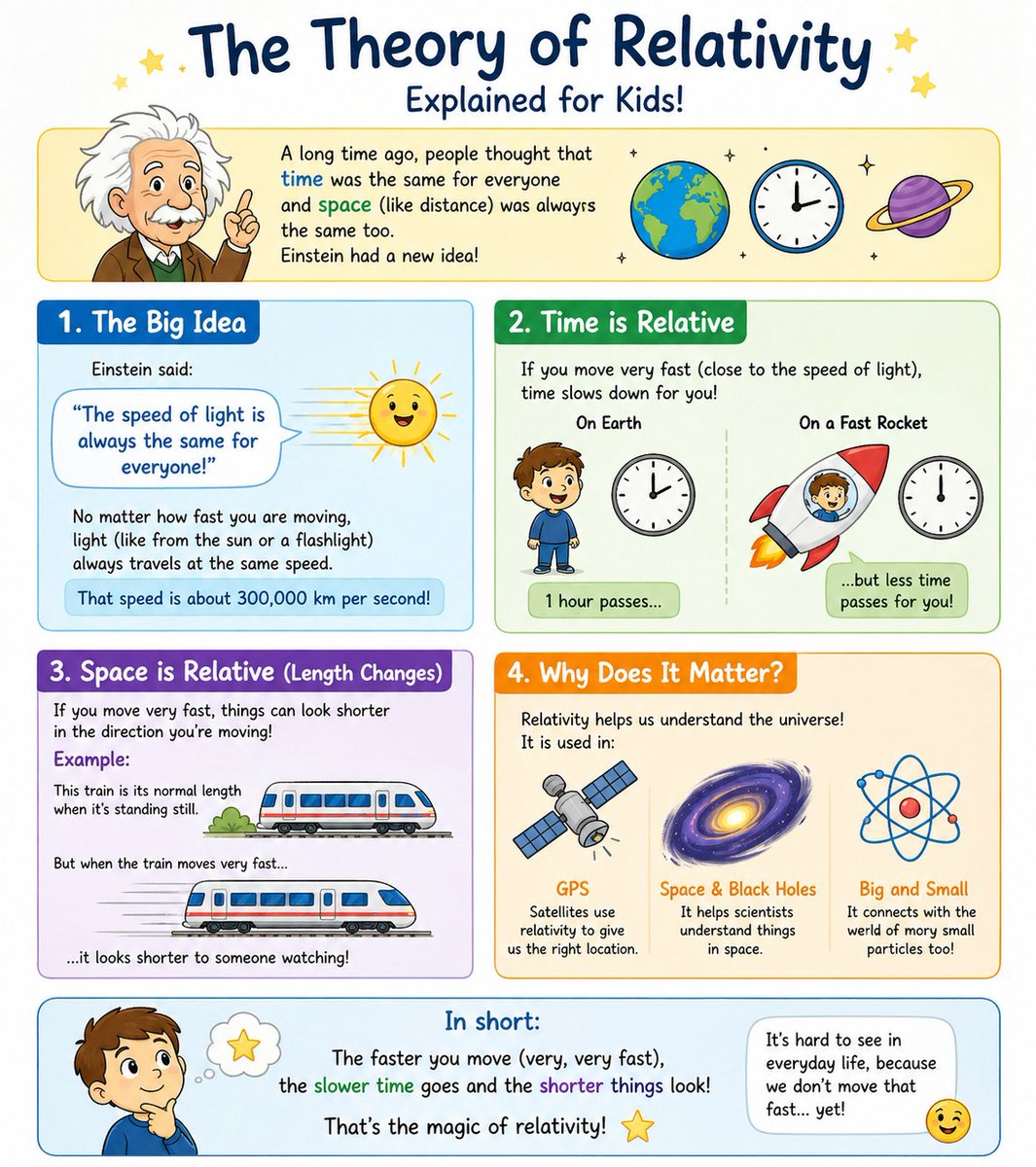
Relativitetsinfografikkplakat for barn
En fargerik pedagogisk plakat forklarer relativitetsteorien for barn ved hjelp av fire merkede seksjoner, søte tegneserier og enkle visuelle sammenligninger for bruk i klasserommet eller på sosiale medier.
Dette er et tilfelle av en GPT Image 2 -ledetekst for Grafikk og plakat . Bruk den kopieringsklare ledeteksten nedenfor for å generere lignende visuelle elementer, og gjennomgå Awesome GPT Image 2 Prompts -attribusjonen pluss kommersielle bruksrettigheter før gjenbruk.
Trenger du hele settet med ledetekster? Bruk Grafikk og plakat emnehub for flere relaterte eksempler, eller åpne GPT Image 2 rask katalog for den fullstendige eksempelindeksen, gjenbrukbare strukturer og kildeattribusjon.
Free 1K preview
Generate one preview image instantly, no sign-up required.
4000/4000
Spørsmål
Klar til kopiering
{
  "type": "children's educational infographic poster",
  "topic": "{argument name=\"topic\" default=\"The Theory of Relativity\"}",
  "subtitle": "{argument name=\"subtitle text\" default=\"Explained for Kids!\"}",
  "style": "cute hand-drawn classroom infographic, bright pastel colors, rounded panels, white background, friendly doodle stars and sparkles, thick outlines, easy-to-understand visual metaphors, playful textbook poster design for elementary school children",
  "format": "vertical poster",
  "header": {
    "title": "The Theory of Relativity",
    "subtitle": "Explained for Kids!",
    "icons_count": 3,
    "icons": [
      "Earth globe",
      "round clock",
      "purple ringed planet"
    ],
    "intro_box": {
      "left_figure": "cartoon Einstein with wild white hair, brown jacket, green vest, white shirt, raising one finger",
      "text": "A long time ago, people thought that time was the same for everyone and space (like distance) was always the same too. Einstein had a new idea!"
    }
  },
  "layout": {
    "sections": [
      {
        "title": "1. The Big Idea",
        "position": "upper left",
        "count": 1,
        "visuals_count": 2,
        "visuals": [
          "speech bubble with quote",
          "smiling sun with rays"
        ],
        "text": "Einstein said: \"The speed of light is always the same for everyone!\" No matter how fast you are moving, light (like from the sun or a flashlight) always travels at the same speed. That speed is about 300,000 km per second!",
        "panel_color": "blue"
      },
      {
        "title": "2. Time is Relative",
        "position": "upper right",
        "count": 2,
        "labels": [
          "On Earth",
          "On a Fast Rocket"
        ],
        "visuals_count": 4,
        "visuals": [
          "child standing on Earth side",
          "clock on Earth side",
          "child inside red rocket with orange flame",
          "clock on rocket side"
        ],
        "text": "If you move very fast (close to the speed of light), time slows down for you! Left caption: 1 hour passes... Right caption: ...but less time passes for you!",
        "panel_color": "green"
      },
      {
        "title": "3. Space is Relative (Length Changes)",
        "position": "middle left",
        "count": 2,
        "labels": [
          "normal train length when standing still",
          "shorter-looking train when moving very fast"
        ],
        "visuals_count": 2,
        "visuals": [
          "train at rest",
          "stretched-motion train with speed lines"
        ],
        "text": "If you move very fast, things can look shorter in the direction you're moving! Example: This train is its normal length when it's standing still. But when the train moves very fast... ...it looks shorter to someone watching!",
        "panel_color": "purple"
      },
      {
        "title": "4. Why Does It Matter?",
        "position": "middle right",
        "count": 3,
        "labels": [
          "GPS",
          "Space & Black Holes",
          "Big and Small"
        ],
        "visuals_count": 3,
        "visuals": [
          "satellite",
          "spiral galaxy or black hole",
          "atom symbol"
        ],
        "text": "Relativity helps us understand the universe! It is used in: GPS — Satellites use relativity to give us the right location. Space & Black Holes — It helps scientists understand things in space. Big and Small — It connects with the weird world of very small particles too!",
        "panel_color": "orange"
      }
    ],
    "footer": {
      "title": "In short:",
      "left_figure": "thoughtful cartoon boy with hand on chin and a thought bubble containing a yellow star",
      "summary_text": "The faster you move (very, very fast), the slower time goes and the shorter things look! That's the magic of relativity!",
      "right_note": "It's hard to see in everyday life, because we don't move that fast... yet!",
      "extra_icon": "winking smiley face"
    }
  },
  "design_notes": {
    "section_count": 4,
    "total_main_icons": 12,
    "typography": "large playful handwritten title, rounded child-friendly sans serif body text",
    "palette": [
      "navy blue",
      "sky blue",
      "green",
      "purple",
      "orange",
      "yellow",
      "red",
      "white"
    ],
    "mood": "curious, cheerful, educational, kid-friendly"
  }
}
Promptvariabler
Redigerbare argumentplassholdere funnet i ledeteksten, med standardverdiene.
Variabel
topic
Misligholde
The Theory of Relativity
Variabel
subtitle text
Misligholde
Explained for Kids!
Best for
- - Grafikk og plakat visual exploration
- - Image generation and reference-image edits
- - Reusable briefs that keep source attribution visible
Change these parts
- - Subject, product, character, or scene
- - Aspect ratio, camera, lighting, and background
- - Brand, text, color, and output constraints
Recommended model and settings
- - Model: gpt-image-2
- - Input mode: Tekst til bilde
- - Aspect ratio: source
- - Commercial status: review original source
How to use this prompt
- 1. Copy the prompt and preserve its structure for the first test.
- 2. Replace the subject, context, and publishing channel.
- 3. Change one camera, lighting, or style variable per iteration.
- 4. Inspect the output, source, text, and rights before reuse.
Limitations, source, and reuse cautions
- - Generated output is an editable draft, not factual, legal, or rights evidence.
- - Review the linked source, people, brands, logos, text, and third-party media before commercial use.
Importert fra Awesome GPT Image 2 Prompts . Attribusjon kreves. Status for kommersiell bruk er allowed ; sjekk kilderettighetene før betalt bruk.
Flere saker i denne kategorien
Prioritert etter kategori, kompatibilitet med inndatamodus, kvalitet og lavere risiko.






Gjenbruk og kildenotater
Bruk denne ledeteksten på en trygg måte etter at du har forhåndsvist saken.
- 1.Kopier ledeteksten eller åpne den direkte i Dovoo med genereringsknappen.
- 2.Juster variabler, sideforhold og referansebilder for ditt eget brukstilfelle.
- 3.Før publisering eller betalt bruk, kontroller kilderettigheter, krav til kreditering og risikoer knyttet til merkevare eller likhet.