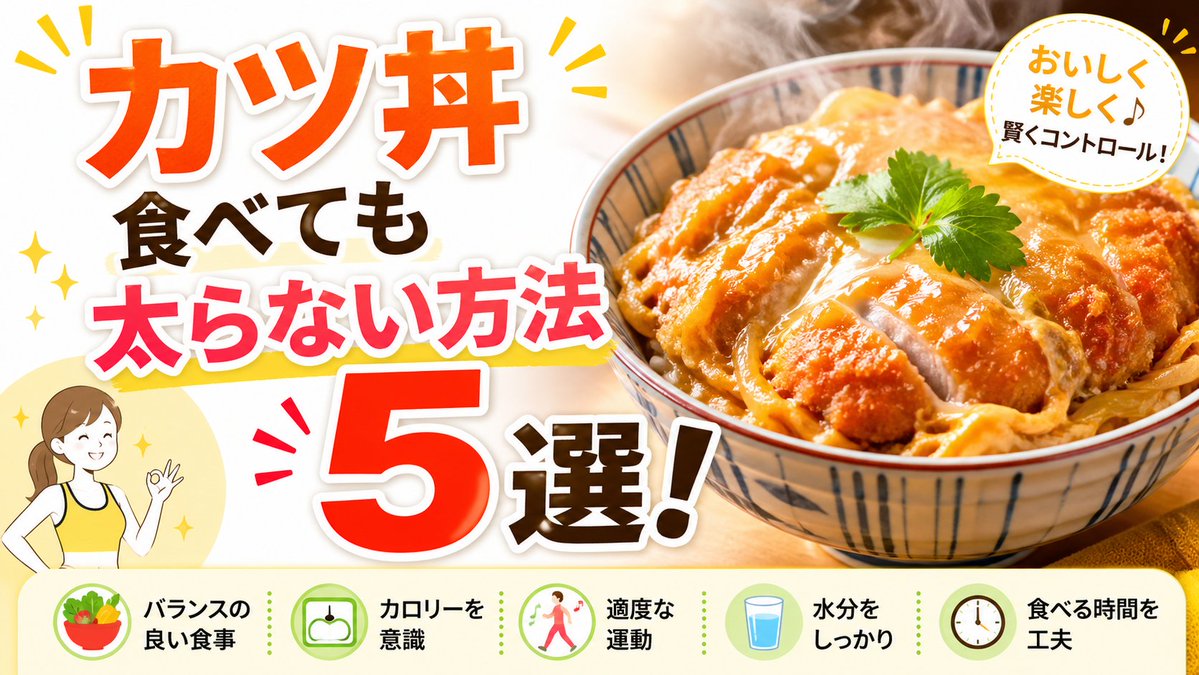
Miniatyrbilde av japansk Katsudon-diett
Dette genererer et dristig YouTube-miniatyrbilde om japansk mat og helse med en dampende katsudon-bolle og fem vektkontrolltips for iøynefallende videoomslag.
Dette er et tilfelle av en GPT Image 2 -ledetekst for Mat og drikke . Bruk den kopieringsklare ledeteksten nedenfor for å generere lignende visuelle elementer, og gjennomgå Awesome GPT Image 2 Prompts -attribusjonen pluss kommersielle bruksrettigheter før gjenbruk.
Trenger du hele settet med ledetekster? Bruk Mat og drikke emnehub for flere relaterte eksempler, eller åpne GPT Image 2 rask katalog for den fullstendige eksempelindeksen, gjenbrukbare strukturer og kildeattribusjon.
Free 1K preview
Generate one preview image instantly, no sign-up required.
1897/4000
Spørsmål
Klar til kopiering
Create a bright, high-impact Japanese YouTube thumbnail about diet-friendly eating, in a clean split composition. The left half is a white background filled with oversized bold Japanese headline text stacked vertically and diagonally for maximum readability: the top line says "カツ丼" in huge vivid orange with a thick white outline and soft drop shadow, below it "食べても" in dark brown, then "太らない方法" in hot pink with a white outline and a yellow underline swoosh, and at the bottom a gigantic red-orange "5" with white outline next to "選!" in dark brown with a white outline. Add small yellow sparkle accents and comic-style emphasis marks around the headline. In the lower left corner, place a simple flat illustration of 1 smiling woman from the waist up wearing a yellow tank top, brown hair tied back in a ponytail, making an OK hand gesture, set over a pale yellow circle. The right half shows a close-up, appetizing katsudon bowl photographed in warm light: 1 ceramic bowl with blue vertical stripe patterns, filled with sliced golden-brown breaded pork cutlet over egg and onion on rice, glossy sauce, visible steam rising, and 1 small green herb leaf garnish on top. In the upper right corner, add 1 white circular badge with a dotted yellow border containing the Japanese text "おいしく楽しく♪ 賢くコントロール!" in a friendly handwritten style, with yellow accent marks around the badge. Along the entire bottom, include a pale cream horizontal information strip with 5 circular icons and 5 labels separated evenly from left to right: 1 salad bowl icon with the text "バランスの良い食事", 1 scale icon with "カロリーを意識", 1 walking person icon with "適度な運動", 1 glass of water icon with "水分をしっかり", and 1 clock icon with "食べる時間を工夫". Use a glossy commercial thumbnail aesthetic, warm food photography, thick outlined typography, cheerful health-themed colors, and strong contrast optimized for social media click-through.
Best for
- - Mat og drikke visual exploration
- - Image generation and reference-image edits
- - Reusable briefs that keep source attribution visible
Change these parts
- - Subject, product, character, or scene
- - Aspect ratio, camera, lighting, and background
- - Brand, text, color, and output constraints
Recommended model and settings
- - Model: gpt-image-2
- - Input mode: Tekst til bilde
- - Aspect ratio: source
- - Commercial status: review original source
How to use this prompt
- 1. Copy the prompt and preserve its structure for the first test.
- 2. Replace the subject, context, and publishing channel.
- 3. Change one camera, lighting, or style variable per iteration.
- 4. Inspect the output, source, text, and rights before reuse.
Limitations, source, and reuse cautions
- - Generated output is an editable draft, not factual, legal, or rights evidence.
- - Review the linked source, people, brands, logos, text, and third-party media before commercial use.
Importert fra Awesome GPT Image 2 Prompts . Attribusjon kreves. Status for kommersiell bruk er allowed ; sjekk kilderettighetene før betalt bruk.
Flere saker i denne kategorien
Prioritert etter kategori, kompatibilitet med inndatamodus, kvalitet og lavere risiko.






Gjenbruk og kildenotater
Bruk denne ledeteksten på en trygg måte etter at du har forhåndsvist saken.
- 1.Kopier ledeteksten eller åpne den direkte i Dovoo med genereringsknappen.
- 2.Juster variabler, sideforhold og referansebilder for ditt eget brukstilfelle.
- 3.Før publisering eller betalt bruk, kontroller kilderettigheter, krav til kreditering og risikoer knyttet til merkevare eller likhet.