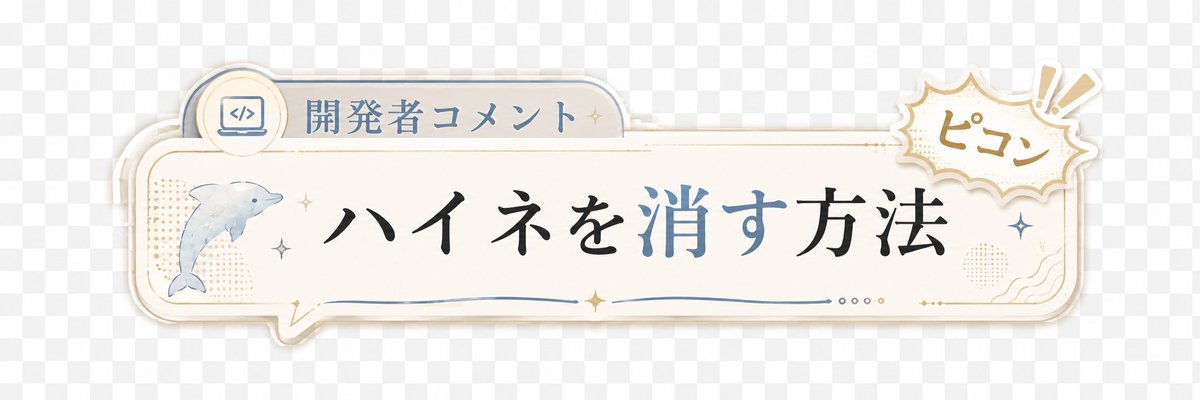
Japanese Developer Comment Banner
A decorative transparent-style Japanese lower-third banner for adding developer comments or captions to short videos.
Dette er et tilfelle av en GPT Image 2 -ledetekst for Grafikk og plakat . Bruk den kopieringsklare ledeteksten nedenfor for å generere lignende visuelle elementer, og gjennomgå Awesome GPT Image 2 Prompts -attribusjonen pluss kommersielle bruksrettigheter før gjenbruk.
Trenger du hele settet med ledetekster? Bruk Grafikk og plakat emnehub for flere relaterte eksempler, eller åpne GPT Image 2 rask katalog for den fullstendige eksempelindeksen, gjenbrukbare strukturer og kildeattribusjon.
Free 1K preview
Generate one preview image instantly, no sign-up required.
1820/4000
Spørsmål
Klar til kopiering
Create a transparent-background decorative Japanese lower-third banner for a short video overlay. Canvas: wide horizontal 3:1 ratio, about 1200×400 px, with a light gray checkerboard transparency preview behind the artwork. Main object: a cream-white rounded rectangular speech-bubble plaque spanning most of the width, with layered offset shadows and thin gold and pale blue outline strokes, slightly vintage stationery style. Layout: place a small tab on the upper left of the plaque containing a circular icon of a laptop with code brackets and the label {argument name="category label" default="開発者コメント"}; place the main headline centered in large elegant Japanese Mincho-style calligraphy reading {argument name="headline text" default="ハイネを消す方法"}, with the characters for “消す” colored muted blue while the rest is black. On the left side inside the plaque, include exactly 1 watercolor-style dolphin illustration facing right, pale blue-gray. On the upper right, overlapping the plaque, add exactly 1 comic burst sticker with scalloped edges, beige outline, and handwritten text {argument name="sound effect text" default="ピコン"}, plus exactly 2 exclamation mark rays. Decorative details: include exactly 6 small sparkle stars distributed around the dolphin, headline, and right edge; exactly 1 thin blue wavy underline beneath the headline; exactly 4 tiny dots near the lower right center; subtle beige halftone dot patches on the left and right; small gold ornamental corner flourishes. Visual style: soft pastel cream, dusty blue, muted gold, clean Japanese YouTube Shorts caption graphic, gentle drop shadows, crisp vector edges mixed with light watercolor texture. Constraints: no characters or people, no extra text, keep the banner readable with generous empty space, preserve a transparent PNG overlay feel.Promptvariabler
Redigerbare argumentplassholdere funnet i ledeteksten, med standardverdiene.
Variabel
category label
Misligholde
開発者コメント
Variabel
headline text
Misligholde
ハイネを消す方法
Variabel
sound effect text
Misligholde
ピコン
Best for
- - Grafikk og plakat visual exploration
- - Image generation and reference-image edits
- - Reusable briefs that keep source attribution visible
Change these parts
- - Subject, product, character, or scene
- - Aspect ratio, camera, lighting, and background
- - Brand, text, color, and output constraints
Recommended model and settings
- - Model: gpt-image-2
- - Input mode: Tekst til bilde
- - Aspect ratio: source
- - Commercial status: review original source
How to use this prompt
- 1. Copy the prompt and preserve its structure for the first test.
- 2. Replace the subject, context, and publishing channel.
- 3. Change one camera, lighting, or style variable per iteration.
- 4. Inspect the output, source, text, and rights before reuse.
Limitations, source, and reuse cautions
- - Generated output is an editable draft, not factual, legal, or rights evidence.
- - Review the linked source, people, brands, logos, text, and third-party media before commercial use.
Importert fra Awesome GPT Image 2 Prompts . Attribusjon kreves. Status for kommersiell bruk er allowed ; sjekk kilderettighetene før betalt bruk.
Flere saker i denne kategorien
Prioritert etter kategori, kompatibilitet med inndatamodus, kvalitet og lavere risiko.

Cute Focus Desk Flat Lay and Kawaii Illustration
Tekst til bilde

Autumn Cozy Casual Outfit Prompt
Tekst til bilde

Street Selfie with Cat in Matching Cap
Tekst til bilde

Morning Bed Stretching Legs Prompt
Tekst til bilde
GPT Image 2 Prompt for Mirror Selfie with Flowers
Tekst til bilde

Boisterous Shrimpers Entering Pub
Tekst til bilde
Gjenbruk og kildenotater
Bruk denne ledeteksten på en trygg måte etter at du har forhåndsvist saken.
- 1.Kopier ledeteksten eller åpne den direkte i Dovoo med genereringsknappen.
- 2.Juster variabler, sideforhold og referansebilder for ditt eget brukstilfelle.
- 3.Før publisering eller betalt bruk, kontroller kilderettigheter, krav til kreditering og risikoer knyttet til merkevare eller likhet.