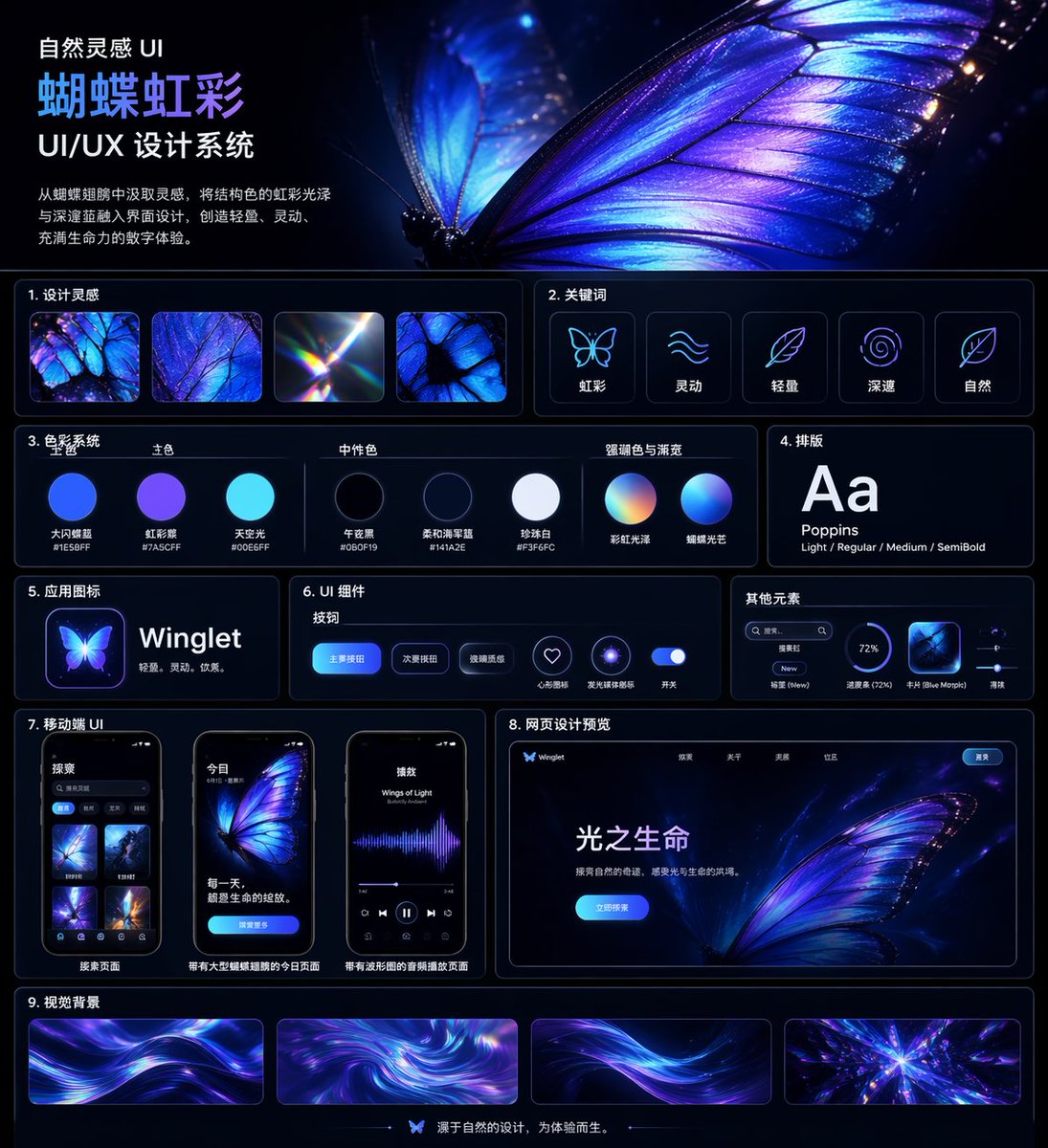
Iriserende sommerfugl brukergrensesnitt hovedkort
Et polert presentasjonstavle for kinesisk UI/UX-designsystem i mørk modus med et glødende sommerfugltema, egnet for designcasestudier, porteføljeomslag og stilsystempresentasjoner.
Dette er et tilfelle av en GPT Image 2 -ledetekst for Annen inspirasjon . Bruk den kopieringsklare ledeteksten nedenfor for å generere lignende visuelle elementer, og gjennomgå Awesome GPT Image 2 Prompts -attribusjonen pluss kommersielle bruksrettigheter før gjenbruk.
Trenger du hele settet med ledetekster? Bruk Annen inspirasjon emnehub for flere relaterte eksempler, eller åpne GPT Image 2 rask katalog for den fullstendige eksempelindeksen, gjenbrukbare strukturer og kildeattribusjon.
Free 1K preview
Generate one preview image instantly, no sign-up required.
4000/4000
Spørsmål
Klar til kopiering
{
  "type": "UI/UX design system showcase board",
  "theme": "dark mode, nature-inspired, luminous iridescent aesthetic",
  "language": "Chinese",
  "canvas": {
    "aspect_ratio": "square poster",
    "background": "deep midnight navy to black with subtle glow",
    "style": "premium futuristic presentation board with thin neon-blue panel outlines, glossy highlights, soft bloom, and high contrast"
  },
  "header": {
    "title": "Natural Inspiration UI\n{argument name=\"system title\" default=\"Butterfly Iridescence\"}\nUI/UX Design System",
    "description": "{argument name=\"chinese description\" default=\"Inspired by butterfly wings, incorporate structural color iridescence with deep blues into the interface design, creating a light, dynamic, and vibrant digital experience.\"}",
    "hero_image": "an oversized, ultra-detailed glowing butterfly wing in electric blue, violet, and iridescent cyan filling the upper-right half, with visible vein structure, translucent edges, spark-like particles, and a second blurred wing behind it"
  },
  "layout": {
    "sections": [
      {
        "title": "1. Design inspiration",
        "position": "upper left below header",
        "count": 4,
        "labels": [
          "iridescent butterfly wing macro",
          "blue-purple wing texture close-up",
          "light refraction prism flare",
          "butterfly wing cell pattern"
        ]
      },
      {
        "title": "2. Keywords",
        "position": "upper right below hero",
        "count": 5,
        "labels": [
          "Iridescent",
          "Dynamic",
          "Lightweight",
          "profound",
          "Natural"
        ],
        "icon_style": "simple glowing line icons inside rounded dark cards"
      },
      {
        "title": "3. Color System",
        "position": "mid left",
        "subsections": [
          {
            "title": "Primary Color",
            "count": 3,
            "labels": [
              "Big Flash Butterfly Blue #1E5BFF",
              "Iridescent Purple #7A5CFF",
              "Sky Light #00E6FF"
            ]
          },
          {
            "title": "Neutral Color",
            "count": 3,
            "labels": [
              "Midnight Black #060F19",
              "Soft Navy Blue #141A2E",
              "Pearl White #F3F6FC"
            ]
          },
          {
            "title": "Accent Color & Gradient",
            "count": 2,
            "labels": [
              "Rainbow Iridescence",
              "Butterfly Lighting"
            ]
          }
        ],
        "visual": "circular color swatches and gradient spheres with Chinese labels beneath"
      },
      {
        "title": "4. Typography",
        "position": "mid right",
        "count": 1,
        "labels": [
          "Aa Poppins Light / Regular / Medium / SemiBold"
        ],
        "visual": "large white Aa on dark card"
      },
      {
        "title": "5. App Icons",
        "position": "left center",
        "count": 1,
        "text": "{argument name=\"app name\" default=\"Winglet\"} Lightweight. Agile. Elegant.",
        "visual": "glowing butterfly app icon beside app name"
      },
      {
        "title": "6. UI Components",
        "position": "center",
        "subsections": [
          {
            "title": "Button",
            "count": 3,
            "labels": [
              "Primary Button",
              "Secondary Button",
              "Glass texture"
            ]
          },
          {
            "title": "Icon",
            "count": 2,
            "labels": [
              "Heart-shaped collection",
              "Glowing ring"
            ]
          },
          {
            "title": "Switch",
            "count": 1,
            "labels": [
              "Switch"
            ]
          }
        ],
        "visual": "rounded blue buttons, neon icon buttons, and a glowing toggle on a dark panel"
      },
      {
        "title": "Other elements",
        "position": "right center",
        "count": 4,
        "labels": [
          "Search box",
          "Label New",
          "Progress bar (72%)",
          "Card Blue Morpho"
        ],
        "visual": "small utility UI widgets in a compact horizontal card"
      },
      {
        "title": "7. Mobile UI",
        "position": "lower left",
        "count": 3,
        "labels": [
          "Search Page",
          "Today page with a large butterfly illustration",
          "Audio playback page with a waveform"
        ],
        "visual": "three smartphone mockups with rounded corners, dark interface, blue-violet butterfly visuals"
      },
      {
        "title": "8. Web design preview",
        "position": "lower right",
        "count": 1,
        "labels": [
          "Light of Life"
        ],
        "visual": "desktop landing page mockup with butterfly hero image, top navigation, bright blue call-to-action button, and Chinese body text"
      },
      {
        "title": "9. Visual Background",
        "position": "bottom full width",
        "count": 4,
        "labels": [
          "flowing light ribbon background 1",
          "swirling iridescent vortex",
          "flowing light ribbon background 2",
          "radiant crystalline burst"
        ],
        "visual": "four elongated rectangular background samples in purple, blue, and cyan"
      }
    ],
    "footer": {
      "count": 1,
      "text": "Designs originating from nature, created for experience.",
      "center_icon": "small butterfly icon"
    }
  },
  "art_direction": {
    "materials": "glassmorphism, neon edge lighting, smooth gradients, subtle reflections",
    "colors": "electric blue, indigo, violet, cyan, white",
    "composition": "clean grid with 9 numbered content sections, generous spacing, thin rounded borders, and a dominant butterfly hero image",
    "render_quality": "highly polished, crisp typography, premium Behance-style design system board"
  }
}
Promptvariabler
Redigerbare argumentplassholdere funnet i ledeteksten, med standardverdiene.
Variabel
system title
Misligholde
Butterfly Iridescence
Variabel
chinese description
Misligholde
Inspired by butterfly wings, incorporate structural color iridescence with deep blues into the interface design, creating a light, dynamic, and vibrant digital experience.
Variabel
app name
Misligholde
Winglet
Best for
- - Annen inspirasjon visual exploration
- - Image generation and reference-image edits
- - Reusable briefs that keep source attribution visible
Change these parts
- - Subject, product, character, or scene
- - Aspect ratio, camera, lighting, and background
- - Brand, text, color, and output constraints
Recommended model and settings
- - Model: gpt-image-2
- - Input mode: Tekst til bilde
- - Aspect ratio: source
- - Commercial status: review original source
How to use this prompt
- 1. Copy the prompt and preserve its structure for the first test.
- 2. Replace the subject, context, and publishing channel.
- 3. Change one camera, lighting, or style variable per iteration.
- 4. Inspect the output, source, text, and rights before reuse.
Limitations, source, and reuse cautions
- - Generated output is an editable draft, not factual, legal, or rights evidence.
- - Review the linked source, people, brands, logos, text, and third-party media before commercial use.
Importert fra Awesome GPT Image 2 Prompts . Attribusjon kreves. Status for kommersiell bruk er allowed ; sjekk kilderettighetene før betalt bruk.
Flere saker i denne kategorien
Prioritert etter kategori, kompatibilitet med inndatamodus, kvalitet og lavere risiko.

Android Quantum Lab Workstation
Tekst til bilde

Surreal 3D Chess Match Artwork
Tekst til bilde

Female Clown Cyborg Portrait
Tekst til bilde

Imperial Research Bunker on Volcanic Planet
Tekst til bilde

Manga Desert Radio Telescope Road Trip
Tekst til bilde

Greyscale Puzzle Portrait with Color Accent
Tekst til bilde
Gjenbruk og kildenotater
Bruk denne ledeteksten på en trygg måte etter at du har forhåndsvist saken.
- 1.Kopier ledeteksten eller åpne den direkte i Dovoo med genereringsknappen.
- 2.Juster variabler, sideforhold og referansebilder for ditt eget brukstilfelle.
- 3.Før publisering eller betalt bruk, kontroller kilderettigheter, krav til kreditering og risikoer knyttet til merkevare eller likhet.