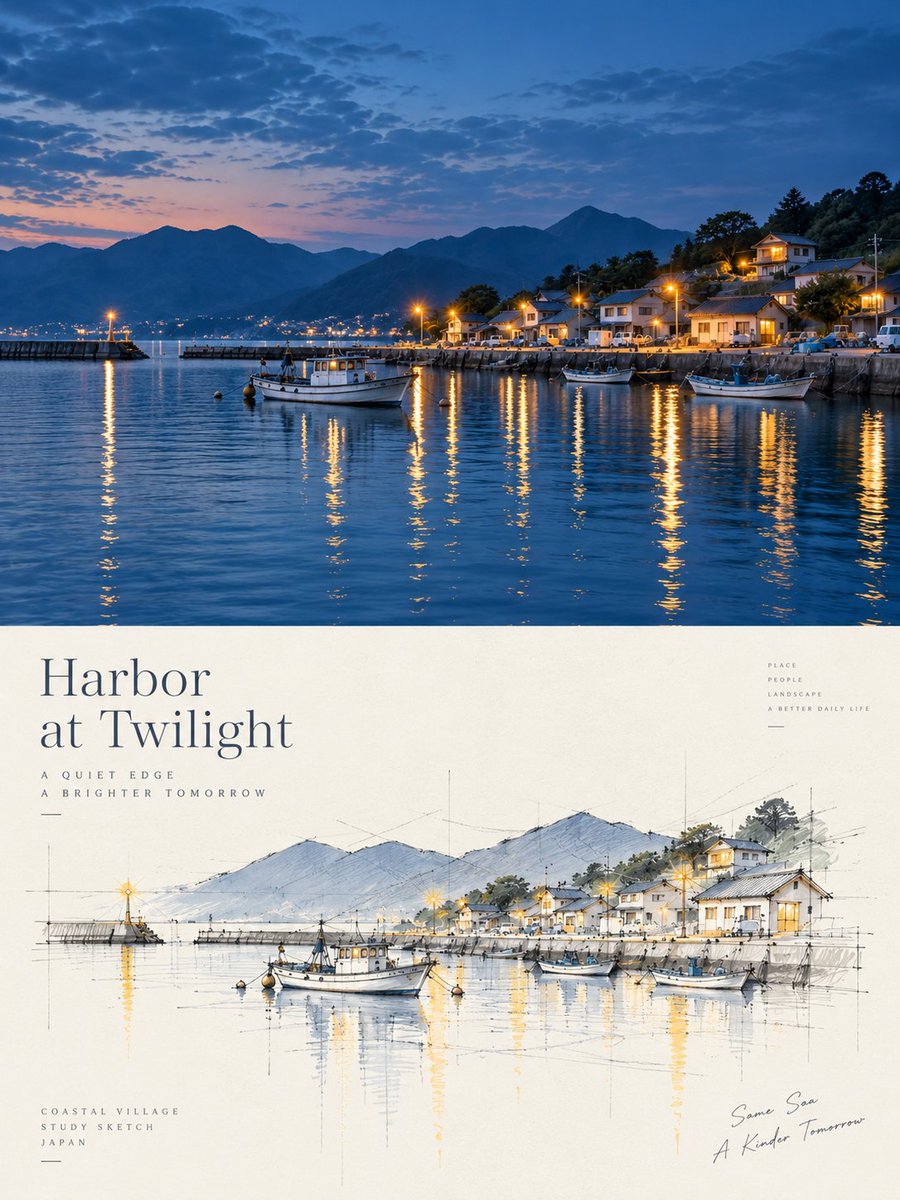
Harbor Twilight Photo Sketch Poster
Creates a split travel poster with a twilight harbor photo above and a matching architectural concept sketch below.
Dette er et tilfelle av en GPT Image 2 -ledetekst for Grafikk og plakat . Bruk den kopieringsklare ledeteksten nedenfor for å generere lignende visuelle elementer, og gjennomgå Awesome GPT Image 2 Prompts -attribusjonen pluss kommersielle bruksrettigheter før gjenbruk.
Trenger du hele settet med ledetekster? Bruk Grafikk og plakat emnehub for flere relaterte eksempler, eller åpne GPT Image 2 rask katalog for den fullstendige eksempelindeksen, gjenbrukbare strukturer og kildeattribusjon.
Free 1K preview
Generate one preview image instantly, no sign-up required.
3263/4000
Spørsmål
Klar til kopiering
Objective: Create a refined travel and architecture-themed poster, combining realistic coastal port photography with an architecturally-styled conceptual sketch of the same scene.

Canvas: Vertical 3:4 poster ratio, with elegant editorial typography. Divide the composition precisely into two parts: the upper part is a full-frame dusk port photograph; the lower part is a cream-colored paper poster area containing typography and a hand-drawn architectural perspective sketch.

Upper Photography Section: Showcase a tranquil port at the {argument name="place" default="small Japanese coastal harbor village at twilight"} blue hour. The scene includes calm, deep blue water, silhouetted mountains in the background, a small coastal village on the hillside to the right, warm yellow streetlights and lights, and long shimmering reflections on the water. Include 4 clearly visible boats: 1 main white fishing boat near the center foreground, 1 smaller boat near the right foreground, 1 darker-colored boat near the right dock, and 1 small boat near the right-center breakwater. Add a breakwater on the left with a single glowing lighthouse, town lights across the bay in the distance, layered blue mountains, scattered dusk clouds, and a soft horizon transitioning from pink-orange to blue.

Lower Poster Section: Use warm ivory paper with a subtle texture. Place a large, elegant serif title text in the upper left: "{argument name="headline text" default="Harbor\nat Twilight"}". Add two lines of small, widely-spaced uppercase sub-headline text below: “A QUIET EDGE” and “A BRIGHTER TOMORROW”. Stack small, uppercase words in the upper right: “PLACE”, “PEOPLE”, “LANDSCAPE”, “A BETTER DAILY LIFE”. Add three lines of small uppercase text in the lower left: “COASTAL VILLAGE”, “STUDY SKETCH”, “{argument name="country label" default="JAPAN"}”. Add casual handwritten-style text in the lower right: “{argument name="handwritten note" default="The Same Sea / A Brighter Tomorrow"}”.

Architectural Sketch: Draw a refined hand-drawn perspective sketch in the center of the lower half, consistent with the photo scene above. Use fine graphite construction lines, faint perspective guidelines, vertical measurement marks, ink outlines, loose watercolor washes, and pale blue mountains, soft gray roofs, soft green trees, and warm yellow highlights to represent lights and reflections. Include 4 sketch boats corresponding to the images above: the main white fishing boat in the center foreground, a small skiff on the left, a small boat near the right-center, and a larger boat on the far right. Include the breakwater, village houses, hillside trees, mountains, and lighthouse, all simplified into an architect’s conceptual sketch.

Visual Style: High-end Japanese coastal travel poster, tranquil and poetic, with realistic photography above and light architectural watercolor sketches below. Use refined typography, ample white space, fine lines, soft lighting, cinematic dusk blues, and warm golden reflections. The image should be clean and uncluttered.

Constraints: Maintain visual alignment between the upper and lower parts, and ensure the sketch clearly corresponds to the photo. Do not add extra panels, excess boats, logos, QR codes, borders, or watermarks.
Promptvariabler
Redigerbare argumentplassholdere funnet i ledeteksten, med standardverdiene.
Variabel
place
Misligholde
small Japanese coastal harbor village at twilight
Variabel
headline text
Misligholde
Harbor\nat Twilight
Variabel
country label
Misligholde
JAPAN
Variabel
handwritten note
Misligholde
The Same Sea / A Brighter Tomorrow
Best for
- - Grafikk og plakat visual exploration
- - Image generation and reference-image edits
- - Reusable briefs that keep source attribution visible
Change these parts
- - Subject, product, character, or scene
- - Aspect ratio, camera, lighting, and background
- - Brand, text, color, and output constraints
Recommended model and settings
- - Model: gpt-image-2
- - Input mode: Tekst til bilde
- - Aspect ratio: source
- - Commercial status: review original source
How to use this prompt
- 1. Copy the prompt and preserve its structure for the first test.
- 2. Replace the subject, context, and publishing channel.
- 3. Change one camera, lighting, or style variable per iteration.
- 4. Inspect the output, source, text, and rights before reuse.
Limitations, source, and reuse cautions
- - Generated output is an editable draft, not factual, legal, or rights evidence.
- - Review the linked source, people, brands, logos, text, and third-party media before commercial use.
Importert fra Awesome GPT Image 2 Prompts . Attribusjon kreves. Status for kommersiell bruk er allowed ; sjekk kilderettighetene før betalt bruk.
Flere saker i denne kategorien
Prioritert etter kategori, kompatibilitet med inndatamodus, kvalitet og lavere risiko.






Gjenbruk og kildenotater
Bruk denne ledeteksten på en trygg måte etter at du har forhåndsvist saken.
- 1.Kopier ledeteksten eller åpne den direkte i Dovoo med genereringsknappen.
- 2.Juster variabler, sideforhold og referansebilder for ditt eget brukstilfelle.
- 3.Før publisering eller betalt bruk, kontroller kilderettigheter, krav til kreditering og risikoer knyttet til merkevare eller likhet.