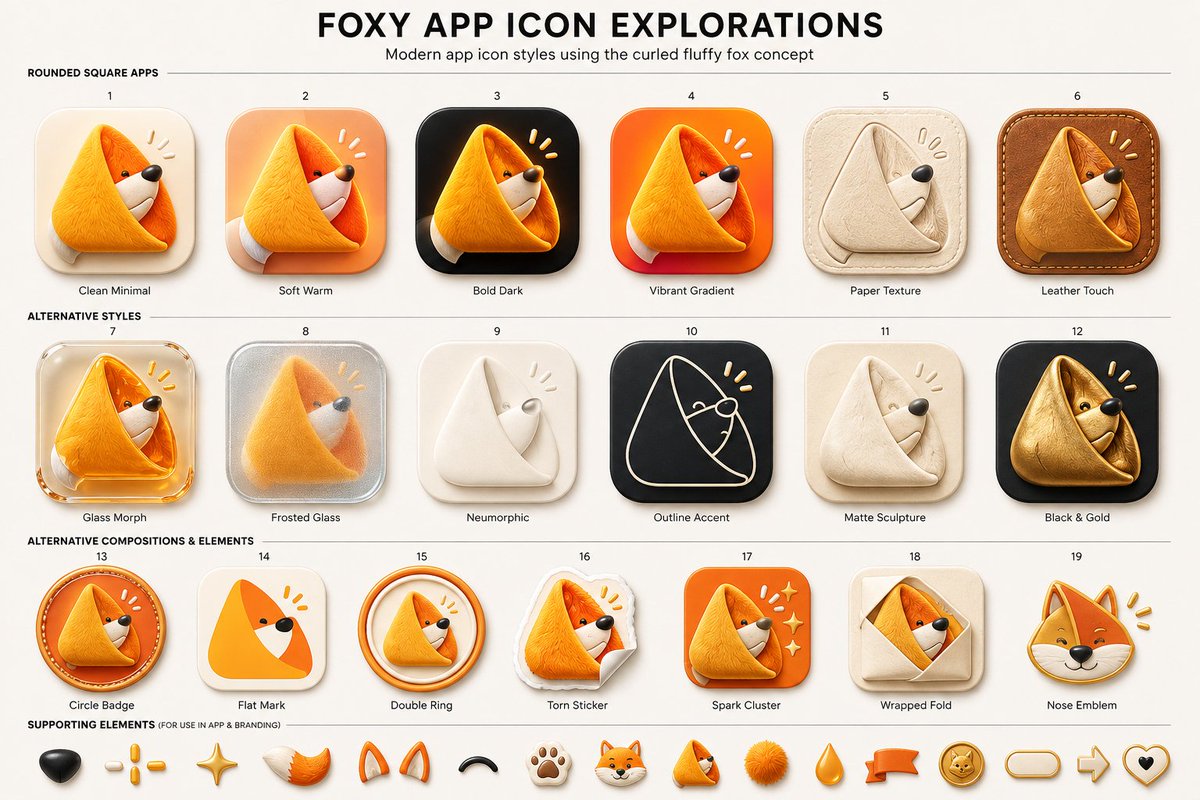
Foxy App Icon Exploration Board
A structured prompt for generating a polished 19-variant app icon exploration sheet featuring a curled fluffy fox mascot in multiple UI styles.
Dette er et tilfelle av en GPT Image 2 -ledetekst for Grafikk og plakat . Bruk den kopieringsklare ledeteksten nedenfor for å generere lignende visuelle elementer, og gjennomgå Awesome GPT Image 2 Prompts -attribusjonen pluss kommersielle bruksrettigheter før gjenbruk.
Trenger du hele settet med ledetekster? Bruk Grafikk og plakat emnehub for flere relaterte eksempler, eller åpne GPT Image 2 rask katalog for den fullstendige eksempelindeksen, gjenbrukbare strukturer og kildeattribusjon.
Free 1K preview
Generate one preview image instantly, no sign-up required.
3916/4000
Spørsmål
Klar til kopiering
Goal: Create a clean presentation board titled {argument name="headline text" default="FOXY APP ICON EXPLORATIONS"}, showing modern app icon style variations for a cute curled fluffy fox logo concept.

Canvas: Wide 16:9 beige/off-white design board, high-resolution, centered composition, subtle paper background. At the top, a large bold black all-caps headline, with a smaller subtitle underneath: {argument name="subtitle text" default="Modern app icon styles using the curled fluffy fox concept"}. Use thin horizontal divider lines to separate sections.

Layout: Arrange exactly 19 numbered app icon concepts in a neat grid of 3 rows: first row has 6 icons, second row has 6 icons, third row has 7 icons. Each icon is a rounded-square or badge-style app icon featuring the same curled triangular fox mascot: a fluffy orange fox curled into a soft triangular fold, with a white muzzle, tiny black eye, black nose, and small yellow attention marks near the head. Put a small number above each icon and a short label below it.

Section 1 title: “ROUNDED SQUARE APPS”. Include exactly 6 icons:
1. Clean Minimal — cream rounded-square background, soft shadow, simple orange curled fox.
2. Soft Warm — peach/orange warm gradient rounded-square background.
3. Bold Dark — black rounded-square background with glowing orange fox.
4. Vibrant Gradient — bright orange-red gradient rounded-square background.
5. Paper Texture — beige paper-like icon, embossed folded fox in pale cream.
6. Leather Touch — brown stitched leather rounded-square background, tan leather fox.

Section 2 title: “ALTERNATIVE STYLES”. Include exactly 6 icons:
7. Glass Morph — translucent glossy glass rounded-square icon with orange fox.
8. Frosted Glass — frosted silver translucent square with blurred fox inside.
9. Neumorphic — soft off-white raised icon with minimal white folded fox.
10. Outline Accent — dark charcoal rounded square with thin cream line-art fox outline and yellow accent marks.
11. Matte Sculpture — soft beige matte clay-like curled fox sculpture.
12. Black & Gold — black rounded square with metallic gold fox.

Section 3 title: “ALTERNATIVE COMPOSITIONS & ELEMENTS”. Include exactly 7 icons:
13. Circle Badge — circular orange badge with curled fox inside and stitched/ring detail.
14. Flat Mark — simplified flat orange triangular fox mark on cream rounded square.
15. Double Ring — curled fox inside two circular orange rings.
16. Torn Sticker — fox printed as a torn paper sticker with curled paper corner.
17. Spark Cluster — orange rounded square with fox and small sparkle/star cluster.
18. Wrapped Fold — beige square with fox peeking from a folded envelope/wrap shape.
19. Nose Emblem — fox head emblem focused on face, ears, black nose, and yellow marks.

Supporting elements: Along the bottom, add a row labeled “SUPPORTING ELEMENTS (FOR USE IN APP & BRANDING)” containing exactly 14 small mascot/brand elements: black nose, three yellow dash marks, golden sparkle star, orange-white fluffy tail, pair of orange fox ears, black curved smile/arc, paw print, small fox head, tiny curled fox mascot, orange fluffy pom-pom, orange teardrop, orange ribbon banner, gold fox coin badge, rounded pill outline, right arrow outline, and heart outline with black center. If space is tight, keep the first 14 most visible items and maintain the same visual style.

Visual style: Premium UI concept sheet, polished 3D soft-rendered icons, rounded corners, tactile materials, gentle shadows, warm orange and cream palette with black accents. Use crisp readable typography, small labels, even spacing, and a modern product-design presentation aesthetic. The mascot should remain consistently recognizable across all variations as a {argument name="mascot description" default="curled fluffy orange fox forming a triangular app icon shape"}. Avoid extra icons, extra labels, watermarks, or photorealistic background clutter.
Promptvariabler
Redigerbare argumentplassholdere funnet i ledeteksten, med standardverdiene.
Variabel
headline text
Misligholde
FOXY APP ICON EXPLORATIONS
Variabel
subtitle text
Misligholde
Modern app icon styles using the curled fluffy fox concept
Variabel
mascot description
Misligholde
curled fluffy orange fox forming a triangular app icon shape
Best for
- - Grafikk og plakat visual exploration
- - Image generation and reference-image edits
- - Reusable briefs that keep source attribution visible
Change these parts
- - Subject, product, character, or scene
- - Aspect ratio, camera, lighting, and background
- - Brand, text, color, and output constraints
Recommended model and settings
- - Model: gpt-image-2
- - Input mode: Tekst til bilde
- - Aspect ratio: source
- - Commercial status: review original source
How to use this prompt
- 1. Copy the prompt and preserve its structure for the first test.
- 2. Replace the subject, context, and publishing channel.
- 3. Change one camera, lighting, or style variable per iteration.
- 4. Inspect the output, source, text, and rights before reuse.
Limitations, source, and reuse cautions
- - Generated output is an editable draft, not factual, legal, or rights evidence.
- - Review the linked source, people, brands, logos, text, and third-party media before commercial use.
Importert fra Awesome GPT Image 2 Prompts . Attribusjon kreves. Status for kommersiell bruk er allowed ; sjekk kilderettighetene før betalt bruk.
Flere saker i denne kategorien
Prioritert etter kategori, kompatibilitet med inndatamodus, kvalitet og lavere risiko.





Gjenbruk og kildenotater
Bruk denne ledeteksten på en trygg måte etter at du har forhåndsvist saken.
- 1.Kopier ledeteksten eller åpne den direkte i Dovoo med genereringsknappen.
- 2.Juster variabler, sideforhold og referansebilder for ditt eget brukstilfelle.
- 3.Før publisering eller betalt bruk, kontroller kilderettigheter, krav til kreditering og risikoer knyttet til merkevare eller likhet.