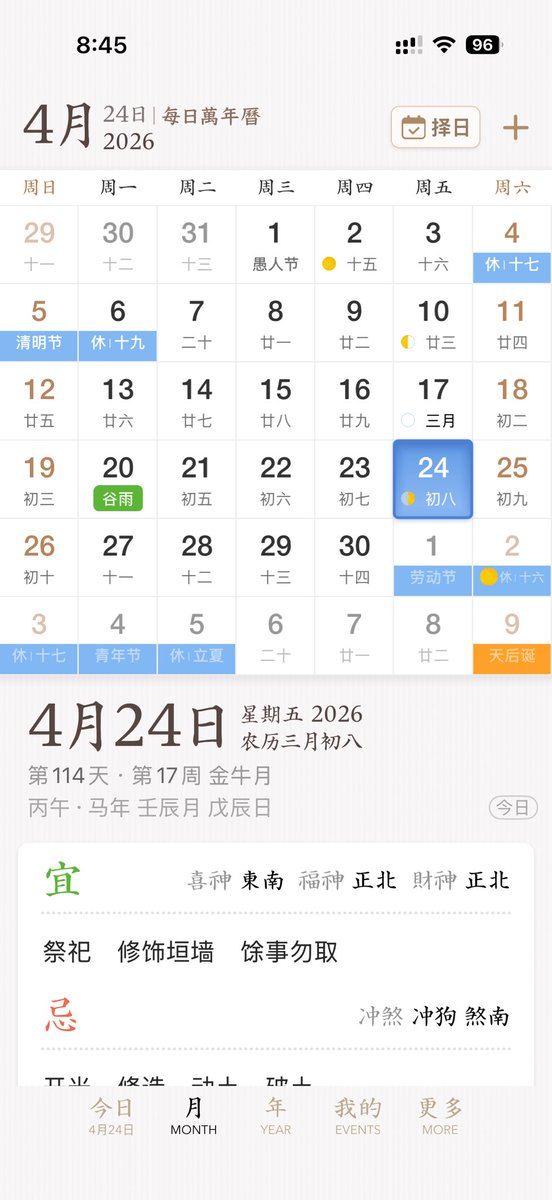
Elegant brukergrensesnitt for kinesisk kalenderapp
Denne ledeteksten genererer et polert mobilgrensesnittkonsept for en kinesisk evighetskalender- og almanakk-app, egnet for appdesignpresentasjoner eller produktmodeller.
Dette er et tilfelle av en GPT Image 2 -ledetekst for Grafikk og plakat . Bruk den kopieringsklare ledeteksten nedenfor for å generere lignende visuelle elementer, og gjennomgå Awesome GPT Image 2 Prompts -attribusjonen pluss kommersielle bruksrettigheter før gjenbruk.
Trenger du hele settet med ledetekster? Bruk Grafikk og plakat emnehub for flere relaterte eksempler, eller åpne GPT Image 2 rask katalog for den fullstendige eksempelindeksen, gjenbrukbare strukturer og kildeattribusjon.
Free 1K preview
Generate one preview image instantly, no sign-up required.
3728/4000
Spørsmål
Klar til kopiering
A sleek and elegant iPhone App UI prototype showcasing a Chinese perpetual calendar and almanac application. The image is a full-screen mobile screenshot with a soft, warm white background featuring a delicate paper texture, embodying refined East Asian editorial aesthetics. The interface combines minimalist serif and sans-serif typography, with a color palette of soft browns, grays, blacks, light blues, greens, and golden accents, and a spacious layout with delicate dividers. The top displays the iOS status bar, showing 8:45 with cellular signal, Wi-Fi icon, and 96% battery. Below is the title of {argument name="month" default="April"}, accompanied by the subtitle “24th | Daily Perpetual Calendar,” with a rounded rectangle date selection button labeled “Choose Date” on the right, featuring a calendar icon and a plus icon. The main section presents the monthly calendar grid for {argument name="year" default="2026"}, with 7 columns for the days of the week, labeled in Chinese as: Sunday, Monday, Tuesday, Wednesday, Thursday, Friday, Saturday. It renders 6 rows of monthly views, totaling 42 date cells, including dates from adjacent months. Visible dates should be: first row 29, 30, 31, 1, 2, 3, 4; second row 5, 6, 7, 8, 9, 10, 11; third row 12, 13, 14, 15, 16, 17, 18; fourth row 19, 20, 21, 22, 23, 24, 25; fifth row 26, 27, 28, 29, 30, 1, 2; sixth row 3, 4, 5, 6, 7, 8, 9. Each date cell contains a larger Gregorian date with a smaller lunar date or note below. Colored holiday and solar term labels are added to specific cells, displaying 10 highlighted labels: “Rest 17th” on the 4th, “Qingming Festival” on the 5th, “Rest 19th” on the 6th, green “Grain Rain” on the 20th, “Labor Day” on the 1st of next month, “Rest 16th” on the 2nd of next month, “Rest 17th” on the 3rd of the last row, “Youth Day” on the 4th of the last row, “Rest Lichia” on the 5th of the last row, and orange “Tianhou Birthday” on the 9th of the last row. Small lunar phase markings are added to certain dates, including yellow crescent moons or dots around the 2nd, 10th, 17th, 24th, and the 2nd of next month. The cell for {argument name="selected date" default="24"} in the Friday column is highlighted with a rounded blue gradient tile and soft shadow, displaying the smaller text “8th.” A detailed daily information panel is separated from the calendar below with whitespace. On the left is a prominent date title “April 24th”; on the right, “Friday 2026” and “Lunar March 8th” are stacked. Below is a smaller gray metadata row, such as “114th Day · 17th Week Golden Moon,” and the traditional sexagenary cycle/date string, such as “Prophet Horse Year Ren Chen Month Wu Chen Day.” A rounded outline capsule button labeled “Today” is placed at the far right of this metadata area. Below is a white rounded large card with almanac guidance. The card contains two main sections with 2 titles: a green “Favorable” section and a red “Unfavorable” section, separated by a fine dotted line. The “Favorable” section includes the directional fortune row “Lucky God Southeast, Wealth God Northeast, Fortune God Northeast” and three activities: “Worship,” “Repair Walls,” and “Avoid Other Activities.” The “Unfavorable” section includes the conflict row “Clash Dog, Direction South.” At the bottom, there is a 5-item iOS-style tab bar with the labels “Today,” “MONTH,” “YEAR,” “EVENTS,” and “MORE”; the first tab is active and includes a small sub-label “April 24th.” Overall style: high-end App design concept, stable Chinese traditional calendar aesthetics, high-fidelity mobile product screenshot, a realistic yet idealized interface, perfect alignment, delicate shadows, soft contrast, and the sophistication of an early-stage product.Promptvariabler
Redigerbare argumentplassholdere funnet i ledeteksten, med standardverdiene.
Variabel
month
Misligholde
April
Variabel
year
Misligholde
2026
Variabel
selected date
Misligholde
24
Best for
- - Grafikk og plakat visual exploration
- - Image generation and reference-image edits
- - Reusable briefs that keep source attribution visible
Change these parts
- - Subject, product, character, or scene
- - Aspect ratio, camera, lighting, and background
- - Brand, text, color, and output constraints
Recommended model and settings
- - Model: gpt-image-2
- - Input mode: Tekst til bilde
- - Aspect ratio: source
- - Commercial status: review original source
How to use this prompt
- 1. Copy the prompt and preserve its structure for the first test.
- 2. Replace the subject, context, and publishing channel.
- 3. Change one camera, lighting, or style variable per iteration.
- 4. Inspect the output, source, text, and rights before reuse.
Limitations, source, and reuse cautions
- - Generated output is an editable draft, not factual, legal, or rights evidence.
- - Review the linked source, people, brands, logos, text, and third-party media before commercial use.
Importert fra Awesome GPT Image 2 Prompts . Attribusjon kreves. Status for kommersiell bruk er allowed ; sjekk kilderettighetene før betalt bruk.
Flere saker i denne kategorien
Prioritert etter kategori, kompatibilitet med inndatamodus, kvalitet og lavere risiko.

Surreal 3D Chess Match Artwork
Tekst til bilde

Pink Hijab Mirror Selfie Portrait
Tekst til bilde

Fashion Studio Portrait with Blue Rim Lighting
Tekst til bilde

Spring Editorial Fashion Collage
Tekst til bilde

Glitch Aesthetic Surreal Portrait
Tekst til bilde

New Chinese-Style Editorial Portrait
Tekst til bilde
Gjenbruk og kildenotater
Bruk denne ledeteksten på en trygg måte etter at du har forhåndsvist saken.
- 1.Kopier ledeteksten eller åpne den direkte i Dovoo med genereringsknappen.
- 2.Juster variabler, sideforhold og referansebilder for ditt eget brukstilfelle.
- 3.Før publisering eller betalt bruk, kontroller kilderettigheter, krav til kreditering og risikoer knyttet til merkevare eller likhet.