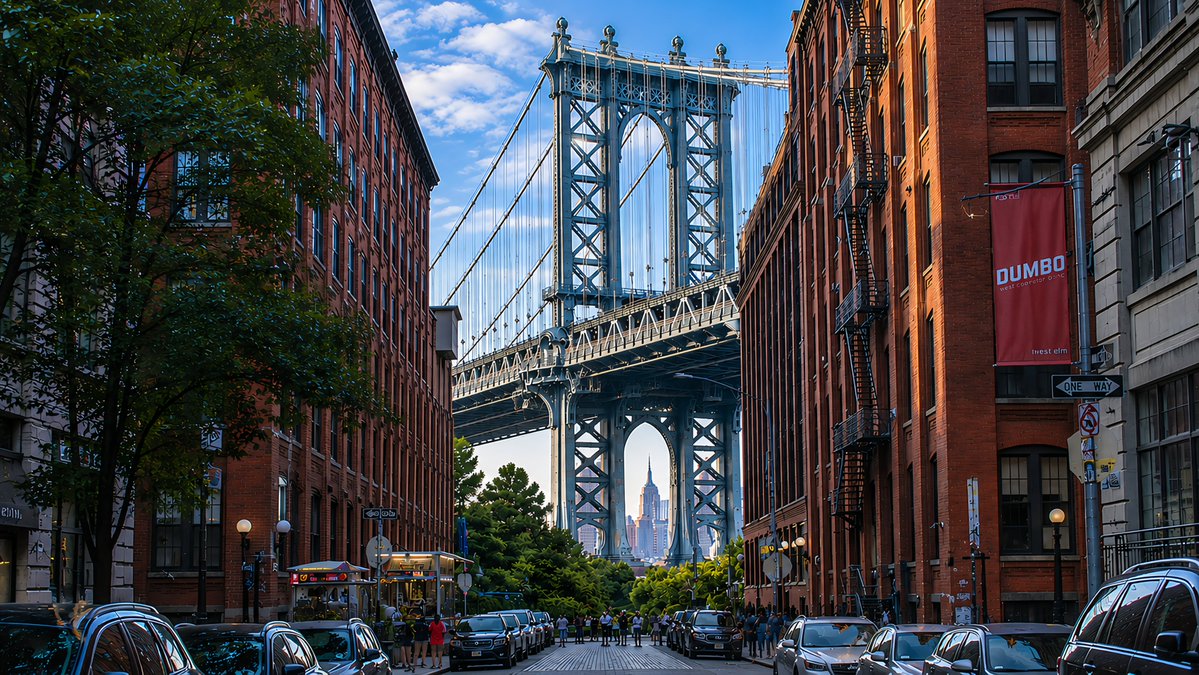
DUMBO Bridge Desktop Wallpaper
Creates a photorealistic 16:9 urban wallpaper of the Manhattan Bridge view in DUMBO using the reference image’s lighting and polished scenic style.
Dette er et tilfelle av en GPT Image 2 -ledetekst for Landskap og natur . Bruk den kopieringsklare ledeteksten nedenfor for å generere lignende visuelle elementer, og gjennomgå Awesome GPT Image 2 Prompts -attribusjonen pluss kommersielle bruksrettigheter før gjenbruk.
Trenger du hele settet med ledetekster? Bruk Landskap og natur emnehub for flere relaterte eksempler, eller åpne GPT Image 2 rask katalog for den fullstendige eksempelindeksen, gjenbrukbare strukturer og kildeattribusjon.
Free 1K preview
Generate one preview image instantly, no sign-up required.
Free text preview doesn’t preserve reference-image consistency.
1191/4000
Spørsmål
Klar til kopiering
Using the provided reference image as a visual-quality and lighting reference, transform the scene into a photorealistic 16:9 desktop wallpaper of {argument name="location" default="DUMBO, Brooklyn"}. Replace the lighthouse coastline with an urban street-canyon composition: exactly 2 rows of tall red-brick warehouse buildings on the left and right, 1 large leafy tree in the left foreground, and 1 centered steel suspension bridge tower filling the background. Frame {argument name="distant landmark" default="the Empire State Building"} precisely through the lower arch of the bridge. Add 2 rows of parked cars along both curbs, a small cluster of pedestrians near the bridge approach, and wet-looking reflective street details for depth. Include exactly 2 readable street elements: a vertical red banner reading {argument name="banner text" default="DUMBO"} on the right building and a black-and-white {argument name="street sign text" default="ONE WAY"} sign below it. Preserve the reference image’s crisp high-resolution realism, blue sky with scattered clouds, rich contrast, golden side lighting, and dreamy wallpaper polish. No lighthouse, ocean, rocks, waves, or coastal buildings.Promptvariabler
Redigerbare argumentplassholdere funnet i ledeteksten, med standardverdiene.
Variabel
location
Misligholde
DUMBO, Brooklyn
Variabel
distant landmark
Misligholde
the Empire State Building
Variabel
banner text
Misligholde
DUMBO
Variabel
street sign text
Misligholde
ONE WAY
Best for
- - Landskap og natur visual exploration
- - Image generation and reference-image edits
- - Reusable briefs that keep source attribution visible
Change these parts
- - Subject, product, character, or scene
- - Aspect ratio, camera, lighting, and background
- - Brand, text, color, and output constraints
Recommended model and settings
- - Model: gpt-image-2
- - Input mode: Bilde til bilde
- - Aspect ratio: source
- - Commercial status: review original source
How to use this prompt
- 1. Copy the prompt and preserve its structure for the first test.
- 2. Replace the subject, context, and publishing channel.
- 3. Change one camera, lighting, or style variable per iteration.
- 4. Inspect the output, source, text, and rights before reuse.
Limitations, source, and reuse cautions
- - Generated output is an editable draft, not factual, legal, or rights evidence.
- - Review the linked source, people, brands, logos, text, and third-party media before commercial use.
Importert fra Awesome GPT Image 2 Prompts . Attribusjon kreves. Status for kommersiell bruk er allowed ; sjekk kilderettighetene før betalt bruk.
Flere saker i denne kategorien
Prioritert etter kategori, kompatibilitet med inndatamodus, kvalitet og lavere risiko.

Stylish Man Street Lamp Portrait
Bilde til bilde

Sci-Fi Cyan Lighting Effect
Bilde til bilde

Street Selfie with Cat in Matching Cap
Tekst til bilde

MotoGP POV Cornering Shot
Tekst til bilde

GPT Image 2 Real-Life Character Street Snap
Tekst til bilde

Gray Denim Lace-Up Top Prompt for GPT Image 2
Tekst til bilde
Gjenbruk og kildenotater
Bruk denne ledeteksten på en trygg måte etter at du har forhåndsvist saken.
- 1.Kopier ledeteksten eller åpne den direkte i Dovoo med genereringsknappen.
- 2.Juster variabler, sideforhold og referansebilder for ditt eget brukstilfelle.
- 3.Før publisering eller betalt bruk, kontroller kilderettigheter, krav til kreditering og risikoer knyttet til merkevare eller likhet.