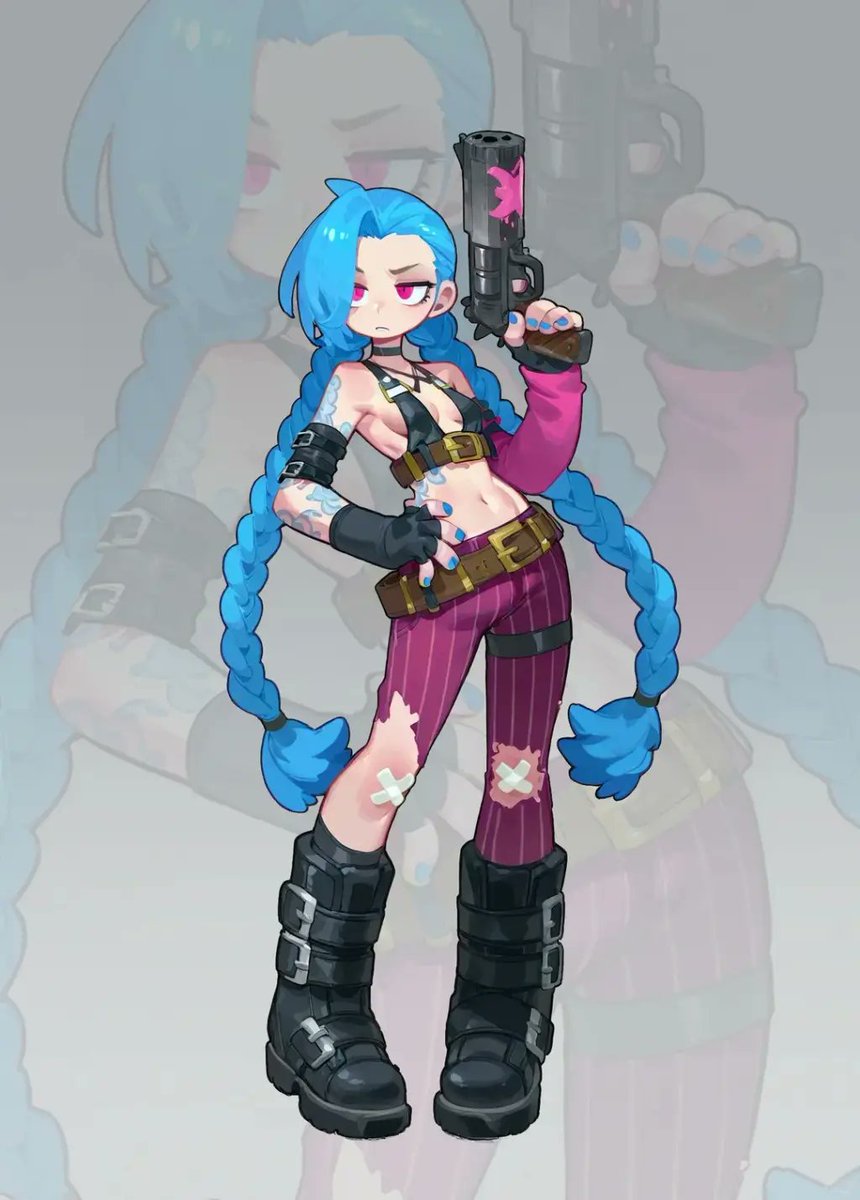
Cosplay to Chibi Game Character
Transforms a cosplay reference photo into a clean chibi anime game-character illustration with a faded silhouette backdrop.
Dette er et tilfelle av en GPT Image 2 -ledetekst for Anime og spill . Bruk den kopieringsklare ledeteksten nedenfor for å generere lignende visuelle elementer, og gjennomgå Awesome GPT Image 2 Prompts -attribusjonen pluss kommersielle bruksrettigheter før gjenbruk.
Trenger du hele settet med ledetekster? Bruk Anime og spill emnehub for flere relaterte eksempler, eller åpne GPT Image 2 rask katalog for den fullstendige eksempelindeksen, gjenbrukbare strukturer og kildeattribusjon.
Free 1K preview
Generate one preview image instantly, no sign-up required.
Free text preview doesn’t preserve reference-image consistency.
1319/4000
Spørsmål
Klar til kopiering
Using the provided reference image as the character base, transform the cosplay photo into a polished 2D chibi game-character illustration. Keep the same recognizable costume, blue twin braids, weapon, tattoos, gloves, belts, torn purple pants with bandage patches, and black boots, but redraw everything as cute stylized anime art with clean linework, simplified proportions, a large head, small body, and glossy cel-shaded coloring. Change the pose from sitting on the floor to a confident full-body standing pose: one hand on the hip and the other hand raised holding the pistol upright. Replace the gritty alley/photo environment with a soft light gray studio background, and add one large, semi-transparent faded silhouette of the same illustrated character behind the main figure as a backdrop. Composition should show exactly 1 main chibi character, 1 raised pistol, and 1 oversized faded background silhouette. Make the image vertical, centered, crisp, high-resolution, and suitable as a character sticker or game asset. Avoid photorealism, avoid extra characters, avoid added text, and do not include a watermark. Optional customization: render in {argument name="art style" default="polished 2D chibi anime game-character style"} with a {argument name="background color" default="soft light gray"} background.Promptvariabler
Redigerbare argumentplassholdere funnet i ledeteksten, med standardverdiene.
Variabel
art style
Misligholde
polished 2D chibi anime game-character style
Variabel
background color
Misligholde
soft light gray
Best for
- - Anime og spill visual exploration
- - Image generation and reference-image edits
- - Reusable briefs that keep source attribution visible
Change these parts
- - Subject, product, character, or scene
- - Aspect ratio, camera, lighting, and background
- - Brand, text, color, and output constraints
Recommended model and settings
- - Model: gpt-image-2
- - Input mode: Bilde til bilde
- - Aspect ratio: source
- - Commercial status: review original source
How to use this prompt
- 1. Copy the prompt and preserve its structure for the first test.
- 2. Replace the subject, context, and publishing channel.
- 3. Change one camera, lighting, or style variable per iteration.
- 4. Inspect the output, source, text, and rights before reuse.
Limitations, source, and reuse cautions
- - Generated output is an editable draft, not factual, legal, or rights evidence.
- - Review the linked source, people, brands, logos, text, and third-party media before commercial use.
Importert fra Awesome GPT Image 2 Prompts . Attribusjon kreves. Status for kommersiell bruk er allowed ; sjekk kilderettighetene før betalt bruk.
Flere saker i denne kategorien
Prioritert etter kategori, kompatibilitet med inndatamodus, kvalitet og lavere risiko.

Anime Girl Heterochromia Portrait
Tekst til bilde

Oversized Head Cartoon Caricature Prompt
Bilde til bildeMiddels risiko

Sci-Fi Cyan Lighting Effect
Bilde til bilde

Stylish Man Street Lamp Portrait
Bilde til bilde

Hell Hound Character Sheet Infographic
Tekst til bilde

Cute Speech Bubble Mascot Profile Icon
Tekst til bilde
Gjenbruk og kildenotater
Bruk denne ledeteksten på en trygg måte etter at du har forhåndsvist saken.
- 1.Kopier ledeteksten eller åpne den direkte i Dovoo med genereringsknappen.
- 2.Juster variabler, sideforhold og referansebilder for ditt eget brukstilfelle.
- 3.Før publisering eller betalt bruk, kontroller kilderettigheter, krav til kreditering og risikoer knyttet til merkevare eller likhet.