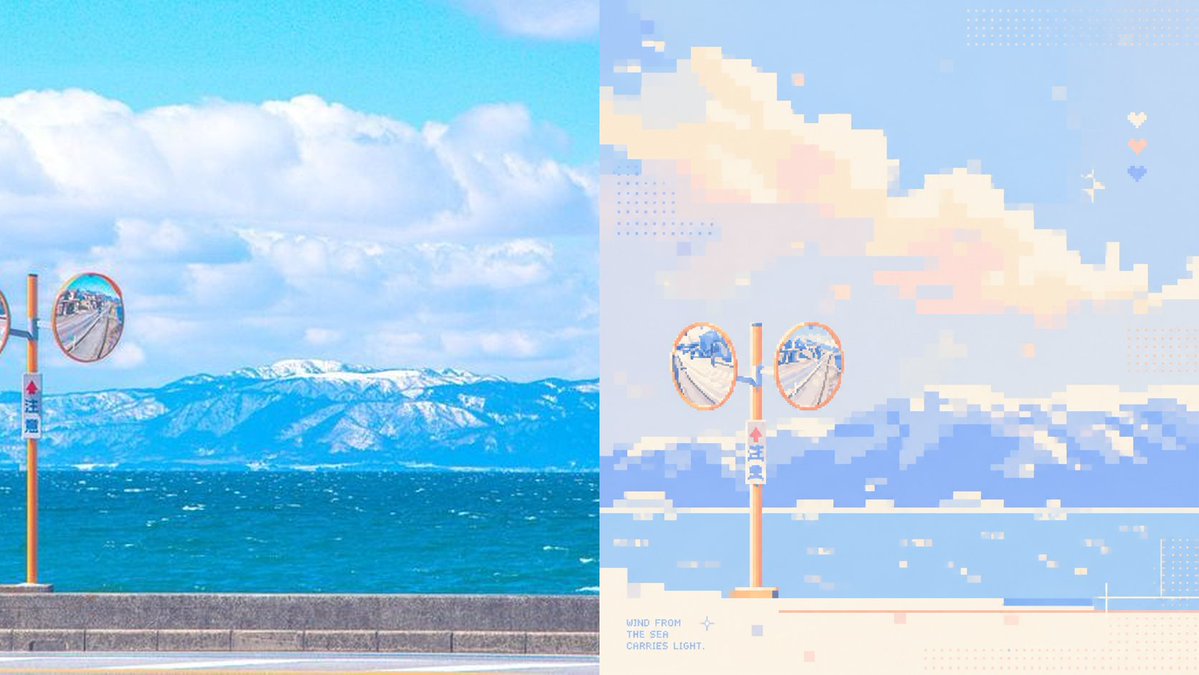
Pastel Pixel Coastal Reconstruction
Generates a two-panel realistic-to-pixel-art coastal scene inspired by a reference layout, useful for showcasing soothing pixel reconstruction samples.
Dette er et tilfelle av en GPT Image 2 -ledetekst for Landskap og natur . Bruk den kopieringsklare ledeteksten nedenfor for å generere lignende visuelle elementer, og gjennomgå Awesome GPT Image 2 Prompts -attribusjonen pluss kommersielle bruksrettigheter før gjenbruk.
Trenger du hele settet med ledetekster? Bruk Landskap og natur emnehub for flere relaterte eksempler, eller åpne GPT Image 2 rask katalog for den fullstendige eksempelindeksen, gjenbrukbare strukturer og kildeattribusjon.
Free 1K preview
Generate one preview image instantly, no sign-up required.
Free text preview doesn’t preserve reference-image consistency.
1742/4000
Spørsmål
Klar til kopiering
Using the provided reference image as a style and layout guide, create a side-by-side reconstruction example containing 2 vertical panels: the left panel featuring a bright, photorealistic seaside photograph, and the right panel featuring a pixel art reinterpretation of that photograph. Replace the lighthouse subject with a sunny coastal roadside scene: turquoise ocean in the foreground, blue snow-capped mountains in the distance, a clear blue sky with large, soft clouds, and an orange pole with 2 circular convex traffic mirrors and a small vertical warning sign standing by the roadside. In the pixel art panel, reconstruct the same coastal scene using soft, healing macaron colors, with coarse, low-resolution blocks, simplifying the mountains, ocean, clouds, roadside, and the same mirror/sign composition. Add light, decorative pixel UI elements: small dot matrix grids, tiny square particles, sparkle marks, and 3 small heart icons near the upper right corner. Include a short English title, {argument name="caption text" default="WIND FROM THE SEA CARRIES LIGHT."}, near the lower left corner of the pixel panel. Maintain an overall atmosphere that is light, peaceful, nostalgic, and minimalist, with warm cream highlights and pale blue tones. Use a wide, horizontal canvas, dividing equally between the photorealistic panel and the pixel reconstruction panel. Optional custom settings: set the scene atmosphere to {argument name="location mood" default="sunny Japanese coastal road"}, the sign text to {argument name="sign text" default="Attention"}, the sea color to {argument name="sea color" default="turquoise blue"}, and the pixel palette to {argument name="pixel palette" default="pastel blue, peach, cream, and lavender"}.Promptvariabler
Redigerbare argumentplassholdere funnet i ledeteksten, med standardverdiene.
Variabel
caption text
Misligholde
WIND FROM THE SEA CARRIES LIGHT.
Variabel
location mood
Misligholde
sunny Japanese coastal road
Variabel
sign text
Misligholde
Attention
Variabel
sea color
Misligholde
turquoise blue
Variabel
pixel palette
Misligholde
pastel blue, peach, cream, and lavender
Best for
- - Landskap og natur visual exploration
- - Image generation and reference-image edits
- - Reusable briefs that keep source attribution visible
Change these parts
- - Subject, product, character, or scene
- - Aspect ratio, camera, lighting, and background
- - Brand, text, color, and output constraints
Recommended model and settings
- - Model: gpt-image-2
- - Input mode: Bilde til bilde
- - Aspect ratio: source
- - Commercial status: review original source
How to use this prompt
- 1. Copy the prompt and preserve its structure for the first test.
- 2. Replace the subject, context, and publishing channel.
- 3. Change one camera, lighting, or style variable per iteration.
- 4. Inspect the output, source, text, and rights before reuse.
Limitations, source, and reuse cautions
- - Generated output is an editable draft, not factual, legal, or rights evidence.
- - Review the linked source, people, brands, logos, text, and third-party media before commercial use.
Importert fra Awesome GPT Image 2 Prompts . Attribusjon kreves. Status for kommersiell bruk er allowed ; sjekk kilderettighetene før betalt bruk.
Flere saker i denne kategorien
Prioritert etter kategori, kompatibilitet med inndatamodus, kvalitet og lavere risiko.






Gjenbruk og kildenotater
Bruk denne ledeteksten på en trygg måte etter at du har forhåndsvist saken.
- 1.Kopier ledeteksten eller åpne den direkte i Dovoo med genereringsknappen.
- 2.Juster variabler, sideforhold og referansebilder for ditt eget brukstilfelle.
- 3.Før publisering eller betalt bruk, kontroller kilderettigheter, krav til kreditering og risikoer knyttet til merkevare eller likhet.