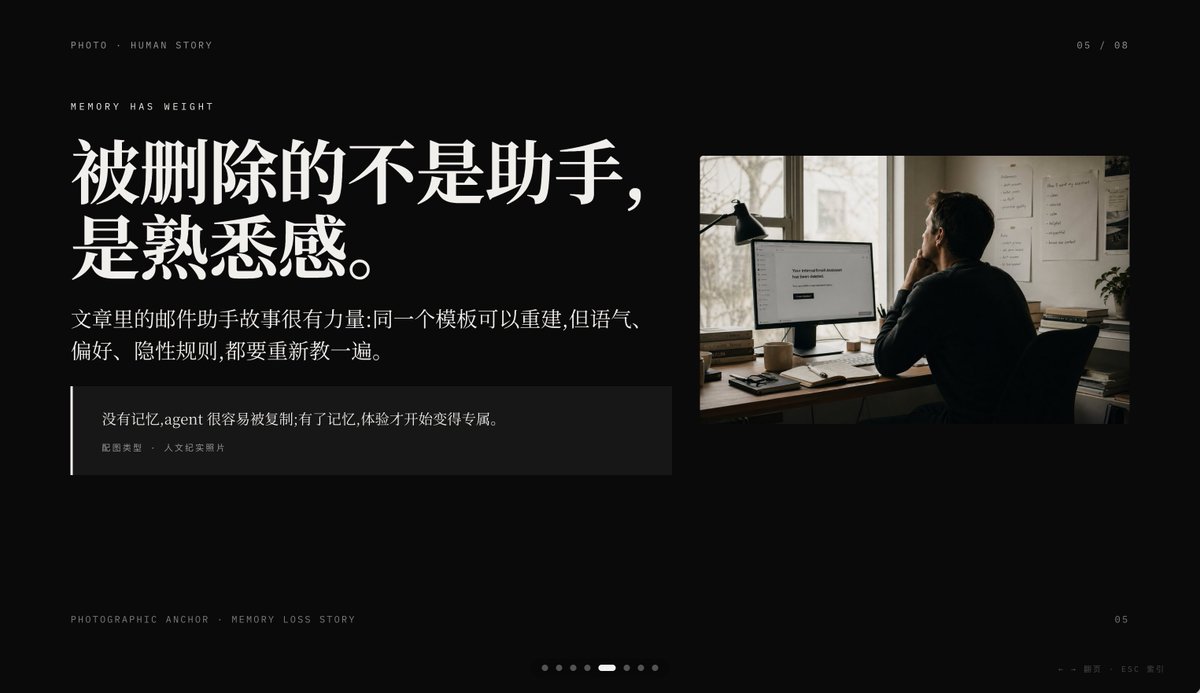
Filmatisk hukommelsestap PPT-lysbilde
Denne prompten genererer et førsteklasses redaksjonelt presentasjonslysbilde med svart bakgrunn som kombinerer kinesisk historiefortellingstypografi med et kontorbilde i dokumentarstil, ideelt for fortellingssider i hovedtaler eller PowerPoint-presentasjoner.
Dette er et tilfelle av en GPT Image 2 -ledetekst for Grafikk og plakat . Bruk den kopieringsklare ledeteksten nedenfor for å generere lignende visuelle elementer, og gjennomgå Awesome GPT Image 2 Prompts -attribusjonen pluss kommersielle bruksrettigheter før gjenbruk.
Free 1K preview
Generate one preview image instantly, no sign-up required.
Spørsmål
Klar til kopiering
Create a minimalist, cinematic presentation Slides with a deep black background and high-end editing style PPT layout, in a 16:9 widescreen aspect ratio. The layout should employ an asymmetrical design, with a large text block on the left and a documentary-style photograph in the upper right corner, leaving ample negative space. Use elegant and high-contrast Chinese fonts to create a high-end magazine feel. Place a line of small, uppercase, miniature text in the upper left corner: “PHOTO • HUMAN STORY”. Below that, add another line of small, uppercase text: “MEMORY HAS WEIGHT”. The main title on the left should be a very prominent, white, bold Chinese font, split into two lines: {argument name="headline text" default="What's lost isn't the assistant,\nbut the familiarity."}. Below the title, place a smaller paragraph of white or light gray Chinese text, consisting of two lines: {argument name="body text" default="The email assistant story in the article is powerful: the same template can be rebuilt, but the tone,\npreferences, and implicit rules all need to be retaught."}. Add a dark, semi-transparent quote box below, with a thin white vertical line along the left edge; the box should contain two layers of text: a Chinese quote {argument name="quote" default="Without memory, an agent is easily copied; with memory, the experience becomes uniquely its own."}, and a smaller line of attribution text “Image Type · Humanistic Documentary Photo”. On the right, insert a warm-toned humanistic documentary photograph: an adult with their back to the camera, sitting at a dimly lit office desk looking at a computer monitor; a desk lamp stands to the left of the monitor, and files are posted on the wall, with soft daylight streaming through the window. The monitor screen displays a simple white interface, with the centered text being {argument name="screen text" default="Your conversational Assistant has been deleted."}. The photo should have a film photography texture, with tones of soft browns and grays, creating an intimate, deep, and slightly melancholic atmosphere. Add similar interface pagination details: “05 / 08” in the upper right corner, miniature text “PHOTOGRAPHIC ANCHOR · MEMORY LOSS STORY” in the lower left corner, small text “05” in the lower right corner, and 8 tiny pagination dots at the bottom center, with the 5th dot highlighted as a slender white capsule, and the rest as dark gray dots. Add a small navigation prompt in the lower right corner: “← → Page · ESC Close”. Overall atmosphere: editorial style, restrained, cinematic, memory and loss, high-end Keynote slide design, concise spacing, precise alignment, high-end narrative presentation aesthetics.Promptvariabler
Redigerbare argumentplassholdere funnet i ledeteksten, med standardverdiene.
Best for
- - Grafikk og plakat visual exploration
- - Image generation and reference-image edits
- - Reusable briefs that keep source attribution visible
Change these parts
- - Subject, product, character, or scene
- - Aspect ratio, camera, lighting, and background
- - Brand, text, color, and output constraints
Recommended model and settings
- - Model: gpt-image-2
- - Input mode: Tekst til bilde
- - Aspect ratio: source
- - Commercial status: review original source
How to use this prompt
- 1. Copy the prompt and preserve its structure for the first test.
- 2. Replace the subject, context, and publishing channel.
- 3. Change one camera, lighting, or style variable per iteration.
- 4. Inspect the output, source, text, and rights before reuse.
Limitations, source, and reuse cautions
- - Generated output is an editable draft, not factual, legal, or rights evidence.
- - Review the linked source, people, brands, logos, text, and third-party media before commercial use.
Flere saker i denne kategorien
Prioritert etter kategori, kompatibilitet med inndatamodus, kvalitet og lavere risiko.






Gjenbruk og kildenotater
Bruk denne ledeteksten på en trygg måte etter at du har forhåndsvist saken.
- 1.Kopier ledeteksten eller åpne den direkte i Dovoo med genereringsknappen.
- 2.Juster variabler, sideforhold og referansebilder for ditt eget brukstilfelle.
- 3.Før publisering eller betalt bruk, kontroller kilderettigheter, krav til kreditering og risikoer knyttet til merkevare eller likhet.