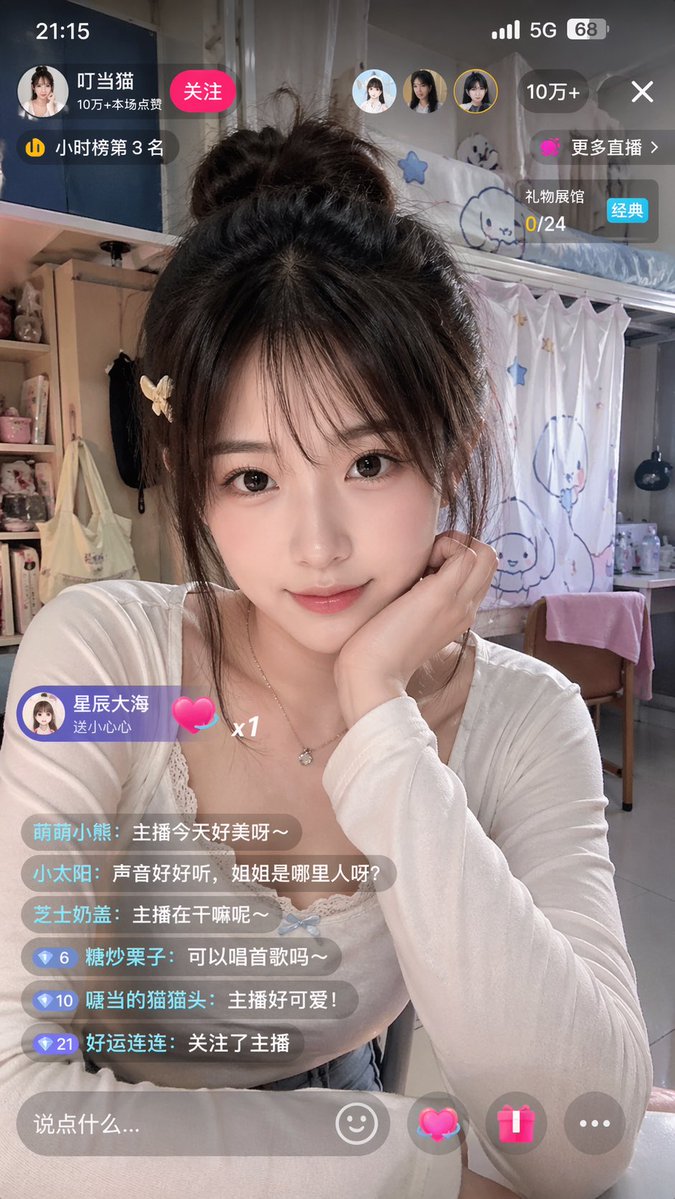
Kinesisk direktestrømming av selfie-grensesnitt for studentboliger
Denne ledeteksten genererer et fotorealistisk vertikalt skjermbilde av en ung kvinnelig streamer i et sovesal med komplette kinesiske overlegg for direktestrømmingsapper, nyttig for mockups på sosiale medier eller demonstrasjoner av brukergrensesnittrealisme.
Dette er et tilfelle av en GPT Image 2 -ledetekst for Produkt og kommersiell . Bruk den kopieringsklare ledeteksten nedenfor for å generere lignende visuelle elementer, og gjennomgå Awesome GPT Image 2 Prompts -attribusjonen pluss kommersielle bruksrettigheter før gjenbruk.
Free 1K preview
Generate one preview image instantly, no sign-up required.
Spørsmål
Klar til kopiering
A realistic, vertical smartphone screenshot showcasing a Chinese live streaming interface. The scene features a young female streamer sitting in a cozy dorm room, framed in a medium shot from the chest up. Show every face clearly with natural, detailed facial features, large-sized, soft rectangular effect. She has long, messy dark brown hair tied into a loose high bun, with a few strands framing her face, and a light-colored small butterfly clip on her left side. She's wearing a fitted white long-sleeved round-neck top with delicate lace trim, and a thin necklace with a small pendant. She's propping her chin with her right hand in a casual and cute pose, creating a soft, intimate, and lively atmosphere. The background is a student dorm interior filled with a girlish aesthetic: a bunk bed in the upper right corner, white curtains with simple blue cartoon characters and stars, bottles and clutter on the desk, a pink towel draped over a wooden chair, and plush toys, cosmetics, and a bag on the shelf to the left. Add a complete Chinese live streaming App UI overlay at the top of the image, designed to resemble a genuine smartphone live streaming app screenshot. Top status bar: displays the time 21:15 in the upper left corner, and mobile signal, 5G icon, and 68% battery in the upper right corner. Top creator area: a circular avatar, streamer name as {argument name="streamer name" default="Doraemon"}, a red “Follow” button, and a line displaying popularity stats “100k+ Likes in this stream”. Add a small ranking badge indicating “3rd on Hourly Ranking”. Near the upper right side, include 3 small circular user avatars. Add a dark rounded popularity capsule in the upper right corner displaying “100k+”, a close X icon, a purple “More Live Streams” button, and a gift progress card displaying “Gift Hall 0/24” with a “Classic” blue label. Floating gift banner on the lower left side: sender avatar and text “Starry Sea sent a Heart”, accompanied by a pink heart icon and x1. Lower left corner comment section: sequentially arranged 6 semi-transparent chat bubbles with the following content: 1. Cute Little Bear: The streamer looks so beautiful today~ 2. Little Sun: Her voice is so nice, where is the sister from? 3. Cheese Milk Cover: What is the streamer doing~ 4. Candied Chestnut: Can you sing a song~ 5. Cat with a Mouth: The streamer is so cute! 6. Lucky Streak: Followed the streamer. Add small blue diamond level badges with numbers 6, 10, and 21 before the last three comments. Bottom input bar: a rounded semi-transparent text box with the placeholder “Say something…”, and 4 controls on the right side: a smiley face icon, a glowing pink heart gift icon, a pink gift box icon, and a gray three-dot icon. Photo-realistic smartphone shooting style, natural skin and fabric textures, with a slight beauty camera soft-focus effect, realistic app overlay transparency, 9:16 vertical aspect ratio.Promptvariabler
Redigerbare argumentplassholdere funnet i ledeteksten, med standardverdiene.
Best for
- - Produkt og kommersiell visual exploration
- - Image generation and reference-image edits
- - Reusable briefs that keep source attribution visible
Change these parts
- - Subject, product, character, or scene
- - Aspect ratio, camera, lighting, and background
- - Brand, text, color, and output constraints
Recommended model and settings
- - Model: gpt-image-2
- - Input mode: Tekst til bilde
- - Aspect ratio: source
- - Commercial status: review original source
How to use this prompt
- 1. Copy the prompt and preserve its structure for the first test.
- 2. Replace the subject, context, and publishing channel.
- 3. Change one camera, lighting, or style variable per iteration.
- 4. Inspect the output, source, text, and rights before reuse.
Limitations, source, and reuse cautions
- - Generated output is an editable draft, not factual, legal, or rights evidence.
- - Review the linked source, people, brands, logos, text, and third-party media before commercial use.
Flere saker i denne kategorien
Prioritert etter kategori, kompatibilitet med inndatamodus, kvalitet og lavere risiko.





Gjenbruk og kildenotater
Bruk denne ledeteksten på en trygg måte etter at du har forhåndsvist saken.
- 1.Kopier ledeteksten eller åpne den direkte i Dovoo med genereringsknappen.
- 2.Juster variabler, sideforhold og referansebilder for ditt eget brukstilfelle.
- 3.Før publisering eller betalt bruk, kontroller kilderettigheter, krav til kreditering og risikoer knyttet til merkevare eller likhet.