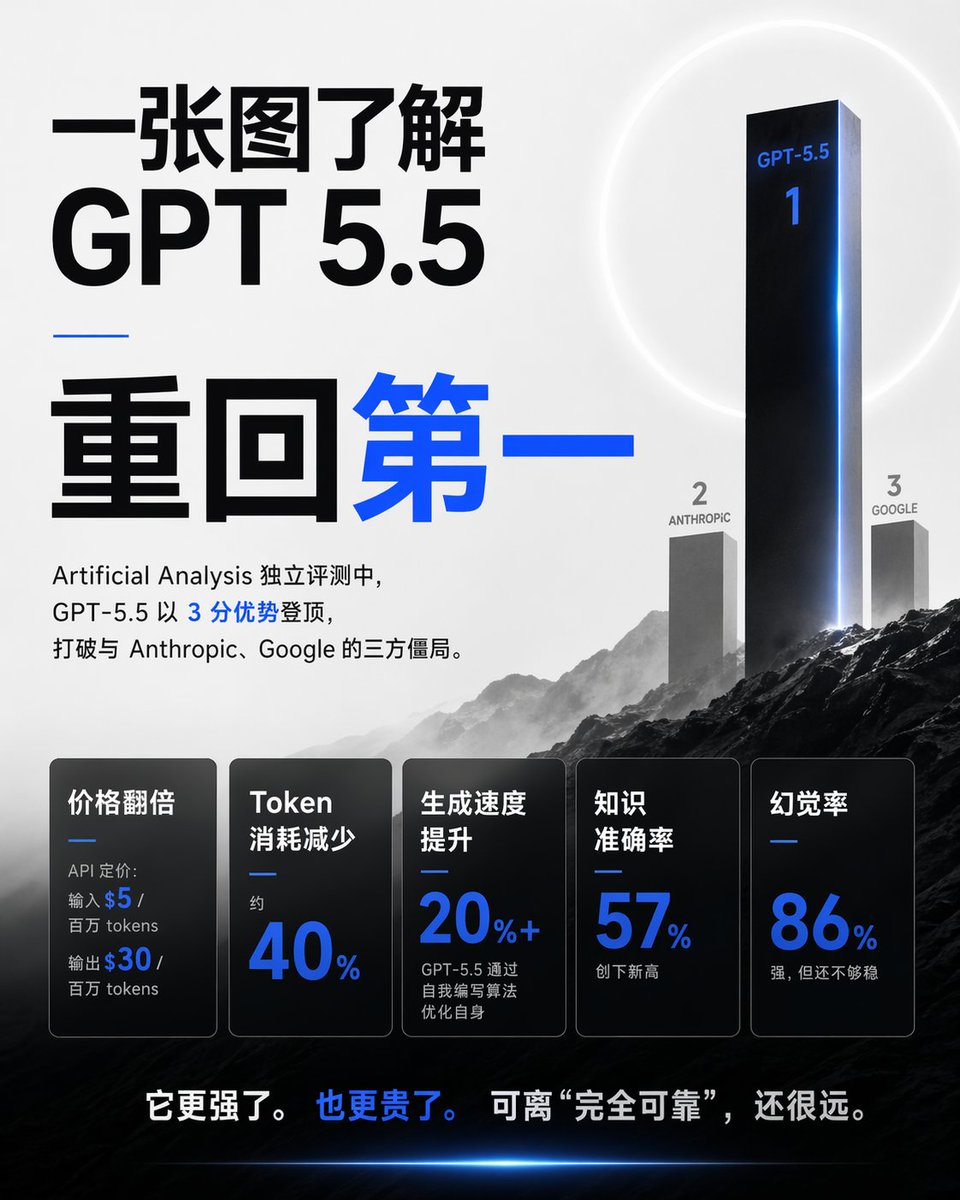
Chinese GPT 5.5 Benchmark Infographic
A square Chinese editorial infographic visualizing GPT-5.5 as the first-place AI benchmark winner with rankings, metrics, and dramatic tech-poster styling.
Dette er et tilfelle av en GPT Image 2 -ledetekst for Grafikk og plakat . Bruk den kopieringsklare ledeteksten nedenfor for å generere lignende visuelle elementer, og gjennomgå Awesome GPT Image 2 Prompts -attribusjonen pluss kommersielle bruksrettigheter før gjenbruk.
Trenger du hele settet med ledetekster? Bruk Grafikk og plakat emnehub for flere relaterte eksempler, eller åpne GPT Image 2 rask katalog for den fullstendige eksempelindeksen, gjenbrukbare strukturer og kildeattribusjon.
Free 1K preview
Generate one preview image instantly, no sign-up required.
3529/4000
Spørsmål
Klar til kopiering
Objective: Create a 1:1 square Chinese tech news infographic poster that explains {argument name="topic" default="GPT 5.5"} within 30 seconds, and adopts a highly dramatic AI benchmark ranking theme.

Canvas: 768x768 square poster, with a light gray to white background in the upper half and a dark, cinematic mountain landscape in the lower half. Use high-contrast black fonts and accents of electric blue.

Layout: The left side is dominated by a large Chinese title layout. The right side features a 3D benchmark podium/ranking scene rising from the mountains. The bottom third contains 5 horizontally arranged dark, semi-transparent metric cards. A striking Chinese summary sentence is at the very bottom.

Main Title Text: Use huge black Chinese characters in the upper left corner: “Understand it in a single image.” Directly below, use huge black Latin characters: “GPT 5.5.” Below a thin, short blue horizontal line, use extra-large Chinese characters: “Back to the Top,” with “Back” in black and “Top” in bright blue.

Introductory Paragraph Below the Title: “In independent evaluations by Artificial Analysis, GPT-5.5 topped the charts with a 3-point advantage, breaking the three-way stalemate with Anthropic and Google.” Keep the number 3 in blue, with the rest of the text primarily in black.

Ranking Scene: Create 3 vertical ranking pillars on the right side, integrated into a misty mountain landscape. 1st place is a very tall, glossy black monolith with blue edge lighting, labeled “GPT-5.5” near the top and a large blue “1” below. 2nd place is a shorter gray monolith on the left, labeled “2” and “ANTHROPIC.” 3rd place is a shorter gray monolith on the right, labeled “3” and “GOOGLE.” Add a faint white halo behind the 1st place monolith and a blue glow along its right edge.

Metric Cards: Add 5 rounded-corner rectangular black/charcoal gray glass-textured cards in the bottom third, each with a thin border, subtle gradient, and a small blue divider line. These 5 cards are: 1) “Price Doubled,” with small text “API pricing: Input $5 / million tokens Output $30 / million tokens,” where $5 and $30 are in blue; 2) “Token Consumption Reduced,” with small text “approx.” and a large blue “40%”; 3) “Generation Speed Increased,” with a large blue “20% +” and small text “GPT-5.5 optimizes itself through self-written algorithms”; 4) “Knowledge Accuracy,” with a large blue “57%” and small text “New High”; 5) “Hallucination Rate,” with a large blue “86%” and small text “Strong, but not yet stable.”

Bottom Summary: Centered above the dark landscape at the bottom, write: “It’s stronger. It’s also more expensive. But still far from “completely reliable.”” with “It’s also more expensive.” in blue and the rest of the text in white.

Visual Style: High-end editorial AI benchmark poster, sharp modern sans-serif fonts, monochromatic color scheme with electric blue highlights, cinematic mist, dark rocky mountains, subtle lens flares, clean spacing, realistic 3D monoliths, no people, no logos, no watermarks.

Parameters: The main customizable theme is {argument name="model name" default="GPT-5.5"}; the leading score can be {argument name="advantage text" default="3-point advantage"}; the 2nd place competitor is {argument name="second competitor" default="Anthropic"}; the 3rd place competitor is {argument name="third competitor" default="Google"}; the bottom information can be {argument name="conclusion text" default="It's stronger. And more expensive. But still far from “completely reliable.”"}.
Promptvariabler
Redigerbare argumentplassholdere funnet i ledeteksten, med standardverdiene.
Variabel
topic
Misligholde
GPT 5.5
Variabel
model name
Misligholde
GPT-5.5
Variabel
advantage text
Misligholde
3-point advantage
Variabel
second competitor
Misligholde
Anthropic
Variabel
third competitor
Misligholde
Google
Variabel
conclusion text
Misligholde
It's stronger. And more expensive. But still far from “completely reliable.”
Best for
- - Grafikk og plakat visual exploration
- - Image generation and reference-image edits
- - Reusable briefs that keep source attribution visible
Change these parts
- - Subject, product, character, or scene
- - Aspect ratio, camera, lighting, and background
- - Brand, text, color, and output constraints
Recommended model and settings
- - Model: gpt-image-2
- - Input mode: Tekst til bilde
- - Aspect ratio: source
- - Commercial status: review original source
How to use this prompt
- 1. Copy the prompt and preserve its structure for the first test.
- 2. Replace the subject, context, and publishing channel.
- 3. Change one camera, lighting, or style variable per iteration.
- 4. Inspect the output, source, text, and rights before reuse.
Limitations, source, and reuse cautions
- - Generated output is an editable draft, not factual, legal, or rights evidence.
- - Review the linked source, people, brands, logos, text, and third-party media before commercial use.
Importert fra Awesome GPT Image 2 Prompts . Attribusjon kreves. Status for kommersiell bruk er allowed ; sjekk kilderettighetene før betalt bruk.
Flere saker i denne kategorien
Prioritert etter kategori, kompatibilitet med inndatamodus, kvalitet og lavere risiko.






Gjenbruk og kildenotater
Bruk denne ledeteksten på en trygg måte etter at du har forhåndsvist saken.
- 1.Kopier ledeteksten eller åpne den direkte i Dovoo med genereringsknappen.
- 2.Juster variabler, sideforhold og referansebilder for ditt eget brukstilfelle.
- 3.Før publisering eller betalt bruk, kontroller kilderettigheter, krav til kreditering og risikoer knyttet til merkevare eller likhet.