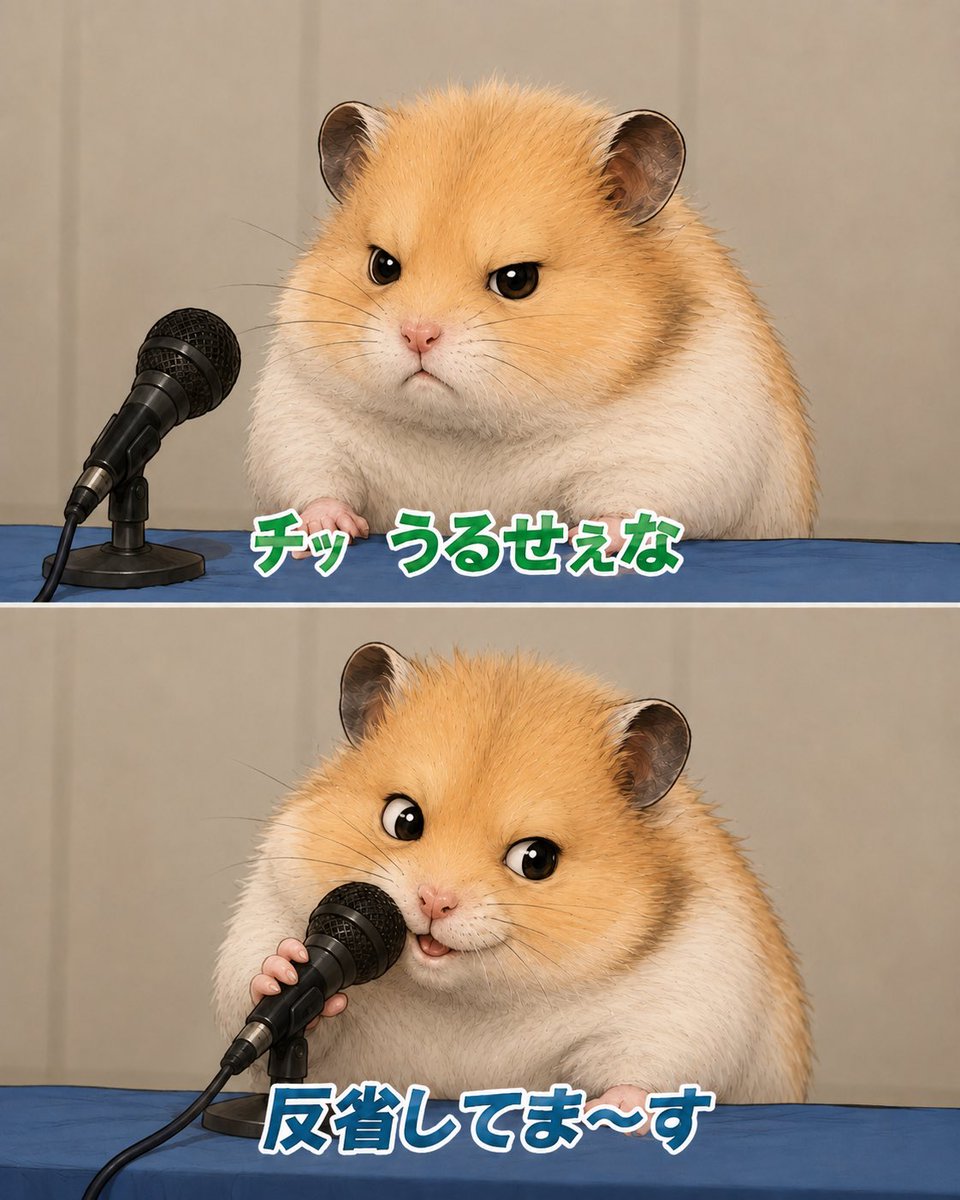
Apologizing Hamster Meme
Creates a two-panel Japanese meme-style image of a fluffy hamster giving a sarcastic press conference apology.
Dette er et tilfelle av en GPT Image 2 -ledetekst for Illustrasjon og kunst . Bruk den kopieringsklare ledeteksten nedenfor for å generere lignende visuelle elementer, og gjennomgå Awesome GPT Image 2 Prompts -attribusjonen pluss kommersielle bruksrettigheter før gjenbruk.
Trenger du hele settet med ledetekster? Bruk Illustrasjon og kunst emnehub for flere relaterte eksempler, eller åpne GPT Image 2 rask katalog for den fullstendige eksempelindeksen, gjenbrukbare strukturer og kildeattribusjon.
Free 1K preview
Generate one preview image instantly, no sign-up required.
2236/4000
Spørsmål
Klar til kopiering
Goal: Create a cute two-panel vertical meme image featuring the same fluffy golden-and-white hamster at a press conference table, apologizing into a microphone.

Canvas: Square-to-portrait social media format, about 4:5 ratio, split horizontally into exactly 2 equal panels with a thin white divider line between them. Use realistic-but-adorable animal rendering with soft studio lighting, shallow depth of field, and a beige curtain backdrop.

Layout: Both panels show a blue tablecloth across the bottom third, beige curtain background, and a black wired handheld microphone on a small desk stand at the left side. The hamster is centered-right, large and close-up, with golden fur on the head and back, white cheeks and body, round ears, glossy black eyes, tiny pink nose, and visible little paws resting on the table.

Panel 1: The hamster looks annoyed and unimpressed, facing forward with narrowed eyes and a small stern mouth. The microphone sits to the hamster’s left, angled toward it but not being touched. Add bold Japanese meme text along the lower center of this panel reading {argument name="top caption" default="チッ うるせぇな"}. Style the text as thick rounded characters, green fill, white outline, subtle dark shadow.

Panel 2: The same hamster now leans toward the microphone and holds it with one tiny paw, looking performatively cheerful and apologetic with wide eyes and a small open smiling mouth. Add bold Japanese meme text along the lower center reading {argument name="bottom caption" default="反省してま〜す"}. Style this text as thick rounded characters, blue fill, white outline, subtle dark shadow.

Subject details: Use a hamster with {argument name="fur color" default="golden orange and white"} plush fur, highly detailed individual hairs, small whiskers, soft chubby body, and expressive cartoon-like eyes while keeping the rest photorealistic. The microphone is black with a metal mesh grille, cable trailing off the lower left, and a compact black stand.

Visual style: Japanese internet meme screenshot, realistic cute animal parody of a press apology conference, crisp focus on hamster and microphone, clean composition, no extra characters, no logos, no watermark, no additional text beyond the two captions.
Promptvariabler
Redigerbare argumentplassholdere funnet i ledeteksten, med standardverdiene.
Variabel
top caption
Misligholde
チッ うるせぇな
Variabel
bottom caption
Misligholde
反省してま〜す
Variabel
fur color
Misligholde
golden orange and white
Best for
- - Illustrasjon og kunst visual exploration
- - Image generation and reference-image edits
- - Reusable briefs that keep source attribution visible
Change these parts
- - Subject, product, character, or scene
- - Aspect ratio, camera, lighting, and background
- - Brand, text, color, and output constraints
Recommended model and settings
- - Model: gpt-image-2
- - Input mode: Tekst til bilde
- - Aspect ratio: source
- - Commercial status: review original source
How to use this prompt
- 1. Copy the prompt and preserve its structure for the first test.
- 2. Replace the subject, context, and publishing channel.
- 3. Change one camera, lighting, or style variable per iteration.
- 4. Inspect the output, source, text, and rights before reuse.
Limitations, source, and reuse cautions
- - Generated output is an editable draft, not factual, legal, or rights evidence.
- - Review the linked source, people, brands, logos, text, and third-party media before commercial use.
Importert fra Awesome GPT Image 2 Prompts . Attribusjon kreves. Status for kommersiell bruk er allowed ; sjekk kilderettighetene før betalt bruk.
Flere saker i denne kategorien
Prioritert etter kategori, kompatibilitet med inndatamodus, kvalitet og lavere risiko.



Gjenbruk og kildenotater
Bruk denne ledeteksten på en trygg måte etter at du har forhåndsvist saken.
- 1.Kopier ledeteksten eller åpne den direkte i Dovoo med genereringsknappen.
- 2.Juster variabler, sideforhold og referansebilder for ditt eget brukstilfelle.
- 3.Før publisering eller betalt bruk, kontroller kilderettigheter, krav til kreditering og risikoer knyttet til merkevare eller likhet.